
Software Application Changed after Parser run
-
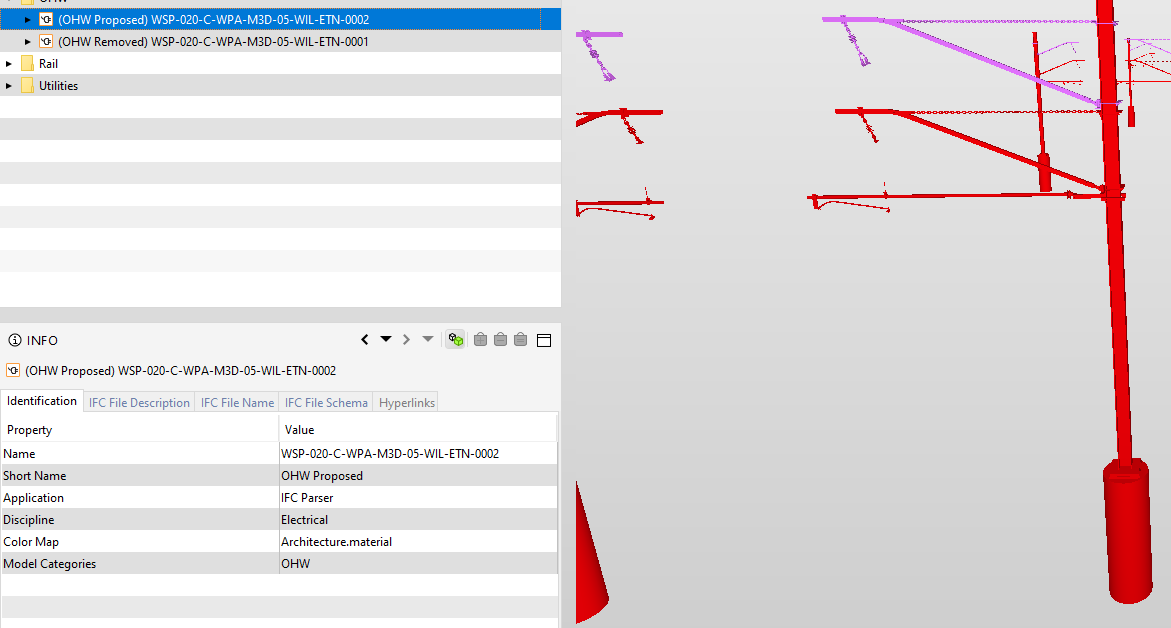
The screenshot is a .ifc model originally from Tekla Structures, We normally run the *ifc file through a Parser to retain GUID’s, but as you can see the Application changed to “IFC Parser”. this happens randomly to any files from Tekla, Revit or 12d. Has anyone come across this and if so what is the solution to retain the native software application in the “Identitification” Property Set.
Hope Some one can help.
Regards
Gamo -
@gamo said in Software Application Changed after Parser run:
Parser
Which parser tool and what’s the purpose? Imho it makes sense to see that a script or tools has probably changed the original IFC but if you do not want to make that visible or you need the name of the original authoring software (…) and your parser has no dedicated option to set this (again, which parser are you using, did you create it on your own or … ?) you could always change this manually via editor in the file - could be also cumbersome if not automated - although I do not recommend it for the given resons. Anyhow, would be itneressted to hear more about your motivations and why you need this tool.
-
HI JSN,
We created the Parser ourselves and use it to maintain the GUID’s of the *ifc files for use in Synchro. GUID’s changes when files are updated or exported to .ifc from different machines. The y not consistent.The problem is really random in that it works well then suddenly changes the application when files are updated. I will look at the Editor option but like you say its manual and will be time consuming. I’ll also try the file on another Solibra machine and see what happens. I thought it was Solibri doing it -
@gamo said in Software Application Changed after Parser run:
GUID’s changes when files are updated or exported to .ifc from different machines.
Interesting. Are you constantly recreating elements in Tekla or why do the GUIDs change?
Just for the sake of interest then, on what basis do you change the GUIDs back then? Is there a certain key you use to identify the value pairs?@gamo said in Software Application Changed after Parser run:
I will look at the Editor option but like you say its manual and will be time consuming.
Well, this could be automated as well if needed. Imho this can be achieved very easily compared to the GUID modification,

Copyright © 2025 Solibri Inc. | Powered by NodeBB