
Conflicts Not Caught in Clash Detection
-
I posted a question about this issue last year in General Discussions, and while there was some good feedback, no solution was ever posted. I came across the issue again with a different model so I thought I’d post it again and see if anyone has found a solution.
While going through my clash checking results, I found one between a light fixture and a pipe hanger that was not identified by the clash check.
-
I went into the rule parameters for the two clashing models, and both models are set to have clashes with each other identified. (I have other clashes between these models.)
-
I also went into the selection basket and was able to find the specific hanger that should be associated with this clash but isn’t (see pictures). So it should be “visible” to clash detection.
-
There is also no “Issues” tab in the INFO box for the hanger, meaning that this component isn’t associated with any clashes. In the second image I have the light fixture highlighted and showing its listed “Issues,” namely a clash with the rod of the hanger, but not the body of the hanger.
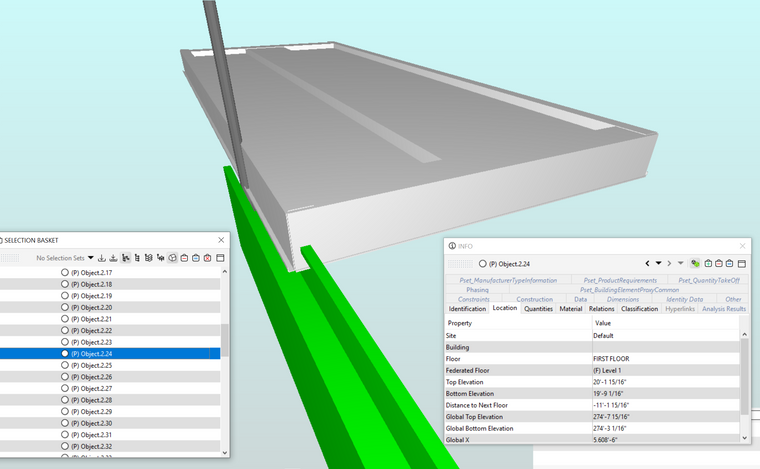
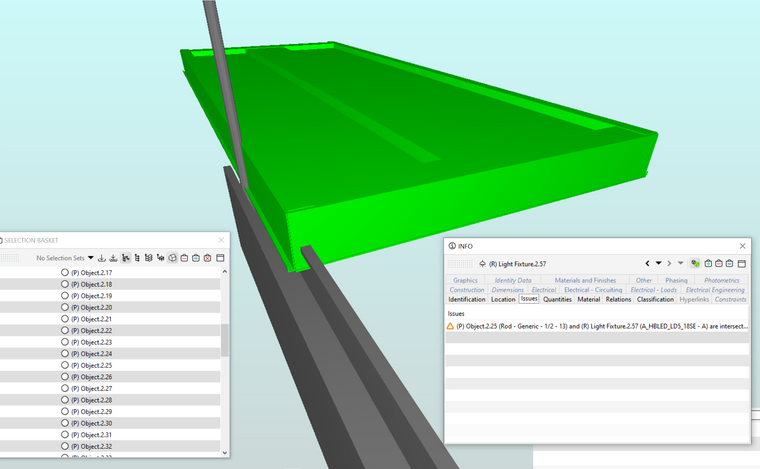
Both of these models were made in Revit 2020 (by two other people). Is it possible that the issue is a setting in Revit? I would be very surprised if only this one hanger was invisible to clash detection though. The model in the question I posed last year was made in AutoDesk Fabrication–so it seems like Solibri is the common link rather than Revit and Fabrication.
Hopefully someone here has experienced this and found a solution!
-
-
Can you place a picture of de clashrule?
Mayby you exclude some parts there.
Sometimes is wil help to see what the ingnore intersections will do.When you use classification for the rulset, maybe in the classification you exclude some parts.
A other possibility is that the ifc is updated and you didn’t recheck.

Copyright © 2025 Solibri Inc. | Powered by NodeBB