Skip to content
  • Categories
Collapse
Solibri Society Forum
  1. Home
  2. Comments & Feedback
  3. Tech Talks
  4. import presentation from excel not importing correctly

import presentation from excel not importing correctly

Scheduled Pinned Locked Moved Tech Talks
3 Posts 2 Posters 350 Views
  • Oldest to Newest
  • Newest to Oldest
  • Most Votes
Log in to reply
This topic has been deleted. Only users with topic management privileges can see it.
  • R Offline
    R Offline
    Robbert_BHV
    wrote on last edited by Robbert_BHV
    #1

    Hi,

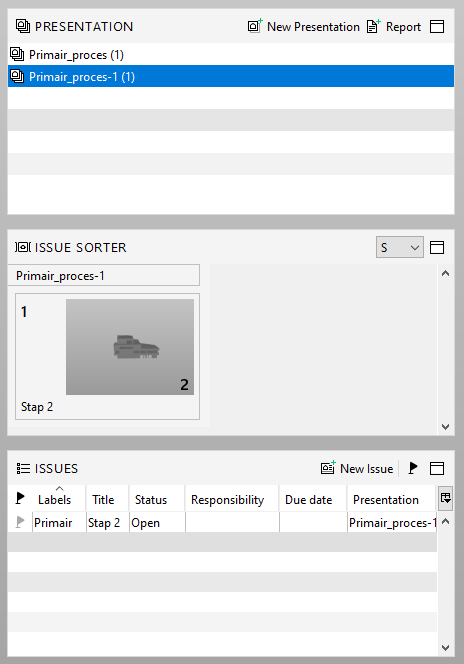
    Been trying to import a presentation from Excel. Problem: I tried this several times but everytime the import results in several different presentations with just 1 slide in there… there’s a presentation created for every line in the Excel.

    According to the Solibri manual, if I give each line the samen “presentation name” this should not happen…

    Is it a bug or is there something I’m missing? Do others have the same experience?

    Below an example of the excel file I’m trying to import:

    ae288f6b-f4ed-4bdf-a2bb-48d7c3f0130c-image.png

    Result of this in Solibr:
    0096b2bb-4a48-49e6-8335-ec932511e0aa-image.png

    Thanks!

    1 Reply Last reply
    1
    • john.lippJ Offline
      john.lippJ Offline
      john.lipp
      wrote on last edited by
      #2

      Hi @Robbert_BHV

      I think that it is working as intended but the name “Slide_Number” was supposed to be “Presentation_ID”
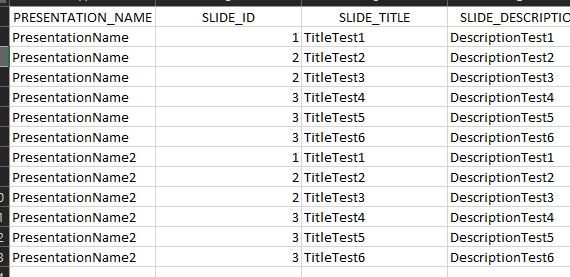
      cc090383-fd96-4707-b415-b95b2eb33598-image.png

      I add some slides through the excel using the attached Excel file I created to test:
      Excel Presentation Test.xls

      After they import, I right-click and select “Tracking ID Prefix”
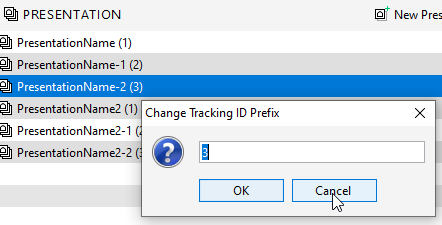
      28c36673-c278-4007-98bc-35d5d49786cd-image.png

      Does this solve the issue if you change that number to the same number or just leave it blank for the presentation?

      1 Reply Last reply
      0
      • R Offline
        R Offline
        Robbert_BHV
        wrote on last edited by
        #3

        Indeed, after changing the Slide_ID to the same number, it does work.

        So, with the example below I do get the expected results…

        2acaedc7-756b-4e74-9af8-a1eb59e062df-image.png

        Result in Solibri:

        8f557fad-0da7-4a34-8e02-0a183b6392c6-image.png

        Thanks John!

        1 Reply Last reply
        0

        Copyright © 2025 Solibri Inc. | Powered by NodeBB

        • Login

        • Don't have an account? Register

        • Login or register to search.
        • First post
          Last post
        0
        • Categories