
Checking Summary Reports unreliable
-
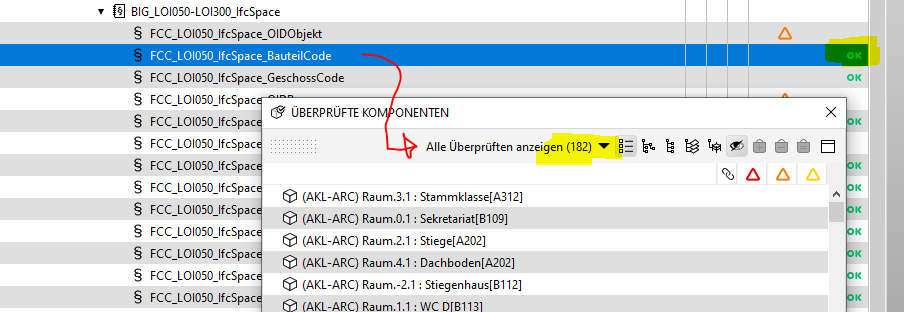
Hi, this (wrong data in the summary reports) has happened now a few times and it is highly annoying. Due to the fact that there is currently no other way to get a comprehensive summary we have to rely heavily on the summary reports. Unfortunately you can’t trust them either. Why?

-
For the sake of documentation I will reply to myself once more but first some words about the process and the workflow itself. The main goal is to check the information in the project. This however varies from project to project. Sometimes it might be necessary to check the whole file and another time the check should be limited to only a certain level, area or building according to the schedule. Basically this means we want to filter what components are going to be checked. So far so good, in theory this is not a complex matter but unfortunately there are some struggles to overcome at the moment to get a correct report.
One way to achieve this is by using the component filter of the rules. Here I have to say that to get the big picture we have lots of rules, this is suboptimal but necessary for a better differentiation of results. (Actually I would be more than happyif we could switch to a different worfklow but unfortunatelly at the momenten there is not really another comprehensive way to tell the overall status of a properties completeness - but this is also kind of another story) So adjusting lots of rules is something everybody wants to avoid as this is a real time stealer.
Well, luckily we can use (a) classification(s) for that but this unfortunately means that every rule has to be touched anyhow as this explicit additional filter was not implemented (or considered as needed) as the rules have been created. Although this sounds like a lot of work, I am afraid there is currently no way around as the following options are all not really turning out well.
One of the those other options would be to simply use gatekeeper rules. Not working with 9/203/230.
This was actually the original workflow intention but it simply does not work.Then there is the “Check Only Selected” way to do it but unfortunately this is resulting in a corrupt report as the numbers are simply not correct. My suspicion was always that legacy results from prior checking processes persist and confuse the whole story but I made some empiric test runs and no matter what I do I always get some incorrect rules. In the following for example you can see that some beams have failed checking = have issue although they were not selected. There have not been performed any checks with this ruleset before. Just this one. So the last hope and option to always have a virgin file (or ruleset) for solely performing property checks and exporting the reports until the gatekeeper issue might be fixed someday seems to be gone as well.
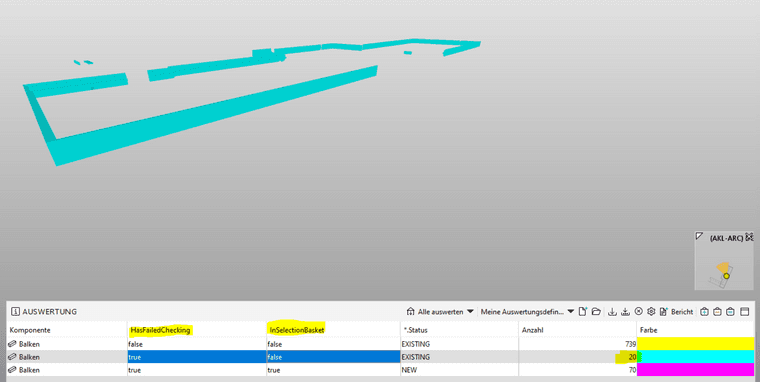

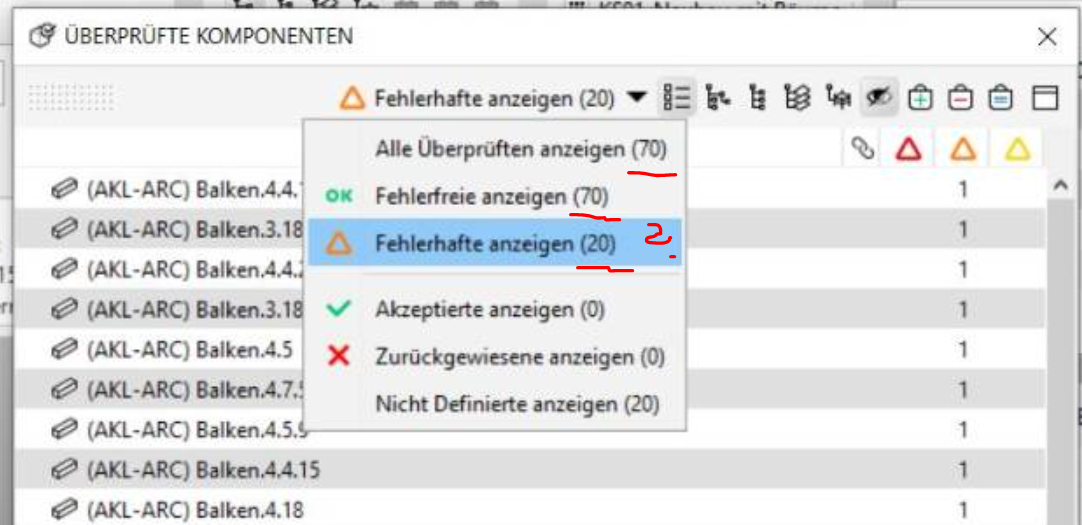
70-70 =/= 20?
In this issue example beams are getting checked although they are not selected. But not just beams, also other elements like doors or walls. So it’s not that thoese elements decompose into different parts or this just appears with exotic objects, it happens with everything but it is also rather hard for me to track down Solibri’s behaviour here as there is not really a clear pattern for me and that is even more frustrating.
I have already spent some time with this and thought I kinda know what steps and workarounds to follow to get correct results - bad enough that you would have to meticolously follow a strict protocoll (where any mistake could lead to corruption) to get trustable outcome - but no, it is always necessary to double and tripple check the results as I just cannot trust Solibri anymore. @Solibrians How should somebody who has not the empiric knowledge regarding this matter and Solibri’s pecularities in general?
What is the approved and suggested workflow and when are the gatekeeper bugs finally fixed? If they won’t then it would be highly appreciated to know as well as then we could at least stop wasting time on this and look for alternatives.
-
 J JSN referenced this topic on
-
Just a breif follow up to the previous post - I realized after half a day of editing rules that the looong way around isn’t doing the job either as desired.
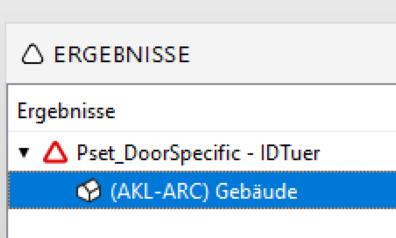
Here you can see that if I check only parts of the model directly sliced with the component filter of the rule, then it does not give me the correct numbers either if the property is not existing in the whole model, as it falls back to the IfcBuilding for rule #203
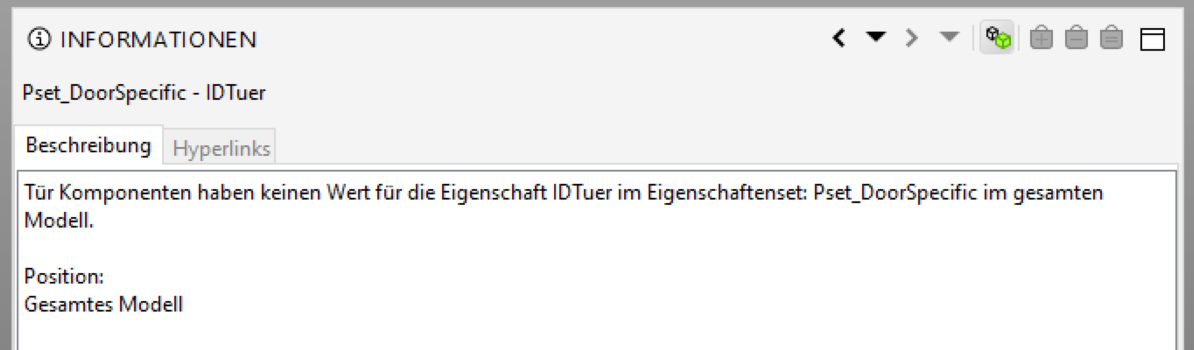
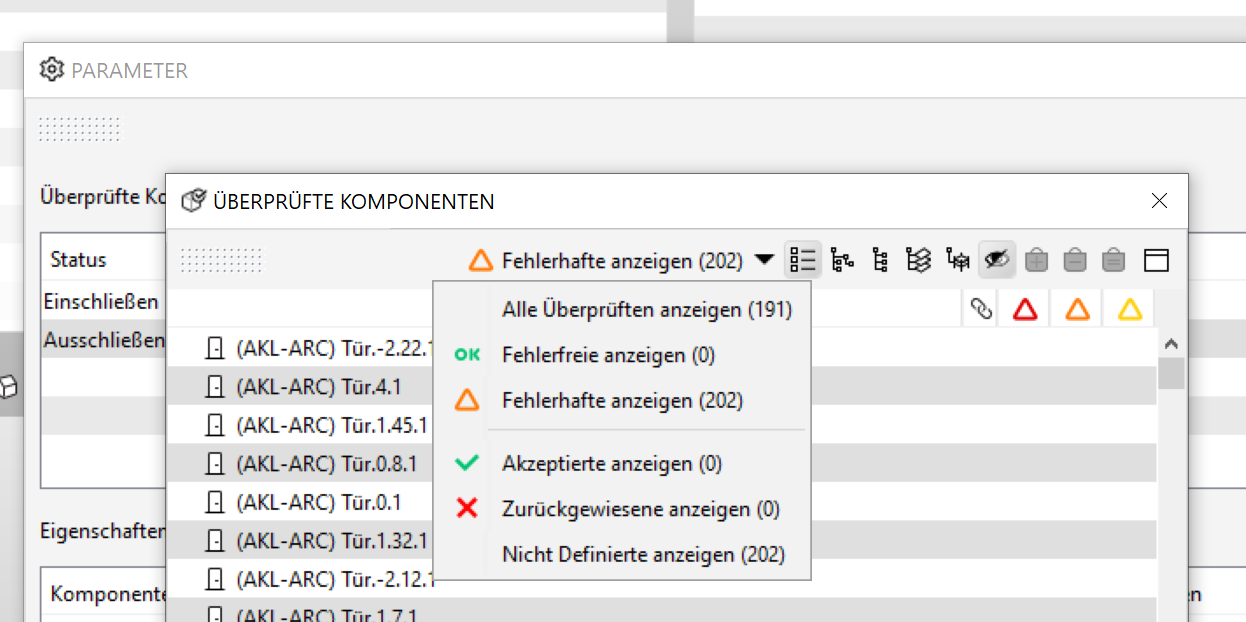
Sounds weird and confusing I know, I have once written more about it here:
https://society.solibri.com/topic/1304/view-of-the-components-that-are-missing-properties-sol-203-2-4/4?_=1641223409175tl,dr: I have 202 doors in the model, 191 (new) should be checked for a specific Property(set), but it is no there. What I am supposed to get is 191 doors with this issue information. What I get is 1 issue for IfcBuilding but a total counting of 202 issues in the report. Both is technically not correct.
-
Hi @JSN,
Sorry for the late reply. We’ll take a look at this in our team to see what can be done to improve this issue.
In the meantime if any workarounds are found we will post them here.Thanks,
David. -
@david-polanski
I really can’t say exactly when I’veobserved this/these thing(s) the first time as I have never documented them meticulously but it definitely dates back some time and versions. Afaik some problems with the gatekeeper appear since 2018 and before. Also reported here: https://society.solibri.com/topic/965/bug-in-solibri-9-12-gatekeeper-rules/6 -
Hey @JSN,
This issue is on our backlog and will be prioritized.
-
J JSN referenced this topic on
-
Hi @Solibrians ,
I’ve encountered a similar issue with Rule 203 and the Checked Components window in Result Summary.
In one instance, it shows all components as passed despite identifying that all components are failed.
For example, it displays “Show passed (463)” and “Show failed (0)”.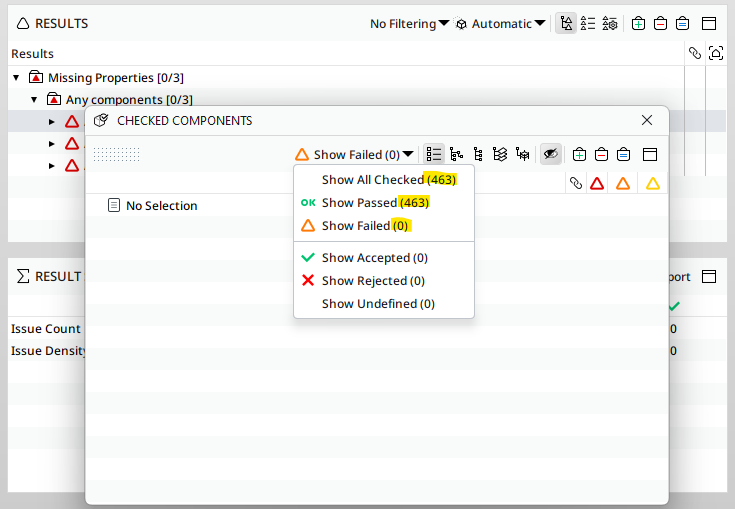
Conversely, in another scenario, it indicates “Show checked (15),” “Show passed (0),” and “Show failed (17)”.
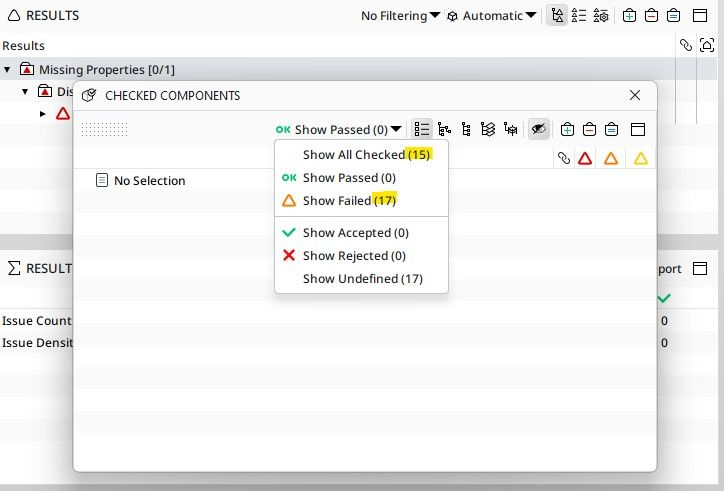
Do you know how to solve this issue?
Thanks in advance!
-
Hi @Pegah,
I noticed the same issue too. Here is the link to the March post: https://society.solibri.com/post/11242. Unfortunately, the bug continues to be present in version 24.5 even though it should have been fixed “in the next release”.



Copyright © 2025 Solibri Inc. | Powered by NodeBB