
Supressing update pop-up
-
Hello everyone,
I’ve noticed that with newest update of Solibri Office there is annoying pop-up on every launch which asks users to update and does not allow to advance/launch the application without updating. We don’t want that in our estate as we update everyone at the same time, have You found a way to suppress or disable this pop-up?
-
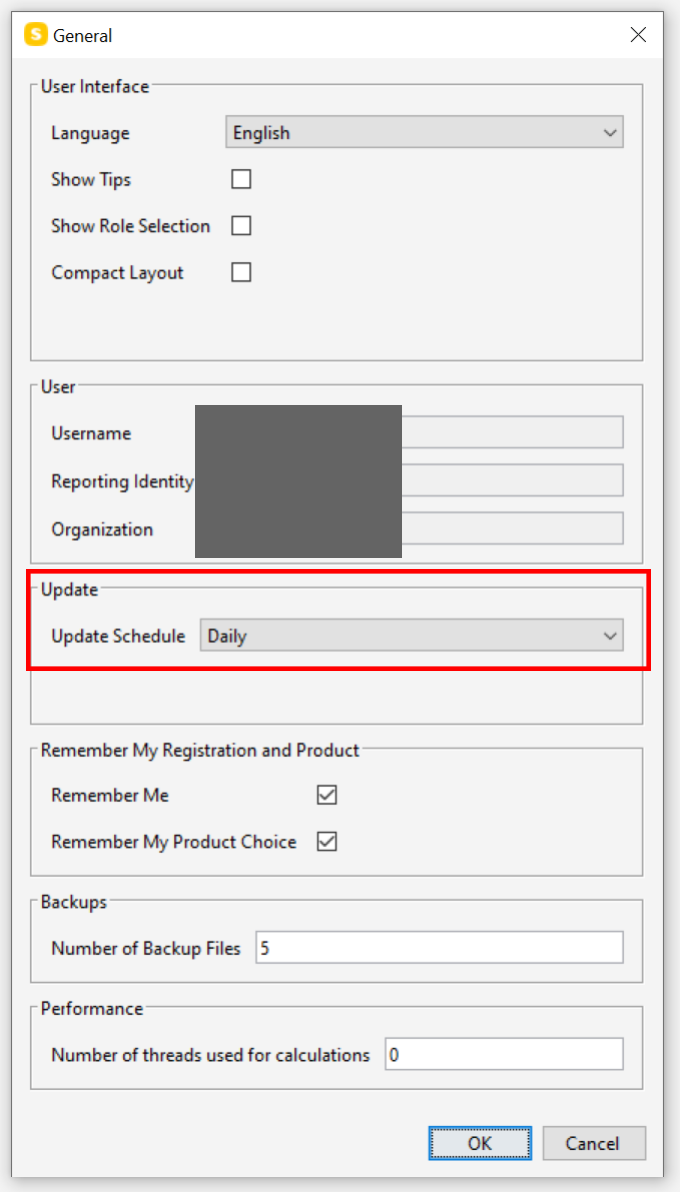
Under settings, general, you can set the update schedule. If you set this to ‘never’, it won’t give the updater on your start.
-
 M Matti marked this topic as a question on
-
M Matti has marked this topic as solved on
-
@zygimantass I don’t, sorry. Our organisation is not that big that we are in that kind of need.
-
The update schedule can be changed in Windows registry also:
Computer\HKEY_CURRENT_USER\SOFTWARE\ej-technologies\install4j\installationsSet the value of updateScheduleXXXXXXXX to “never”
updateSchedule0630-8640-0694-3929 is for Solibri 9.12
There is a key for each major version of Solibri. You can set them all “never”.
I will post a separate post about the installer.
-
@matti-kannala said in Supressing update pop-up:
I will post a separate post about the installer.
Hi Matti, could you inform us about how to set it to never check for updates on install?
-
@matti-kannala Hi Matti, any updates on this?

Copyright © 2025 Solibri Inc. | Powered by NodeBB