Skip to content
  • Categories
Collapse
Solibri Society Forum
  1. Home
  2. Comments & Feedback
  3. Tech Talks
  4. Custom Hierarchy Feature

Custom Hierarchy Feature

Scheduled Pinned Locked Moved Unsolved Tech Talks
14 Posts 7 Posters 4.2k Views
  • Oldest to Newest
  • Newest to Oldest
  • Most Votes
Log in to reply
This topic has been deleted. Only users with topic management privileges can see it.
  • MattiM Offline
    MattiM Offline
    Matti Solibrians
    wrote on last edited by
    #4

    @lraimo
    It seems a bit difficult. I cannot say if this would be done.

    1 Reply Last reply
    0
    • Alex.JA Offline
      Alex.JA Offline
      Alex.J
      wrote on last edited by
      #5

      @lraimo Wouldn’t a classification be more suitable?
      Classify elements by there level location or by their top and bottom elevation and use that classification in the custom hierarchy.

      1 Reply Last reply
      0
      • S Offline
        S Offline
        SanneVertommen
        wrote on last edited by
        #6

        Hi,
        We had the same issue so we made a classification based on category and used that to organise the results within checking

        T 1 Reply Last reply
        0
        • T Offline
          T Offline
          twosk
          replied to SanneVertommen on last edited by
          #7

          @SanneVertommen said in Custom Hierarchy Feature:

          made a classification based on category

          @SanneVertommen how did you classify results based on clash category yourself?becd994e-d93e-4d7c-91ba-d85e095cb906-image.png

          1 Reply Last reply
          0
          • P Offline
            P Offline
            Pauwels Tom
            wrote on last edited by
            #8

            We made a classification where we placed the components in a classification with the same name.

            4ea7104e-c87a-4e11-9d84-883dbc00962c-image.png

            then we can filter by this classification.

            5f8a1c80-41e2-4284-88c0-792bd2c402ce-image.png

            Alex.JA john.lippJ 2 Replies Last reply
            0
            • T Offline
              T Offline
              twosk
              wrote on last edited by twosk
              #9

              @Pauwels-Tom thanks, does it work like this?
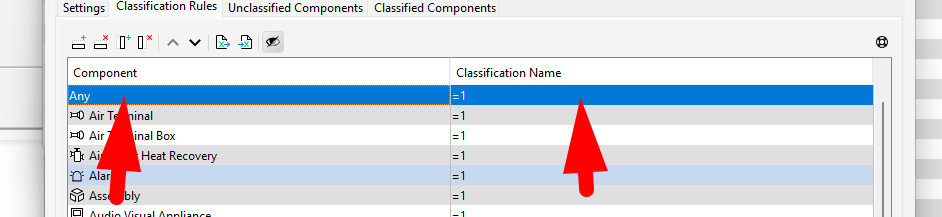
              image.png

              by the way your method gives custom sorting like this?
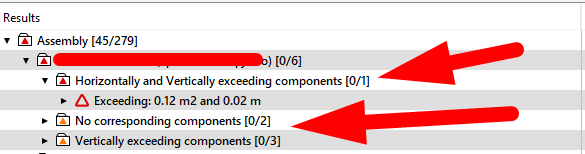
              image.png

              1 Reply Last reply
              0
              • Alex.JA Offline
                Alex.JA Offline
                Alex.J
                replied to Pauwels Tom on last edited by
                #10

                @Pauwels-Tom why don’t you use Component directly at level 2?

                1 Reply Last reply
                0
                • john.lippJ Offline
                  john.lippJ Offline
                  john.lipp
                  replied to Pauwels Tom on last edited by john.lipp
                  #11

                  @Pauwels-Tom

                  That’s a clever workaround. For those interested, here is a component.classification that includes all components/containers if you want to categorize results by Component:

                  Component.classification

                  Since they the components automatically localize in the column, you can use this regardless of the language you are running Solibri with

                  1 Reply Last reply
                  0
                  • L Offline
                    L Offline
                    lraimo
                    wrote on last edited by
                    #12

                    Thanks to @SanneVertommen suggestion I got almost the result that I wanted. Only downside is I can not get issue count the same way as in Category hierarchy
                    Category hierarchy result
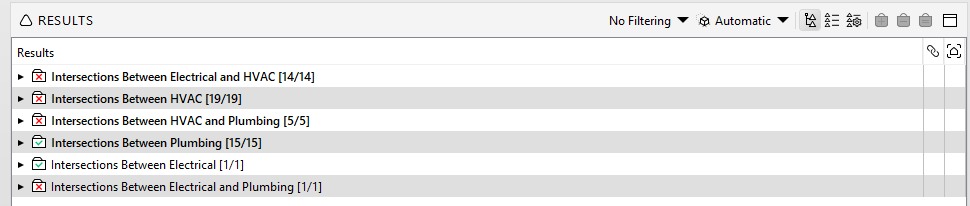
                    dfa119ae-a388-42fa-892a-fba7cdbae995-image.png
                    Custom hierarchy result
                    image.png

                    1 Reply Last reply
                    0
                    • L Offline
                      L Offline
                      lraimo
                      wrote on last edited by
                      #13

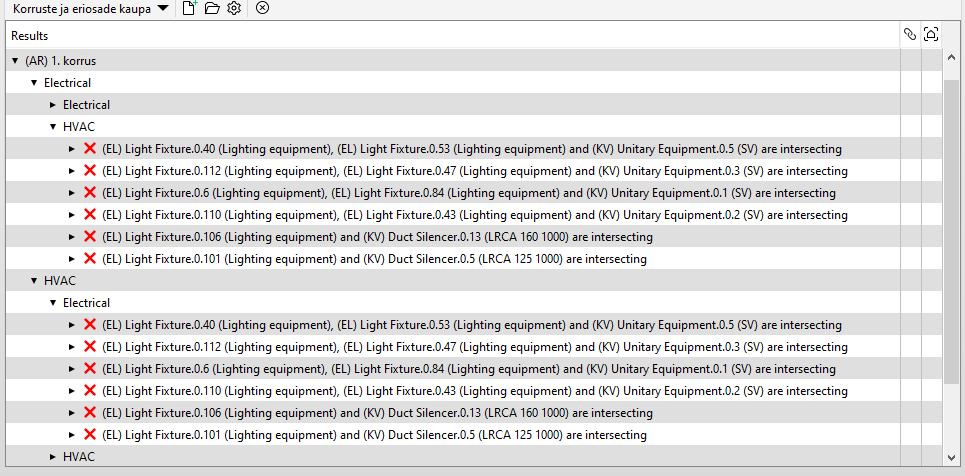
                      Unfortunately, with the larger model, I realized that the result is not what I want. For example under Electrical-Electrical there are also issues with Electrical and HVAC
                      ee0261fd-52bc-46f9-9392-53b8e2699189-image.png
                      Would like to get result by Level and then the same way as in Category hierarchy, bonus would be to get issue counts. Is there any way to achieve this?

                      1 Reply Last reply
                      1
                      • L Offline
                        L Offline
                        lraimo
                        wrote on last edited by
                        #14

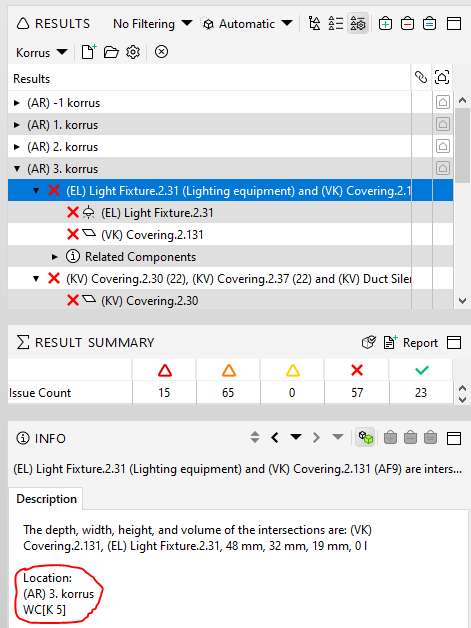
                        Another question is it possible to make Custom Hierarchy based on issue location?
                        image.png

                        1 Reply Last reply
                        0

                        Copyright © 2025 Solibri Inc. | Powered by NodeBB

                        • Login

                        • Don't have an account? Register

                        • Login or register to search.
                        • First post
                          Last post
                        0
                        • Categories