Skip to content
  • Categories
Collapse
Solibri Society Forum
  1. Home
  2. General Discussion
  3. BCF Live Connector Presentation

BCF Live Connector Presentation

Scheduled Pinned Locked Moved General Discussion
4 Posts 3 Posters 952 Views
  • Oldest to Newest
  • Newest to Oldest
  • Most Votes
Log in to reply
This topic has been deleted. Only users with topic management privileges can see it.
  • A Offline
    A Offline
    alex4omnicon
    wrote on last edited by
    #1

    Hello,

    when I do my model check with Solibri and create presentations from the results and afterwards import the presentations to the BCF Live Connector, they are “connected”:

    0pqfjMkcZA.png

    Is there a way to link issues afterwards as well?

    Best regards
    Alex

    1 Reply Last reply
    0
    • T Offline
      T Offline
      TRS_LUD
      wrote on last edited by
      #2

      Hi Alex,

      did you go to setting - BCF Live Connector… and uncheck “automated synchronization”? this way you can link issues and sync them manually within BCF Live Connector.

      1 Reply Last reply
      0
      • A Offline
        A Offline
        alex4omnicon
        wrote on last edited by
        #3

        Hello, thanks for your response. Yes I have unchecked this option.
        Can you please describe, how I can link an existing issue on the server with an issue from my presentations?

        1 Reply Last reply
        0
        • Harmen JorritsmaH Offline
          Harmen JorritsmaH Offline
          Harmen Jorritsma
          wrote on last edited by
          #4

          You cant’t link a issue in Solibri with a issue in BIM Collab.
          You can make a BCF report in BIM Collab and load this in Solibri. Than you have an linked issue between Solibri and Bim Collab.
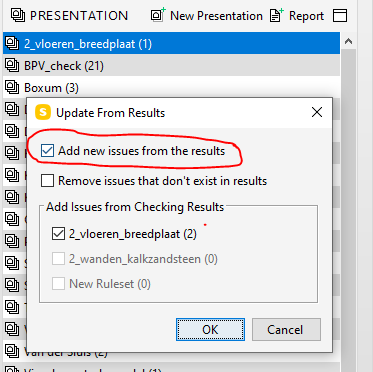
          The snapshot shows a issues created in de ruleset.
          When you create new issues in the ruleset you have to use the presentation section in Solibri.

          When you import the issues from the ruleset you get them from the presentaion
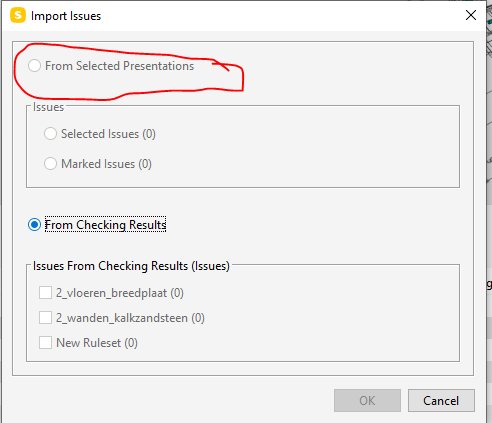
          image.png

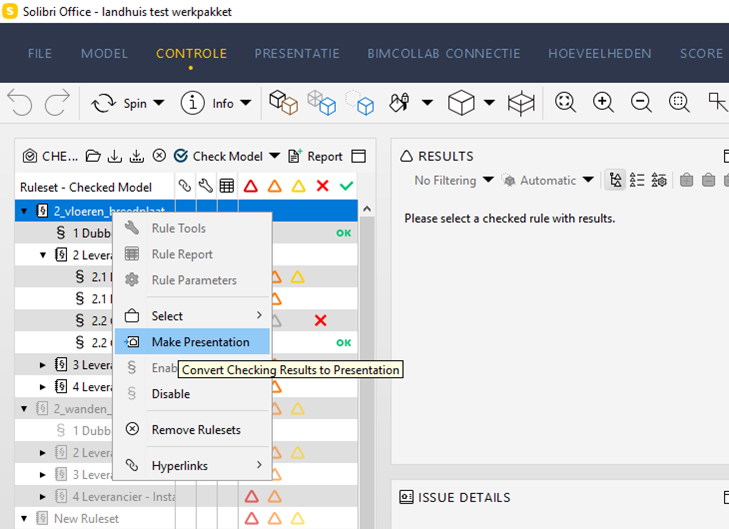
          Wou can create the presentation form the ruleset by clicking the right mouse button en the create presentation.
          02c26b9b-cae6-4984-84f4-5bc7b7ba8a64-image.png

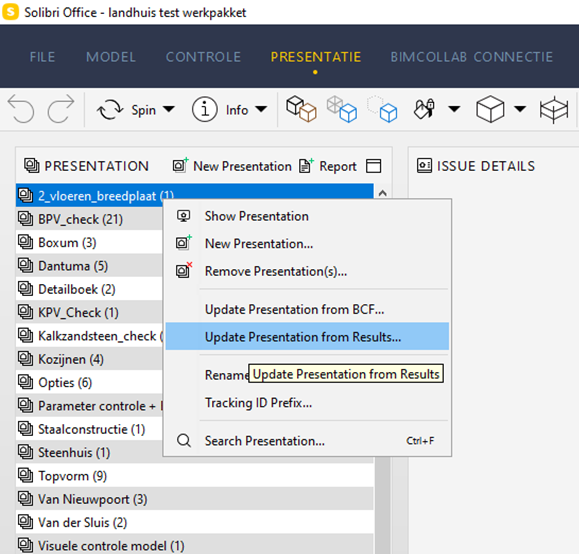
          When you create new issues in the ruleset, you can update the presenmtation with the results from the ruleset.
          a7429845-3351-4d2b-aee0-56a3862e9639-image.png
          1273db00-f4cb-4f47-86a1-c4de078b31bc-image.png
          Select the new issues in the presentation witch you want to sent to BIm Collab.
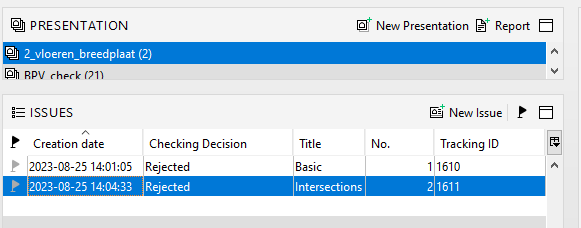
          62938b5e-a589-4f41-872c-c11f8112f6de-image.png
          Import the seleted issues in BIM Collab
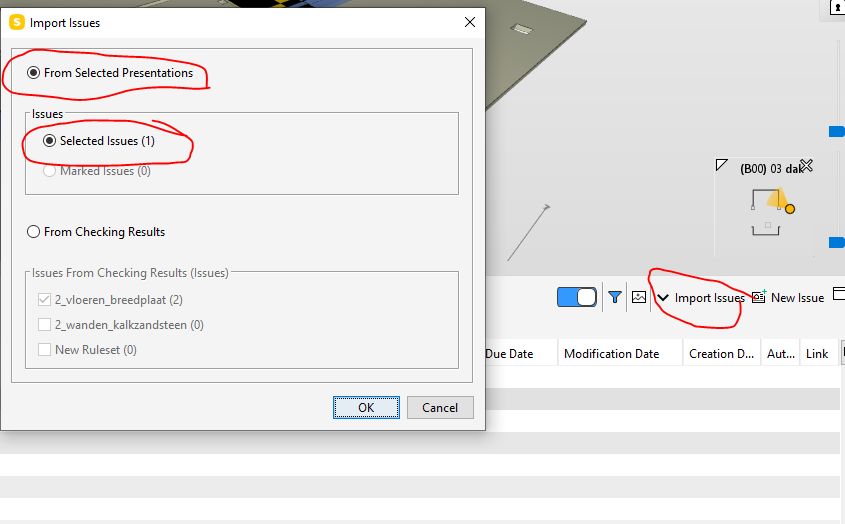
          3d82ffa1-c9db-4d93-b31a-0419b98332a9-image.png
          You see in the BCF Live Vieuw the issues. The triangle shows that this issues coms from the ruleset, imported via presentation.

          e84ae789-c4e0-45f7-9ebe-1f0280055c6b-image.png

          Met vriendelijke groet,
          Harmen Jorritsma

          BIM regisseur Van Wijnen Amsterdam
          Diemerhof 32 | 1112 XN Diemen | KvK 32129744

          020 -36 44 000 | 06-83 15 66 88 | LinkedIn | www.vanwijnen.nl
          Volg ons op Facebook en Twitter

          1 Reply Last reply
          1

          Copyright © 2025 Solibri Inc. | Powered by NodeBB

          • Login

          • Don't have an account? Register

          • Login or register to search.
          • First post
            Last post
          0
          • Categories