Skip to content
  • Categories
Collapse
Solibri Society Forum
  1. Home
  2. General Discussion
  3. BCF Live Connector to Trimble Connect FILE_NAME

BCF Live Connector to Trimble Connect FILE_NAME

Scheduled Pinned Locked Moved Solved General Discussion
16 Posts 7 Posters 3.1k Views
  • Oldest to Newest
  • Newest to Oldest
  • Most Votes
Log in to reply
This topic has been deleted. Only users with topic management privileges can see it.
  • L Offline
    L Offline
    lraimo
    wrote on last edited by
    #4

    Could you share your python script?
    I have reported it to Trimble Connect forum, see link in first post

    1 Reply Last reply
    0
    • W Offline
      W Offline
      Wing Mang
      wrote on last edited by
      #5

      There you go.
      I mostly asked Chatgpt to write it for me, and i just kept prompting it, and i added some GUI to make it nicer to use. Feel free to use or modify it (at your own risk, of course.)

      Here’s the approach of my workflow and the script:

      • sync the files from Trimble connect TC to my computer.
      • run script to loop through all the IFC file in the folder I’m concerned with.
      • in each of these IFC, find the strings of the file name of which line starts with FILE_NAME
      • replace it with the file name.
      • sync back to TC

      It’s rather difficult to ask the BIM author to always match the FILE_NAME to the file name. The FILE_NAME field is set at the time of export by the BIM software, and before the author uploads the IFC file, it would often get renamed manually. So having this simple script is good for housekeeping.

      import os
      import shutil
      import tkinter as tk
      from tkinter import filedialog, messagebox
      import sys
      
      ### change the FILE_NAME in the IFC header to match the file name
      ### if overwrite is set to True, the original file will be overwritten
      ### then run trimble connect sync to upload the files
      ### run every time any one uploaded a new version of the IFC file
      
      # main function
      class IFCProcessor:
          def change_ifc_filename(self, input_file, overwrite=False):
              base_name, _ = os.path.splitext(os.path.basename(input_file))
              folder = os.path.dirname(input_file)
              
              with open(input_file, 'r') as file:
                  lines = file.readlines()
                  for line in lines:
                      if line.startswith('FILE_NAME'):
                          parts = line.split(',')
                          current_filename = parts[0].split("'")[1]
                          if current_filename == f"{base_name}.ifc":
                              print(f"The FILE_NAME in the IFC header matches the file name for {input_file}. Skipping this file.")
                              return
                          else:
                              if overwrite:
                                  output_file = input_file
                              else:
                                  output_file = os.path.join(folder, f"{base_name}_renamed.ifc")
                                  shutil.copy2(input_file, output_file)
      
                              with open(output_file, 'r+') as output:
                                  output_lines = output.readlines()
                                  output.seek(0)
                                  for output_line in output_lines:
                                      if output_line.startswith('FILE_NAME'):
                                          output_parts = output_line.split(',')
                                          output_parts[0] = f"FILE_NAME('{base_name}.ifc'"
                                          output_line = ','.join(output_parts)
                                      output.write(output_line)
                                  output.truncate()
                              return
      
          def process_ifc_files_in_folder(self, folder_path, overwrite=False):
              for dirpath, dirnames, filenames in os.walk(folder_path):
                  for filename in filenames:
                      if filename.lower().endswith('.ifc'):
                          fullpath = os.path.join(dirpath, filename)
                          print(f"Processing file: {fullpath}")
                          self.change_ifc_filename(fullpath, overwrite)
      
      class IFCProcessorGUI:
          def __init__(self, root, processor):
              self.root = root
              self.processor = processor
              self.folder_var = tk.StringVar()
              self.overwrite_var = tk.BooleanVar()
              self.create_widgets()
      
          def select_folder(self):
              folder_path = filedialog.askdirectory()
              self.folder_var.set(folder_path)
      
          def process_files(self):
              folder_path = self.folder_var.get()
              overwrite = self.overwrite_var.get()
      
              print(f"Processing files in folder: {folder_path}")
              print(f"Overwrite flag is set to: {overwrite}")
      
              self.processor.process_ifc_files_in_folder(folder_path, overwrite)
      
              messagebox.showinfo("Success", "Files processed successfully!")
      
          def create_widgets(self):
              folder_label = tk.Label(self.root, text="Folder containing IFC files (subfolders will be searched):")
              folder_entry = tk.Entry(self.root, textvariable=self.folder_var)
              folder_button = tk.Button(self.root, text="Select Folder", command=self.select_folder)
      
              overwrite_check = tk.Checkbutton(self.root, text="Overwrite", variable=self.overwrite_var)
      
              process_button = tk.Button(self.root, text="Process Files", command=self.process_files)
      
              self.console = tk.Text(self.root)
              sys.stdout = TextRedirector(self.console, "stdout")
      
              folder_label.pack()
              folder_entry.pack()
              folder_button.pack()
              overwrite_check.pack()
              process_button.pack()
              self.console.pack()
      
      ## Redirect stdout to the console
      class TextRedirector(object):
          def __init__(self, widget, tag="stdout"):
              self.widget = widget
              self.tag = tag
      
          def write(self, str):
              self.widget.configure(state="normal")
              self.widget.insert("end", str, (self.tag,))
              self.widget.configure(state="disabled")
      
          def flush(self):
              pass
      
      if __name__ == "__main__":
          root = tk.Tk()
          root.title("IFC FILE_NAME Corrector") # Set the window title here
          processor = IFCProcessor()
          gui = IFCProcessorGUI(root, processor)
          root.mainloop()
      
      1 Reply Last reply
      0
      • L Offline
        L Offline
        lraimo
        wrote on last edited by
        #6

        @Wing-Mang
        Thank you for the code.
        By the way, my testing has shown ifc FILE_NAME in Solibri must be the same as the file name in Trimble Connect. So the last step in your workflow (sync back to TC) is actually redundant

        1 Reply Last reply
        0
        • H Offline
          H Offline
          Hamo
          wrote on last edited by
          #7

          WE communicated the Problem with Solibri and Connect. This is the result:

          This issue was discussed between the Trimble Connect dev team and the Solibri dev team. The conclusions are:

          1. Immediate Workaround is: go to the IFC file and change the IFC file name header
          2. Solibri improvement identified: Solibri plans to add a user setting so that: “Add option to map model name based on file name OR the IFC header file name”. Please look for an upcoming new release of the Solibri Office.
          1 Reply Last reply
          3
          • paola bronzoP Offline
            paola bronzoP Offline
            paola bronzo
            wrote on last edited by
            #8

            Hi @Solibrians ,

            Do you have any updates on how to resolve the problem?
            Or does @Hamo 's answer above always apply?
            Thanks

            1 Reply Last reply
            0
            • P Offline
              P Offline
              Pasi Paasiala Solibrians
              wrote on last edited by
              #9

              BCF-API 3.0 has a solution for this. We’ve communicated with Trimble that they could update their implementation.

              paola bronzoP 1 Reply Last reply
              0
              • paola bronzoP Offline
                paola bronzoP Offline
                paola bronzo
                replied to Pasi Paasiala on last edited by
                #10

                Sorry @Pasi-Paasiala, does this mean that the problem has already been fixed in the last versione 9.13.7 and that the synchronization between Solibri and Trimble Connect works well now? Or does Trimble still have to apply the solution?
                Thanks.

                1 Reply Last reply
                0
                • P Offline
                  P Offline
                  Pasi Paasiala Solibrians
                  wrote on last edited by
                  #11

                  @paola-bronzo Trimble would need to implement BCF-API 3.0. In the meanwhile we’re working on a workaround.

                  1 Reply Last reply
                  1
                  • L Offline
                    L Offline
                    lraimo
                    wrote on last edited by
                    #12

                    This has been fixed in Solibri 9.13.8 Beta

                    S 1 Reply Last reply
                    0
                    • S Offline
                      S Offline
                      Sander E
                      replied to lraimo on last edited by
                      #13

                      @lraimo Where can i get the 9.13.8 beta?

                      1 Reply Last reply
                      0
                      • L Offline
                        L Offline
                        lraimo
                        wrote on last edited by
                        #14

                        @Sander-E
                        You have to join Solibri Beta Program!
                        https://society.solibri.com/topic/740/join-our-solibri-beta-program

                        1 Reply Last reply
                        1
                        • MattiM Offline
                          MattiM Offline
                          Matti Solibrians
                          wrote on last edited by
                          #15

                          This is now done in Solibri 9.13.8.
                          https://society.solibri.com/topic/2826/solibri-9-13-8-has-been-released
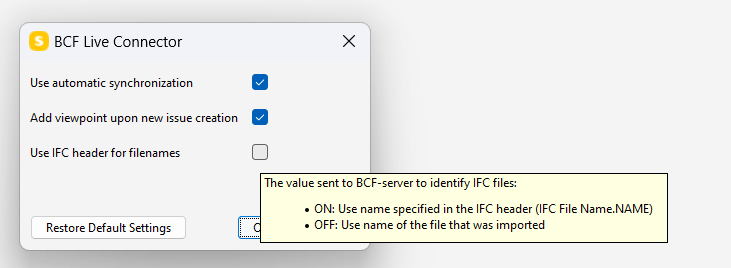
                          image.png

                          1 Reply Last reply
                          2
                          • MattiM Matti marked this topic as a question on
                          • MattiM Matti has marked this topic as solved on
                          • MattiM Matti unlocked this topic on
                          • S Offline
                            S Offline
                            Sander E
                            wrote on last edited by Sander E
                            #16

                            Thanks. It is done; Issues from Solibri to Trimble Connect it is working… BUT… Issues from Trimble to Solibri did not working.
                            I am figuring out if this is a problem related to the File name/IFC name header or something else.

                            1 Reply Last reply
                            0

                            Copyright © 2025 Solibri Inc. | Powered by NodeBB

                            • Login

                            • Don't have an account? Register

                            • Login or register to search.
                            • First post
                              Last post
                            0
                            • Categories