Skip to content
  • Categories
Collapse
Solibri Society Forum
  1. Home
  2. General Discussion
  3. How to reduce SMC file size?

How to reduce SMC file size?

Scheduled Pinned Locked Moved General Discussion
solibrifilesize
13 Posts 8 Posters 3.1k Views
  • Oldest to Newest
  • Newest to Oldest
  • Most Votes
Log in to reply
This topic has been deleted. Only users with topic management privileges can see it.
  • L Offline
    L Offline
    lvsteijn
    wrote on last edited by
    #1

    Can someone tell me how to reduce the size of Solibri files?
    After removing issues, the filesize barely reduces…

    Thanks in advance

    1 Reply Last reply
    1
    • Harmen JorritsmaH Offline
      Harmen JorritsmaH Offline
      Harmen Jorritsma
      wrote on last edited by
      #2

      You can try to reduce the size of the ifc’s bye the ifc optimizer, this will make the smc smaler.

      Classifications and ito’s are also a part that makes the smc lager.
      Sometimes its help to make an new smc and load all the rulesets, classifications and ito’s.

      You can also check the model if it has a lot of lines in it(triangle count). Those part can cost a lot of the power of the pc.

      Maybe someone else has ideas to?

      Met vriendelijke groet,
      Harmen Jorritsma

      BIM regisseur Van Wijnen Amsterdam
      Diemerhof 32 | 1112 XN Diemen | KvK 32129744

      020 -36 44 000 | 06-83 15 66 88 | LinkedIn | www.vanwijnen.nl
      Volg ons op Facebook en Twitter

      L 1 Reply Last reply
      1
      • B Offline
        B Offline
        b.huijskes
        wrote on last edited by
        #3

        The only thing that comes to mind would be to export to IFC4, should your modelling software allow that. In theory, that should reduce the IFC file size, and with that the SMC file size, by a decent bit.

        1 Reply Last reply
        1
        • MattiM Offline
          MattiM Offline
          Matti Solibrians
          wrote on last edited by Matti
          #4

          All the snapshots in the slides and results are stored as PNG image format.
          In Full HD resolution on snapshot takes about 200-500 KB. 100 Full HD snapshots can take 50MB and with 4K much more.

          Some Tips:

          • Less snapshots stored
          • Capture with smaller 3D view
          • Don’t use gradient as background color (10% effect)
          • Use smaller thumbnail size (Presentation settings, only minor effect)
          1 Reply Last reply
          1
          • L Offline
            L Offline
            lvsteijn
            wrote on last edited by
            #5

            Thank you for your replies.
            @Matti-Kannala I will try your suggestions. Do you have more of these tips?

            1 Reply Last reply
            0
            • MattiM Offline
              MattiM Offline
              Matti Solibrians
              wrote on last edited by
              #6

              More Tips:

              • Don’t export needless components to IFC. Use ITO and Triangle Count column to detect the biggest geometries.
              • Don’t import needless IFC property sets (Ignore property sets in IFC Import Settings)
              • Optimize the IFC files with Solibri IFC Optimizer (might also affect to the Solibri model size even Solibri is doing a lot of compression)
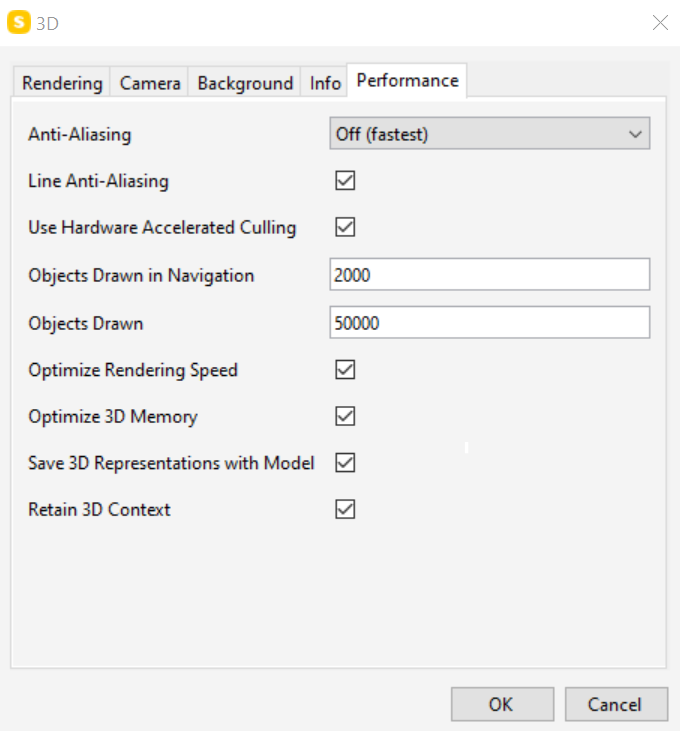
              • Turn off "Save 3D Representation with Model). Model opening takes more time. Saving should be faster and the model size will be smaller on disk…
              1 Reply Last reply
              3
              • D Offline
                D Offline
                dirkbent
                wrote on last edited by
                #7

                @Matti-Kannala What is meant bij 3D representation? If u leave it out of the model are there more disavantages (other then longer time to open the model)?

                MattiM 1 Reply Last reply
                0
                • MattiM Offline
                  MattiM Offline
                  Matti Solibrians
                  replied to dirkbent on last edited by
                  #8

                  @dirkbent said in How to reduce SMC file size?:

                  meant bij 3D representation

                  If “Save 3D Representation with Model” is off, then the meshes are generated from parametric geometries are not saved with model (e.g. extrusions is a parametric geometry). When the model is opened again the meshes are generated.

                  Pros:

                  • Model size on the disk is smaller
                  • Saving takes less time

                  Cons:

                  • Opening takes more time
                  J 1 Reply Last reply
                  0
                  • J Offline
                    J Offline
                    Jimin
                    replied to Matti on last edited by
                    #9

                    @Matti-Kannala I am quiet new to Solibri and I am still learning but I do wonder, where do I find this setting? 🙂

                    1 Reply Last reply
                    0
                    • V Offline
                      V Offline
                      vasu
                      wrote on last edited by
                      #10

                      You find the settings @Matti-Kannala mentioned in Performance tab under File -> Settings -> 3D…
                      a7ffadb7-9b2f-4bca-b28d-e74fc13df16a-image.png

                      J 1 Reply Last reply
                      0
                      • J Offline
                        J Offline
                        Jimin
                        replied to vasu on last edited by
                        #11

                        @vasu Thank you! 😄

                        1 Reply Last reply
                        0
                        • L Offline
                          L Offline
                          lvsteijn
                          replied to Harmen Jorritsma on last edited by
                          #12

                          @Harmen-Jorritsma said in How to reduce SMC file size?:

                          You can also check the model if it has a lot of lines in it(triangle count)

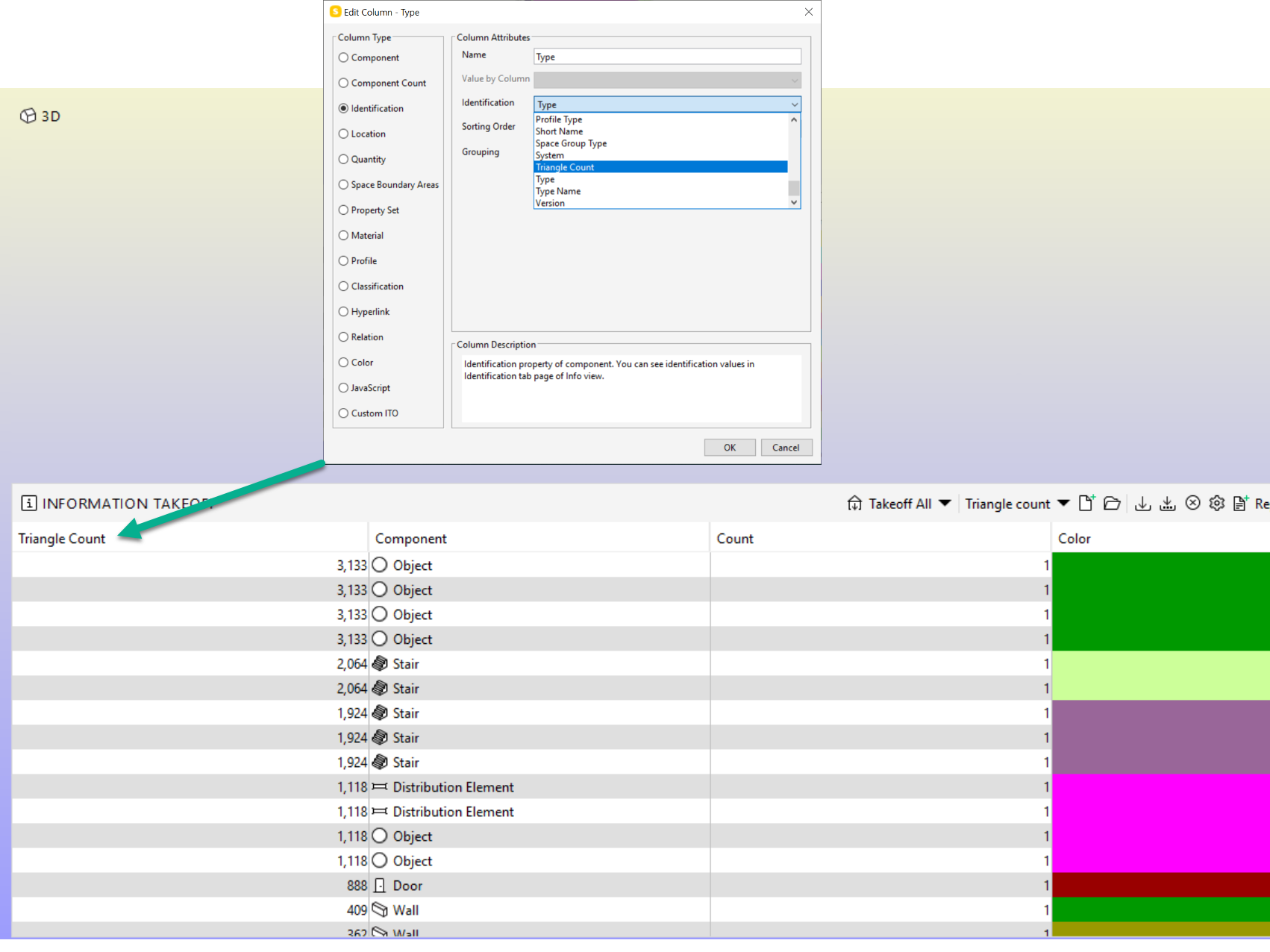
                          @Harmen-Jorritsma How do I get an overview from the trianglecount per IFC?

                          1 Reply Last reply
                          0
                          • Lauri LuomaL Offline
                            Lauri LuomaL Offline
                            Lauri Luoma Solibrians
                            wrote on last edited by
                            #13

                            @lvsteijn

                            In Solibri you can see the triangle count by listing the information in ITO:

                            21b0ee54-b3c7-4c48-9e1c-2b7462fe0551-image.png

                            1 Reply Last reply
                            0

                            Copyright © 2025 Solibri Inc. | Powered by NodeBB

                            • Login

                            • Don't have an account? Register

                            • Login or register to search.
                            • First post
                              Last post
                            0
                            • Categories