Skip to content
  • Categories
Collapse
Solibri Society Forum
  1. Home
  2. General Discussion
  3. multiple values

multiple values

Scheduled Pinned Locked Moved General Discussion
6 Posts 4 Posters 1.2k Views
  • Oldest to Newest
  • Newest to Oldest
  • Most Votes
Log in to reply
This topic has been deleted. Only users with topic management privileges can see it.
  • B Offline
    B Offline
    brinkman
    wrote on last edited by
    #1

    Is it possible to search for multiple values in a single cell by splitting the potential values using logical functions, such as ‘OR’?

    1 Reply Last reply
    0
    • T Offline
      T Offline
      tommaso.delia
      wrote on last edited by
      #2

      Yes, you can use “one of” in filter definition.

      Solibri shows you the available values for the property you have chosen. If you need to find the elements whose cell values match exactly the values you are looking for, select them.

      If you need to search those cells that contain the values, you can still use “one of”: you should select as many available values as that you are looking for, then edit the available values by double clicking on them and writing the values you are looking for, each in one row, enclosing them with * wildcard character (for example: if you are looking for " wall ", write " wall ". You can also write " wall* " or " *wall " if you want to search respectively the cells that start or end with " wall ").

      1 Reply Last reply
      0
      • B Offline
        B Offline
        brinkman
        wrote on last edited by
        #3

        The search for multiple values in this manner works within the filter options of the ITOs and the classifications. I would like to use it for the classification rules, for instance, with several possible values for type.

        image.png

        1 Reply Last reply
        0
        • P Offline
          P Offline
          Pasi Paasiala Solibrians
          wrote on last edited by
          #4

          @brinkman Can’t you just add multiple lines?
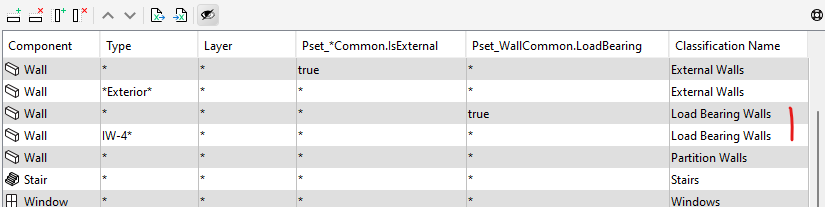
          2e028287-f9b8-4daf-aa82-bbc593fef51e-image.png

          1 Reply Last reply
          0
          • B Offline
            B Offline
            brinkman
            wrote on last edited by
            #5

            We work from a large externally managed list. We want to keep the link with the original list as intact as possible.

            JSNJ 1 Reply Last reply
            0
            • JSNJ Offline
              JSNJ Offline
              JSN
              replied to brinkman on last edited by
              #6

              @brinkman said in multiple values:

              We work from a large externally managed list. We want to keep the link with the original list as intact as possible.

              Keep the list as it is and use e.g. Power Query to transform into a new file as needed that can be linked?


              1 Reply Last reply
              1

              Copyright © 2025 Solibri Inc. | Powered by NodeBB

              • Login

              • Don't have an account? Register

              • Login or register to search.
              • First post
                Last post
              0
              • Categories