Skip to content
  • Categories
Collapse
Solibri Society Forum
  1. Home
  2. Comments & Feedback
  3. Tech Talks
  4. Resolution issue Solibri Model Checker

Resolution issue Solibri Model Checker

Scheduled Pinned Locked Moved Solved Tech Talks
6 Posts 4 Posters 1.6k Views
  • Oldest to Newest
  • Newest to Oldest
  • Most Votes
Log in to reply
This topic has been deleted. Only users with topic management privileges can see it.
  • Robbert EversR Offline
    Robbert EversR Offline
    Robbert Evers
    wrote on last edited by Robbert Evers
    #1

    It would be great if Solibri is going to improve the resolution issues 😃

    Sometimes when you work with two display screens, the resolutions of Solibri changes.
    Icons, lay-out names or other buttons are getting very small or almost not readable.
    Solibri kleine resolutie.jpg

    Thank you in advance,

    Robbert

    1 Reply Last reply
    0
    • Lauri LuomaL Offline
      Lauri LuomaL Offline
      Lauri Luoma Solibrians
      wrote on last edited by
      #2

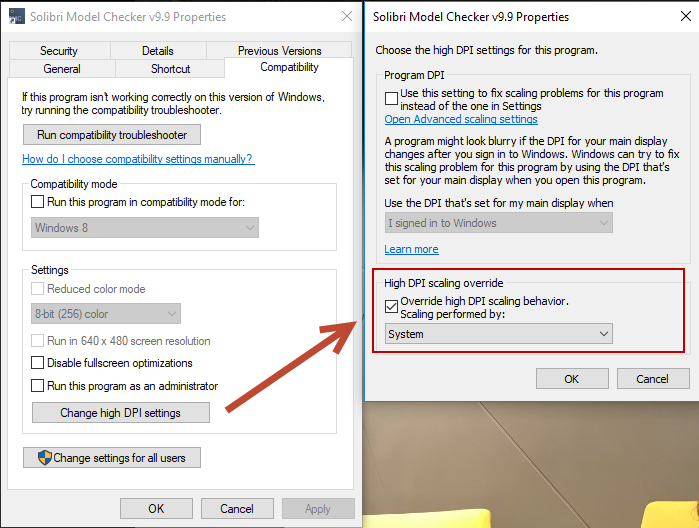
      Changing the SMC shortcut properties “change high DPI settings” has fixed some resolution issues in the past. This is something to try at least.
      resolution.png

      If the issue still persists we need to investigate further how to solve this.

      Robbert EversR 1 Reply Last reply
      4
      • Robbert EversR Offline
        Robbert EversR Offline
        Robbert Evers
        replied to Lauri Luoma on last edited by
        #3

        @Lauri-Luoma Thanks! that was the issue.

        1 Reply Last reply
        0
        • Lauri LuomaL Offline
          Lauri LuomaL Offline
          Lauri Luoma Solibrians
          wrote on last edited by
          #4

          @Robbert-Evers Great! happy to hear. 🙂

          1 Reply Last reply
          1
          • J Offline
            J Offline
            Jan Reiter 0
            wrote on last edited by
            #5

            Hello,
            unfortunately, the problem with the lack of automatic scaling (by system) still exists in the latest versions of Solibri.
            The setting mentioned above works for local installations, but this config should actually already be fixed by the installation of Solibri. The background is that otherwise for various systems (local installation manually, virtual desktop or local installation via automation) each user must make the change independently / manually. Especially since the above-mentioned approach unfortunately does not work on a virtual desktop.
            Every other software scales itself without problems, when working with Solibri on different monitors (e.g. 27 inch monitor and laptop screen) the scaling is not handled dynamically, which leads to the UI becoming unreadably small in meetings using solibri on the laptop.

            Adjustments can be made to the UI via the “Solibri Console.vmoptions” config file, e.g. the line:
            “-Dprism.allowhidpi=false” can be added below the “-Dsun.java2d.uiScale=1.0”.
            We had already experimented with this solution a few years ago, but as I said, the actual problem does not lie with the user, but with the general software settings.

            Regards Jan

            1 Reply Last reply
            2
            • A Offline
              A Offline
              Antsche
              wrote on last edited by
              #6

              Same problem here. If I scale it manually, the UI scales better and is sharp, but the 3D viewport becomes blurry. This shouldn’t be a workaround, but rather a proper fix.

              1 Reply Last reply
              1

              Copyright © 2025 Solibri Inc. | Powered by NodeBB

              • Login

              • Don't have an account? Register

              • Login or register to search.
              • First post
                Last post
              0
              • Categories