
BIMcollab - 3D images disappear on Issue details
-
Hello everyone,
I don’t know if a topic already exist about it, but I have a problem with BIMcollab on Solibri. In fact, every Monday morning, I lose all my 3D images on my Issue Details :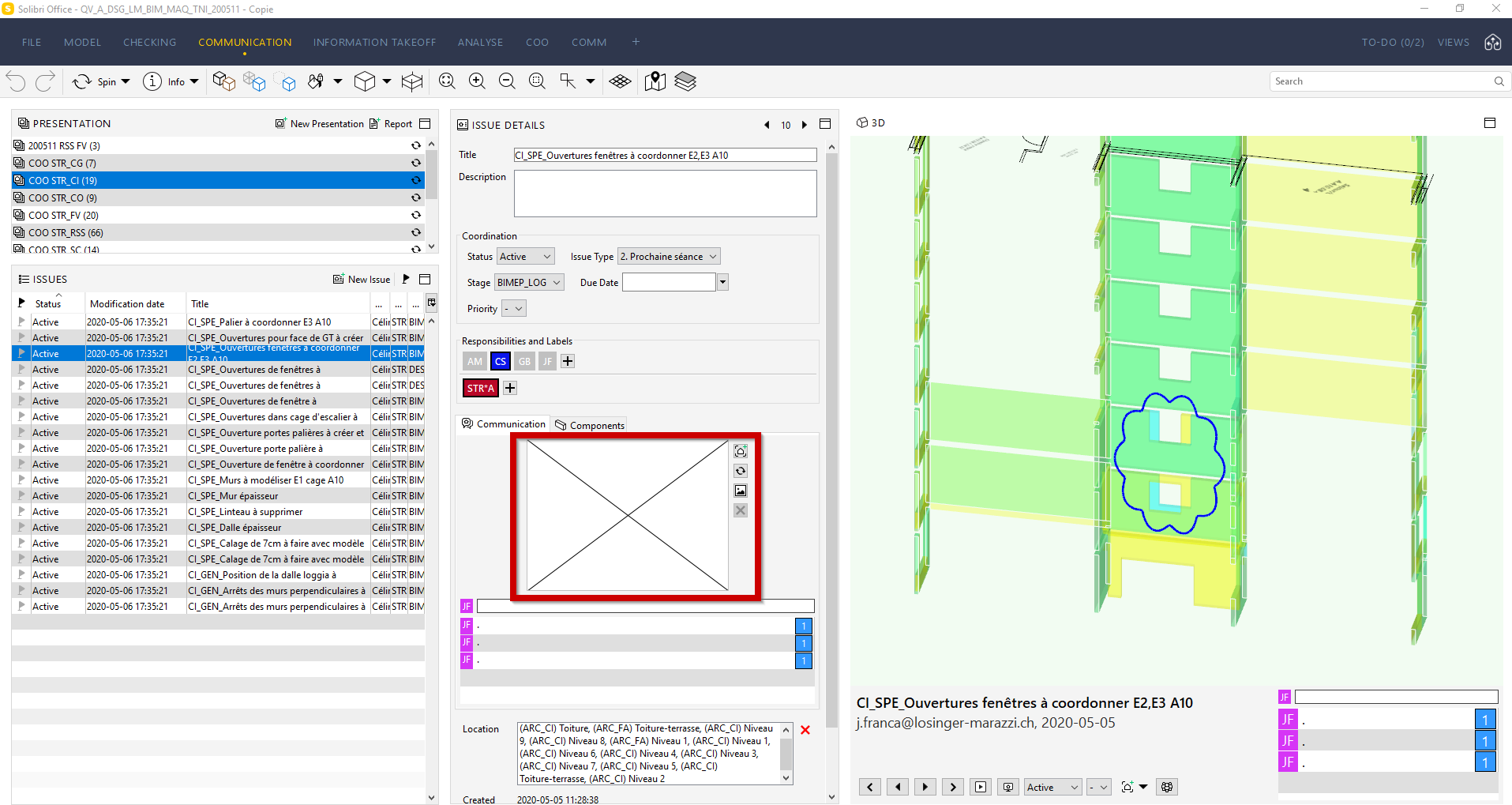 .
.
The 3D images are replaced by a cross and I don’t know why.I have already contacted the support of BIMcollab, and they have no answer to my question…
I tried to restart a new Solibri model with new issues, but the problem still exist. For information, the 3D images are not deleted on BIMcollab. When I try to download the issues from BIMcollab, the problem is not solved.
Has anyone ever encountered this problem?
Thank you for your answers.
Cheers !
-
Hello @Jérémie-Franca and @hkringsKUBUS,
We have had a slightly similar report about snapshots disappearing with a previous software version (9.10.6). Some more details would help:
-
As @hkringsKUBUS mentioned, have you tried with the new BCF-API connection?
-
Are you using only web-based, or does your project have a mix of file-based and web-based issues?
Kind regards,
Toni on behalf of the Solibri team
-
-
Hello Jérémie,
Sorry, you are repeatedly losing the snapshots of your issues.
I assume that they still exist in BIMcollab, is that correct?Have you tried the new Solibri - BIMcollab connection when using 9.10.8? You can set this up via File > settings > BCF connector en choosing “BIMcollab new”.
As the every Monday is very specific, I’m wondering whether this could might be caused by changes that happen at the end of the week and your synchronisation method.
If using the new connection does not help, Could share some more details on what changed since the last synchronisation and which synchronisation setup/method you use?Have any @Solibrians seen this before and know a cause?
With kind regards,
Hilde Krings
KUBUS, reseller Solibri Belgium and The Netherlands -
Hello @Jérémie-Franca and @hkringsKUBUS,
We have had a slightly similar report about snapshots disappearing with a previous software version (9.10.6). Some more details would help:
-
As @hkringsKUBUS mentioned, have you tried with the new BCF-API connection?
-
Are you using only web-based, or does your project have a mix of file-based and web-based issues?
Kind regards,
Toni on behalf of the Solibri team
-
-
Hello !
Thank you for your answers ! I tried the new BCF-API connection by choosing “BIMcollab new” and everything’s fine. I just updated my issues and all my images came back.
Thank you for your help !
Kind regards
Jérémie


Copyright © 2025 Solibri Inc. | Powered by NodeBB