Skip to content
  • Categories
Collapse
Solibri Society Forum
  1. Home
  2. Comments & Feedback
  3. Tech Talks
  4. Output in report of Result Summary

Output in report of Result Summary

Scheduled Pinned Locked Moved Tech Talks
9 Posts 5 Posters 1.8k Views
  • Oldest to Newest
  • Newest to Oldest
  • Most Votes
Log in to reply
This topic has been deleted. Only users with topic management privileges can see it.
  • Harmen JorritsmaH Offline
    Harmen JorritsmaH Offline
    Harmen Jorritsma
    wrote on last edited by
    #1

    Hello there,

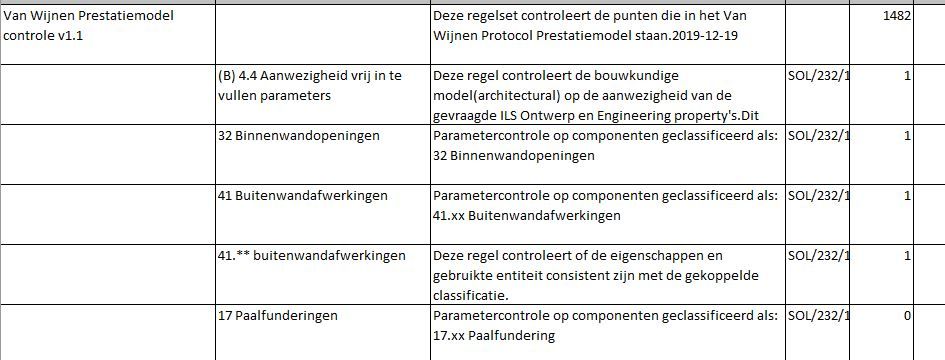
    I want to use de data of the result summary to make a overview how good the model is.
    But the output have not the same structure as the handmade ruleset.
    The output is very illogical.
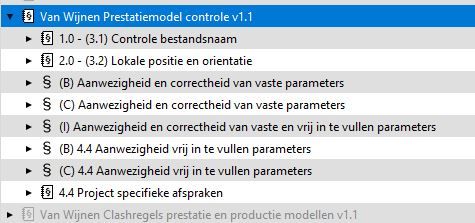
    out1.JPG out2.JPG

    I tried a lot of things in excel, but it seems like that Solibri make it’s own output.
    Is there something i can do or is this something for the @Solibrians?

    Met vriendelijke groet,
    Harmen Jorritsma

    BIM regisseur Van Wijnen Amsterdam
    Diemerhof 32 | 1112 XN Diemen | KvK 32129744

    020 -36 44 000 | 06-83 15 66 88 | LinkedIn | www.vanwijnen.nl
    Volg ons op Facebook en Twitter

    MattiM 1 Reply Last reply
    1
    • MattiM Offline
      MattiM Offline
      Matti Solibrians
      replied to Harmen Jorritsma on last edited by
      #2

      @Harmen-Jorritsma

      Can you share the ruleset?

      1 Reply Last reply
      0
      • Harmen JorritsmaH Offline
        Harmen JorritsmaH Offline
        Harmen Jorritsma
        wrote on last edited by
        #3

        Hello Matti,

        Here is the ruleset

        [0_1591277058035_Van Wijnen Prestatiemodel controle v1.1.cset](Uploading 100%)

        Met vriendelijke groet,
        Harmen Jorritsma

        BIM regisseur Van Wijnen Amsterdam
        Diemerhof 32 | 1112 XN Diemen | KvK 32129744

        020 -36 44 000 | 06-83 15 66 88 | LinkedIn | www.vanwijnen.nl
        Volg ons op Facebook en Twitter

        MattiM 1 Reply Last reply
        0
        • MattiM Offline
          MattiM Offline
          Matti Solibrians
          replied to Harmen Jorritsma on last edited by
          #4

          @Harmen-Jorritsma

          Looks like that file format is not supported. Could you try again as zip file?

          EricE 1 Reply Last reply
          0
          • EricE Offline
            EricE Offline
            Eric
            replied to Matti on last edited by
            #5

            @Matti-Kannala .cset has been added as supported file format so I’d recommend trying again with this first…

            1 Reply Last reply
            1
            • T Offline
              T Offline
              tsolsen
              wrote on last edited by
              #6

              The export to excel, needs to sort, as the rulesets are sorted in the ruleset manager. At the moment, it looks like it sorts the export, acccording to the creation order?
              Would assume it would sort either alphanummericly or in the ruleset order.

              I have previously asked about this, with ref: 00D24Knbp._50024kmIS4. Can’t locate the answer.
              But iirc, it was something like “yes, that’s just how it is”.

              1 Reply Last reply
              0
              • Harmen JorritsmaH Offline
                Harmen JorritsmaH Offline
                Harmen Jorritsma
                wrote on last edited by
                #7

                Van Wijnen Prestatiemodel controle v1.1.cset.zip Van Wijnen Prestatiemodel controle v1.1.cset

                Here is the zip and the ruleset.
                Like @tsolsen told in his reply, it looks like it sort with the creation date, but it would be nice to see the structure of the ruleset back in the output in excel.
                Now it is a puzzel witch rule belongs to the rule in the ruleset.

                I hope you have a solution for this.
                Have a good weekend!

                Met vriendelijke groet,
                Harmen Jorritsma

                BIM regisseur Van Wijnen Amsterdam
                Diemerhof 32 | 1112 XN Diemen | KvK 32129744

                020 -36 44 000 | 06-83 15 66 88 | LinkedIn | www.vanwijnen.nl
                Volg ons op Facebook en Twitter

                1 Reply Last reply
                0
                • MombourM Offline
                  MombourM Offline
                  Mombour
                  wrote on last edited by
                  #8

                  Hey @Harmen-Jorritsma,

                  I encountered the same problem when using gatekeeper rules.

                  @tsolsen this seems to be the case aswell.

                  @Solibrians thumbs up if you have a solutions for this 🙂

                  Best

                  M.

                  1 Reply Last reply
                  0
                  • Harmen JorritsmaH Offline
                    Harmen JorritsmaH Offline
                    Harmen Jorritsma
                    wrote on last edited by
                    #9

                    @Matti-Kannala,

                    I toke a test yesterday:
                    When i open all rules with the arrow, so you can see all the rules, then i can select all the rules with shift.
                    If i did that en click on report, the report looks more like the ruleset.
                    However this is a workaround which cost a lot of time.

                    Met vriendelijke groet,
                    Harmen Jorritsma

                    BIM regisseur Van Wijnen Amsterdam
                    Diemerhof 32 | 1112 XN Diemen | KvK 32129744

                    020 -36 44 000 | 06-83 15 66 88 | LinkedIn | www.vanwijnen.nl
                    Volg ons op Facebook en Twitter

                    1 Reply Last reply
                    1
                    • JSNJ JSN referenced this topic on

                    Copyright © 2025 Solibri Inc. | Powered by NodeBB

                    • Login

                    • Don't have an account? Register

                    • Login or register to search.
                    • First post
                      Last post
                    0
                    • Categories