Skip to content
  • Categories
Collapse
Solibri Society Forum
  1. Home
  2. Comments & Feedback
  3. Tech Talks
  4. Pop-up window to close Microsoft excel is always cut off

Pop-up window to close Microsoft excel is always cut off

Scheduled Pinned Locked Moved Tech Talks
3 Posts 2 Posters 550 Views
  • Oldest to Newest
  • Newest to Oldest
  • Most Votes
Log in to reply
This topic has been deleted. Only users with topic management privileges can see it.
  • RicardoR Offline
    RicardoR Offline
    Ricardo
    wrote on last edited by
    #1

    Hi,

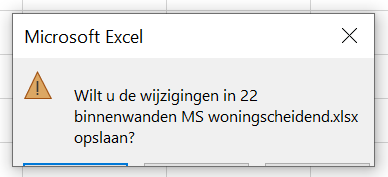
    Almost every time when I want to close an Excel report, the pop-up window is cut off at the bottom.
    Does somebody know what I can do about this? It only happens with Excel files that are made with Solibri.

    de4b3c0b-677a-4ec4-91bf-ed7d9b15c766-image.png

    1 Reply Last reply
    0
    • MattiM Offline
      MattiM Offline
      Matti Solibrians
      wrote on last edited by
      #2

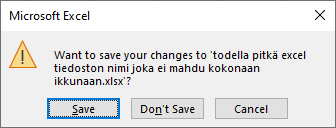
      This must be Excel problem. Might relate to localisation or Windows screen scaling. Please contact Excel support Help->Contact Support in Excel.

      Note: On my system the warning icon is a bit different color. You might use older version of Excel.
      5795d23f-7e19-443e-8dbf-e7f74fdd5ebd-image.png

      1 Reply Last reply
      0
      • RicardoR Offline
        RicardoR Offline
        Ricardo
        wrote on last edited by Ricardo
        #3

        Thanks for the tip.
        I have an older laptop lying around with a lower resolution. I can test if the same problem will occur there.

        1 Reply Last reply
        0

        Copyright © 2025 Solibri Inc. | Powered by NodeBB

        • Login

        • Don't have an account? Register

        • Login or register to search.
        • First post
          Last post
        0
        • Categories