Skip to content
  • Categories
Collapse
Solibri Society Forum
  1. Home
  2. Comments & Feedback
  3. Tech Talks
  4. Installation

Installation

Scheduled Pinned Locked Moved Tech Talks
10 Posts 3 Posters 1.8k Views
  • Oldest to Newest
  • Newest to Oldest
  • Most Votes
Log in to reply
This topic has been deleted. Only users with topic management privileges can see it.
  • chrisC Offline
    chrisC Offline
    chris
    wrote on last edited by
    #1

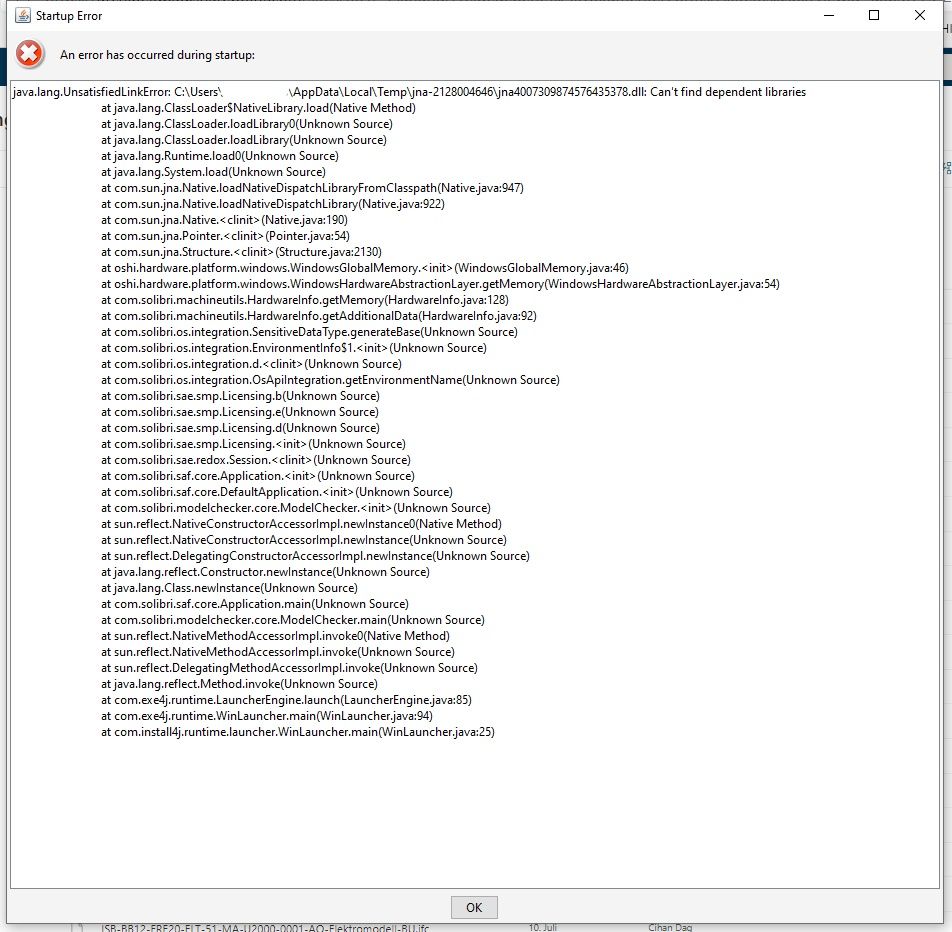
    Does someone have the same issue with solibri after start the application? The app is not starting because of this report. Any help?

    THX
    christof

    Solibri Fehler_LI.jpg

    1 Reply Last reply
    0
    • MattiM Offline
      MattiM Offline
      Matti Solibrians
      wrote on last edited by
      #2

      Hi,
      I have not seen issue before. Some Windows library is missing.

      Please try to install Visual C++ Redistributables:
      https://support.microsoft.com/en-us/help/2977003/the-latest-supported-visual-c-downloads

      I hope this helps.

      RicardoR 1 Reply Last reply
      1
      • RicardoR Offline
        RicardoR Offline
        Ricardo
        replied to Matti on last edited by Ricardo
        #3

        @Matti-Kannala said in Installation:

        Hi,
        I have not seen issue before. Some Windows library is missing.

        Please try to install Visual C++ Redistributables:
        https://support.microsoft.com/en-us/help/2977003/the-latest-supported-visual-c-downloads

        I hope this helps.

        @christofraess said in Installation:

        Does someone have the same issue with solibri after start the application? The app is not starting because of this report. Any help?

        THX
        christof

        Christof,

        I would suggest installing the Visual C++ 2010 (64bit if you have a 64bit computer) first. This is the version I had succes with, because Solibri couldn’t connect anymore to the synchronization servers…

        1 Reply Last reply
        0
        • chrisC Offline
          chrisC Offline
          chris
          wrote on last edited by
          #4

          The Visual C++ is allready installed…

          1 Reply Last reply
          0
          • chrisC Offline
            chrisC Offline
            chris
            wrote on last edited by
            #5

            This Issue is still here… Any advise?

            1 Reply Last reply
            0
            • MattiM Offline
              MattiM Offline
              Matti Solibrians
              wrote on last edited by
              #6

              Which version of Solibri you tried to run?
              The latest release version is Solibri 9.10.8.34

              Which version of Windows you have? The information is visible in System Information window:
              e.g.
              OS Name Microsoft Windows 10 Pro
              Version 10.0.18363 Build 18363

              Is there anything special on your Windows setup?

              The problem you have is in Oshi library that Solibri is using.
              Oshi cannot not finding dependent Windows libraries :
              https://github.com/oshi
              I tried to google but I didn’t find the same the problem.

              1 Reply Last reply
              0
              • chrisC Offline
                chrisC Offline
                chris
                wrote on last edited by
                #7

                hi matti

                my company has installed solibri:
                Solibri_v9_10_windows_64bit_9_10_6_23-20200226

                windows 10 enterprise
                10.0.19041 Build 19041, x64

                christof

                1 Reply Last reply
                0
                • MattiM Offline
                  MattiM Offline
                  Matti Solibrians
                  wrote on last edited by Matti
                  #8

                  Could you try installing and running the the latest version of Solibri. You could install that in different folder for testing this.
                  We might have a newer version of Oshi library there.

                  1 Reply Last reply
                  0
                  • MattiM Offline
                    MattiM Offline
                    Matti Solibrians
                    wrote on last edited by
                    #9

                    Hi,

                    I think I found a fix to your problem by manually updating 3 libraries:

                    1. Download updated libraries:
                      updated-libraries.zip

                    2. Copy and replace the libraries in Solibri installation lib folder:
                      C:\Program Files\Solibri\SOLIBRI\lib

                    3. Run Solibri

                    The libraries are available in:
                    https://repo1.maven.org/maven2/com/github/oshi/oshi-core/4.9.5/oshi-core-4.9.5.jar
                    https://repo1.maven.org/maven2/net/java/dev/jna/jna-platform/5.6.0/jna-platform-5.6.0.jar
                    https://repo1.maven.org/maven2/net/java/dev/jna/jna/5.6.0/jna-5.6.0.jar

                    1 Reply Last reply
                    0
                    • chrisC Offline
                      chrisC Offline
                      chris
                      wrote on last edited by
                      #10

                      hi

                      nothing changed after the installation. i will try again tomorrow…

                      1 Reply Last reply
                      0

                      Copyright © 2025 Solibri Inc. | Powered by NodeBB

                      • Login

                      • Don't have an account? Register

                      • Login or register to search.
                      • First post
                        Last post
                      0
                      • Categories