Skip to content
  • Categories
Collapse
Solibri Society Forum
  1. Home
  2. General Discussion
  3. How to remove a decimal when using a formula?

How to remove a decimal when using a formula?

Scheduled Pinned Locked Moved Solved General Discussion
3 Posts 2 Posters 138 Views
  • Oldest to Newest
  • Newest to Oldest
  • Most Votes
Log in to reply
This topic has been deleted. Only users with topic management privileges can see it.
  • RicardoR Offline
    RicardoR Offline
    Ricardo
    wrote last edited by
    #1

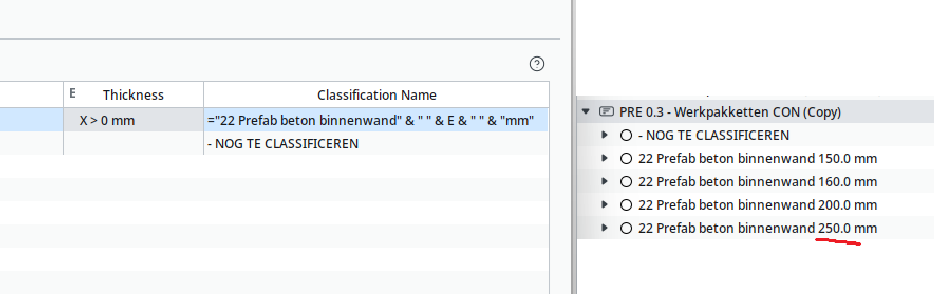
    I try to use the thickness of elements in a Formula, but it puts a decimal in the results. Is there a way to remove this decimal? I thought perhaps that the Units settings had something to do with it, but that does not seem the case.

    25e03739-96f2-428d-ae65-a88b4a6e9863-image.png

    1 Reply Last reply
    0
    • jakub.rusinJ Offline
      jakub.rusinJ Offline
      jakub.rusin Solibrians
      wrote last edited by jakub.rusin
      #2

      Hi @Ricardo

      Unit settings control display formatting in tables and reports, not how numbers appear when you concatenate them in a classification formula.

      To remove the decimal in the classification name, you could try to wrap the thickness reference in FIXED(E;0) or INT(E) in your formula.
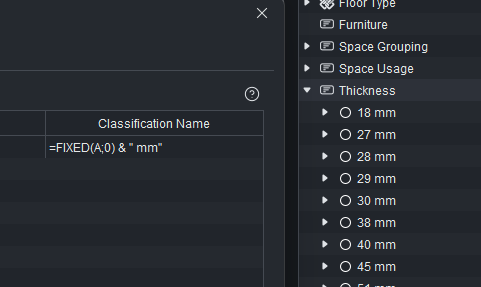
      33086ee2-afb0-45d3-856f-0813a10c6e48-image.png

      Hope that helps!

      RicardoR 1 Reply Last reply
      0
      • RicardoR Offline
        RicardoR Offline
        Ricardo
        replied to jakub.rusin last edited by
        #3

        @jakub-rusin That works great, thanks!

        1 Reply Last reply
        1
        • jakub.rusinJ jakub.rusin marked this topic as a question
        • jakub.rusinJ jakub.rusin has marked this topic as solved
        • jakub.rusinJ jakub.rusin unlocked this topic

        Copyright © 2025 Solibri Inc. | Powered by NodeBB

        • Login

        • Don't have an account? Register

        • Login or register to search.
        • First post
          Last post
        0
        • Categories