
Issues loose connection when updating model
-
Do you mean that the issue looses the components in the list and also the “triangle” as an error report?
I am experiencing this problem since the last update to 9.10.6.23. All of a sudden all my results loose components and the worst this is that solibri does not see it as a problem anymore, even though the problem is still there.
Which version are you running? -
Would you be able to to provide some more information?
-
Can you confirm if this happens ONLY starting from 9.10.6? For example, if you have an earlier version installed, would you be able to test with that?
-
Does this happen only when models are updated?
-
Could either of you be able to provide an example model for testing purposes? If so, please send me a direct message and I will provide an upload link.
Kind regards,
Toni on behalf of the Solibri team
-
-
Hi @tonigyllenberg
to answer you questions:- I would need to install an older version since I always run the newest one.
- Usually a model check can be performed when models are updated. Another scenario is when the local rule set is modified. Therefore I would assume that: yes, when models are updated.
- I will try…
Below I am also sending you a screenshot visualizing the problem. In my project I have documented (sol/234/1.2) discrepancies between an architectural opening and a proxy element. In the next model update, all issues using this SOL in this presentation lost their connections but the problems are still there.
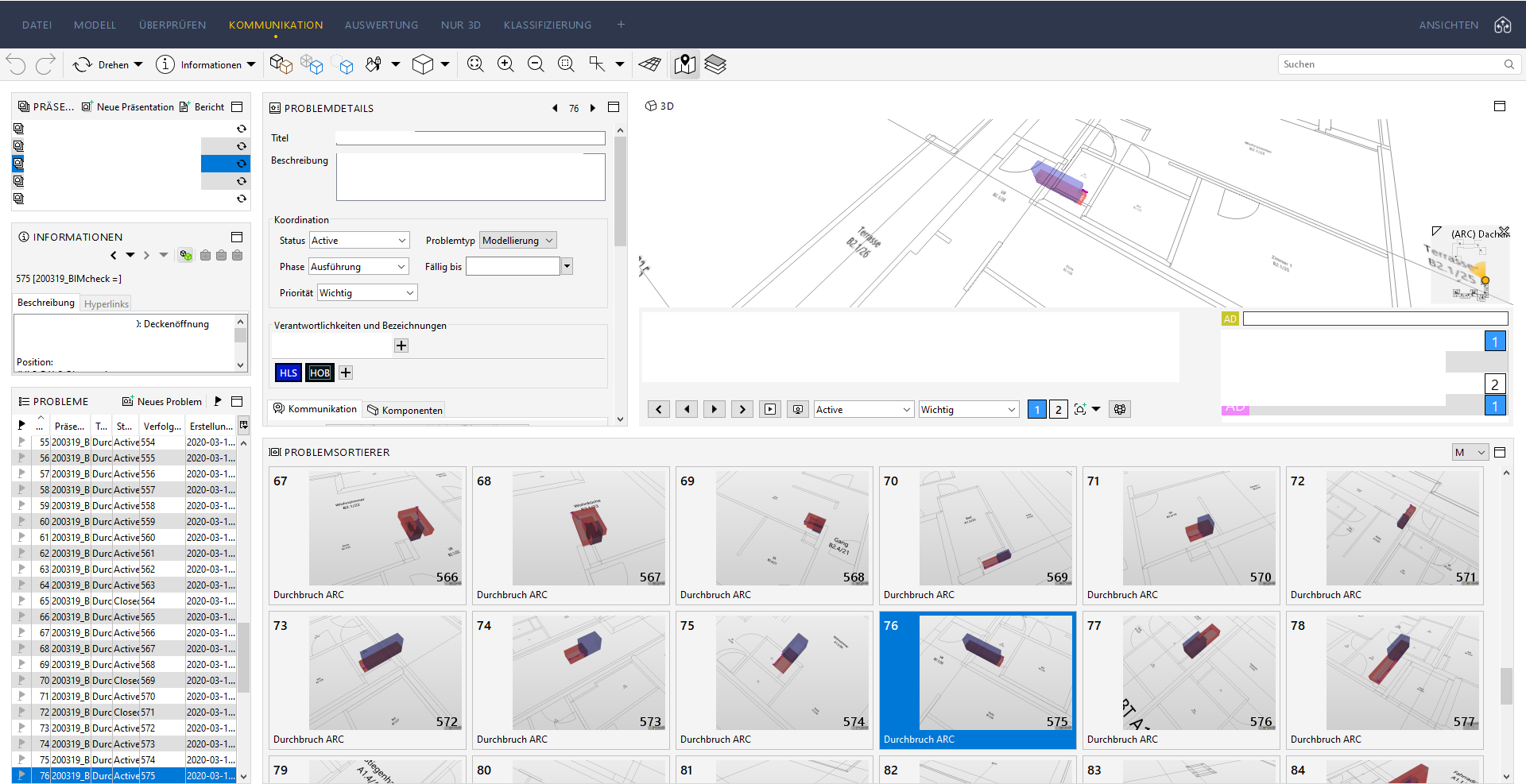
The strange phenomenon about this case is that somehow not all issues have been lost but some sort of filtering happened here. There are other SOLs in the check that might or might not have lost this connection. I am still trying to identify why and how.
I have another SMC file which I also consulted with my local solibri reseller ( @marchi ) and at that time we thought the problem was coming from the double GUIDs. All objects coming from the architect had the same IDs with the objects from the structural engineer (don’t ask why). Also in this file this strange filtering and breaking of issue connection to the problem is apparent. Therefore @marchi, it is not the case of the GUIDs

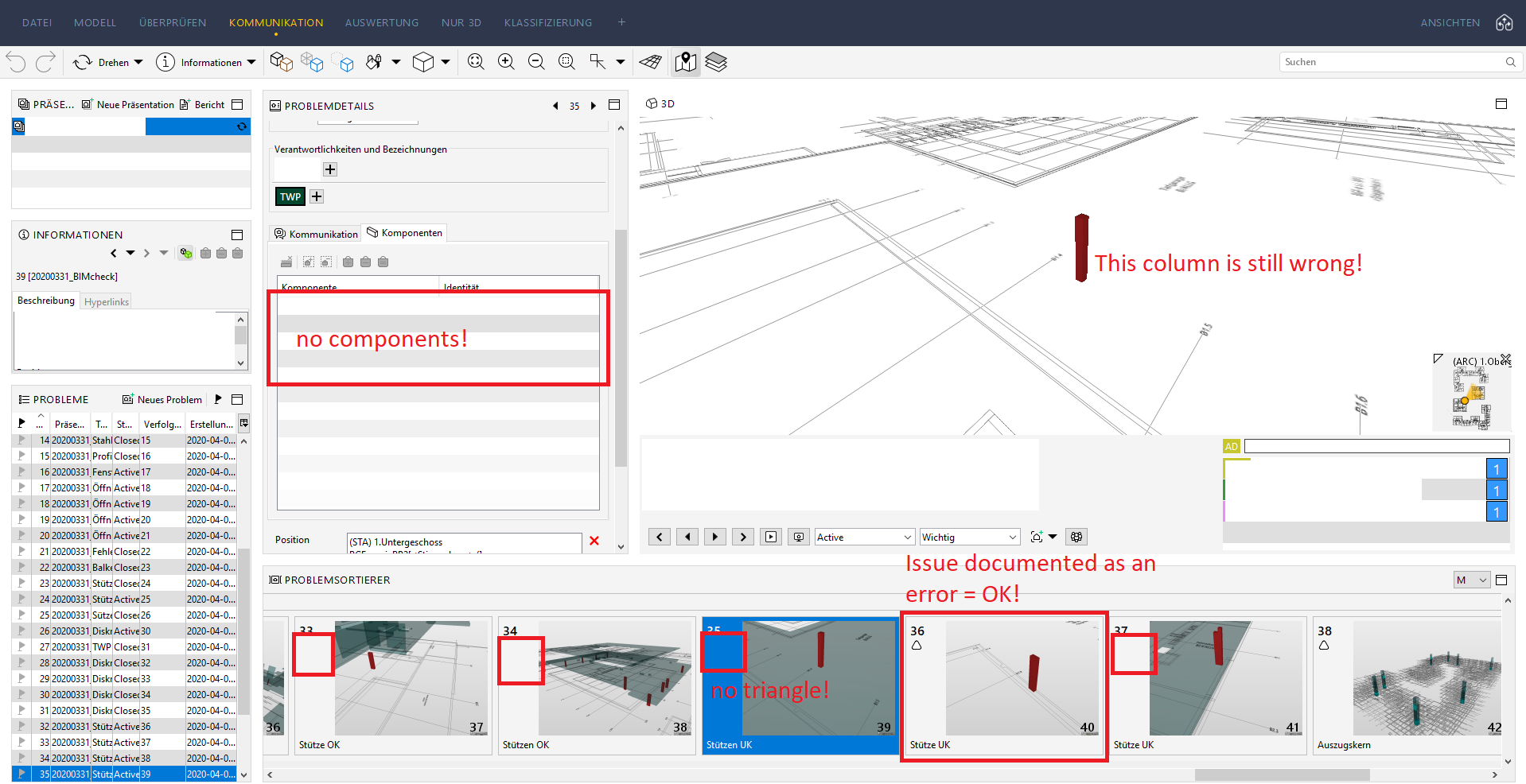
-
Hey @tonigyllenberg,
the whole team is updating instantly when a new version is out. So I would need an older version of Solibri to install and test.
Here is a screenshot of an example clash detection between to HVAC IFC-models. A pipe and a flowsegment are clashing. I created an issue and a presentation.
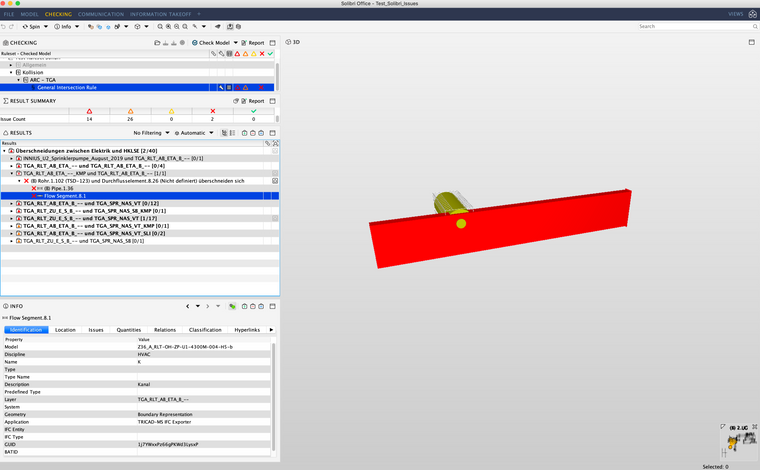
Now I updated one modell. The clash still exists but the issue is gone (no connection of the issue in the presentation to components and no triangle). The categorization of results changed completely. The component is now called “Duct” although the IFC entity is still IfcFlowSegment.
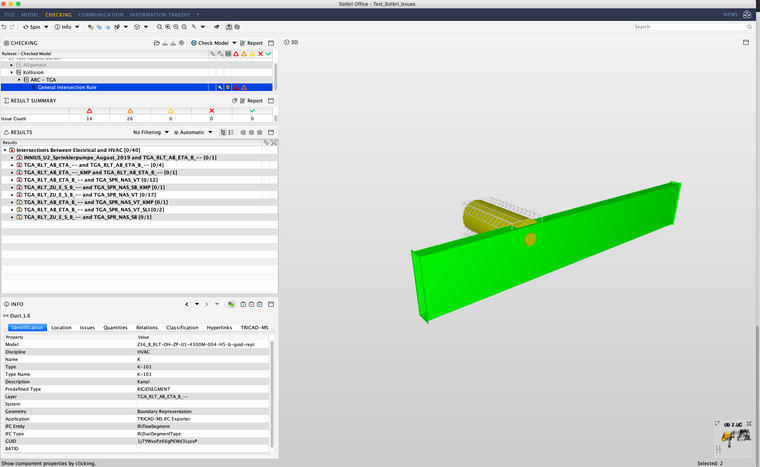
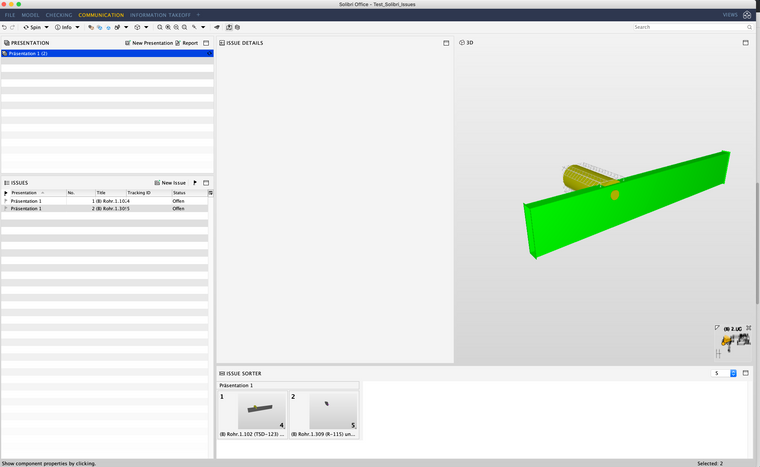
The difference between the component in the first an the same component in the second model is the Solibri name “Flow Segment” and “Duct”. The component got an additional IFCDUCTSEGMENTTYPE in the second IFC. The GUID is the same.
I guess the connection of issues to components and rules gets lost when the TypeClass (https://society.solibri.com/topic/96/visible-ifc-entity) or the IfcName of the component changes – because Solibri then changes the categorization of the results and the issue is gone.
-
If component type changes from Flow Segment to Duct or Column to Beam the results are lost in rechecking even the IFC Guid stays the same. This has been always the case in Solibri. Note: also this effects on many filters in rules, classifications and ITOs. The new component type might not be included in the existing filters. The results might change or be missing also due to this.
In IFC2x3 there is no IFCDUCT entity like there is in IFC4. The component type (e.g. Duct) is selected based on the IFCTYPE entity (e.g. IFCDUCTSEGMENTTYPE).
I believe that there is two possible cause for the problem that you encountered:
- The IFCDUCTSEGMENTTYPE is added the IFC file
- Solibri has been fixing issues in the IFC type import and in the earlier version the IFCDUCTSEGMENTTYPE was not imported correctly. Now the new version brings the type in and the component changes to Duct from IfcFlowSegment.
We will check if the results could be some how preserved in case of change in component type.
-
And now the you mention it @tonigyllenberg, sometimes issues are deleted from the presentation after synchronization, saving, closing and re-opening the smc-file.
That means the issues are synched to e.g. BIMcollab but can’t be found in the presentation in Solibri anymore. In the checking layout the issues are still there – but marked with the symbol that it hasn’t been added to a presentation yet:
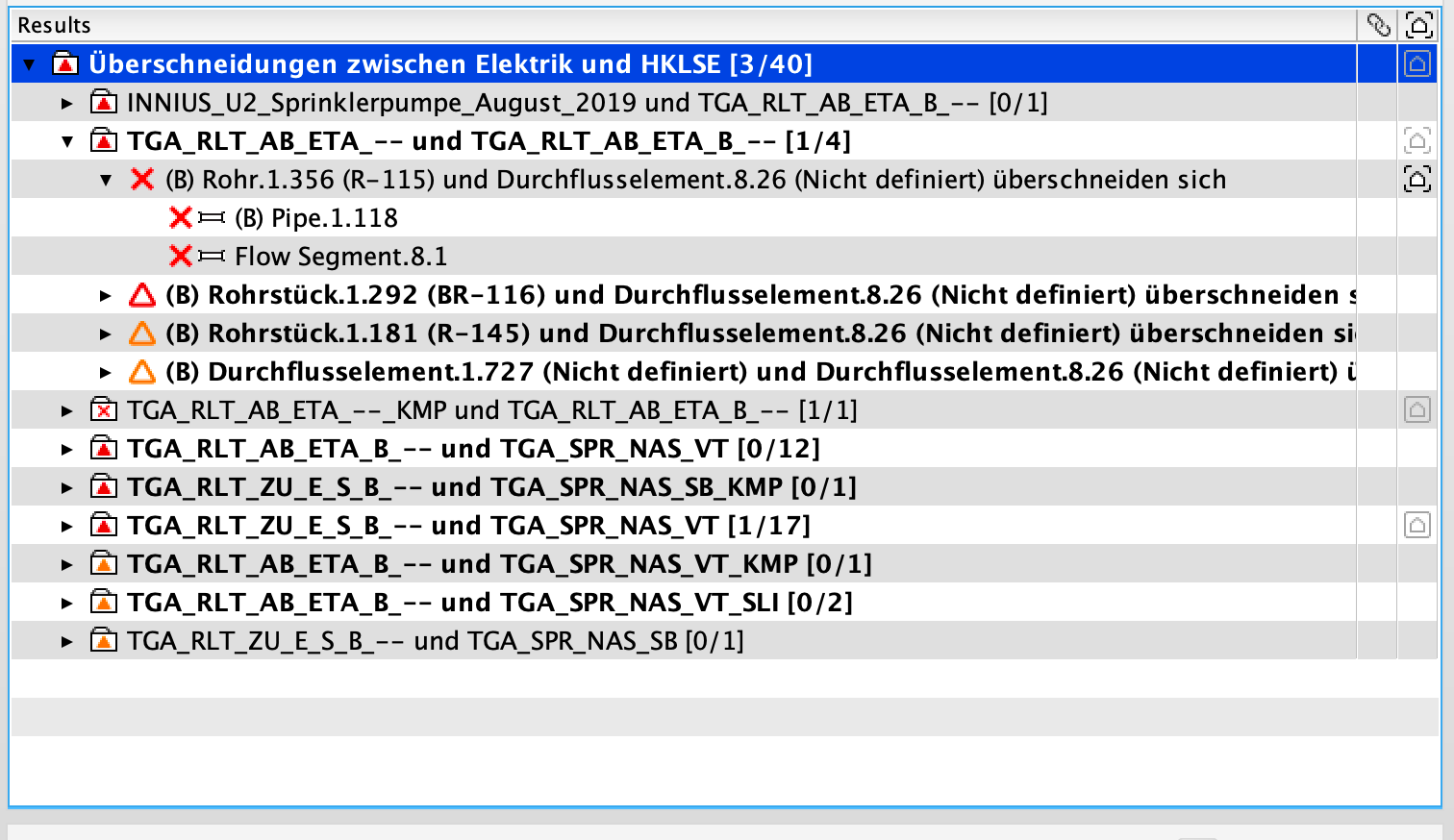
I can’t create this problem on purpose but will keep you updated when this happens again.
-
@Matti-Kannala said in Issues loose connection when updating model:
If component type changes from Flow Segment to Duct or Column to Beam the results are lost in rechecking even the IFC Guid stays the same. This has been always the case in Solibri. Note: also this effects on many filters in rules, classifications and ITOs. The new component type might not be included in the existing filters. The results might change or be missing also due to this.
In IFC2x3 there is no IFCDUCT entity like there is in IFC4. The component type (e.g. Duct) is selected based on the IFCTYPE entity (e.g. IFCDUCTSEGMENTTYPE).
I believe that there is two possible cause for the problem that you encountered:
- The IFCDUCTSEGMENTTYPE is added the IFC file
- Solibri has been fixing issues in the IFC type import and in the earlier version the IFCDUCTSEGMENTTYPE was not imported correctly. Now the new version brings the type in and the component changes to Duct from IfcFlowSegment.
We will check if the results could be some how preserved in case of change in component type.
Isn’t it a big difference whether a component is changed from column to beam – I understand that case – and additional type information to one component in the updated model? IfcFlowSegment still is an IfcFlowSegment, The type alone shouldn’t affect the issue management when the entity and GUID stay the same. And the IfcName shouldn’t affect the issues also.
Example:
In a bigger office project the architects re-named walls for better connection to the cost management. This went terribly wrong. Some walls lost the information in IfcName and got the value “LEER” (=empty). That affected different kinds of walls e.g. inner and outer, walls with and without insulation. So the categorization changed, summed up the walls with the name “LEER” in one file of the tree and all issues concerning these walls were lost. -
A bit offtopic, but a tip for anybody who wants to run older Solibri versions to test things out; enable Hyper-V on Windows. This allows you to install a virtual machine on your computer, where then an older version of Solibri can be installed. So this eliminates the need to remove existing Solibri installations,
https://docs.microsoft.com/nl-nl/virtualization/hyper-v-on-windows/quick-start/enable-hyper-v
-
Also in my opinion this fault happens for some reason with the loss of either the IFC Entity, IFC Type or even both. It clearly visible at @JMann screenshots, in the first one you see the IfcFlowSegment and on the second (updated model) there is no IFC Entity for the same element. In both cases GUID is the same.
I have tested also my models and came to the same conclusion. In my case the proxy element is an IfcBuildingElementProxy when I did the first check, respectively issue slide. In the next model update, the IFC Entity is missing, and also the Issue connectivity to those elements is gone.
-
Thank you for the additional information. We will discuss this internally to see if there is a way that results could somehow preserved in case the component type changes. And of course, if you have models which can be shared for testing and development, they are always welcome and much appreciated!
Kind regards,
Toni on behalf of the Solibri team
-
Thank you @tonigyllenberg!
-
-
Hello @JMann,
My apologies for the delay! The matter was discussed internally, and we have an issue created for implementation. The issue has currently not been selected for development, however we are planning on making improvements to checking features in the near future, and at the same time we will open the issue up again.
Kind regards,
Toni on behalf of the Solibri team
-
Thank you @tonigyllenberg for your reply! Can’t wait for the progress!
-
Hey @tonigyllenberg,
do you have an update on this topic? -
Hello @JMann,
Although the issue has been looked into before, it has not yet been selected for development. This issue falls under Checking improvements, which we have an extensive list of. Once we begin working more on checking related items, we will revisit this topic.
Kind regards,
Toni on behalf of the Solibri team
-
Hey @tonigyllenberg,
are there any updates on this issue? Thanks in advance! -
Hello @JMann,
Unfortunately we don’t have any updates on the topic yet. At the moment we are currently not working on checking improvements, and this item has not been selected for development.
Kind regards,
Toni on behalf of the Solibri team




Copyright © 2025 Solibri Inc. | Powered by NodeBB