
Shared resources and Sharepoint Online
-
Hi there,
I am interested in best practices about sharing company standards (roles, rulesets, ito’s etc.) with a Sharepoint Online and OneDrive setup.
We are using Sharepoint Online and Microsoft Teams to share our company standards and projects. Sharepoint Online and Teams folders are synced to each workstation using the OneDrive for Business sync client. The default OneDrive setup puts the OneDrive main folder inside a user’s personal folder. Because of that setup each users has a different path to shared files and folders. Solibri always needs, to the best of my knowledge, absolute paths to roles and shared resources. These absolute paths differ on each workstation making use of absolute paths with Solibri useless.
These are a few of the possible solutions we came up with and tested but didn’t work out.
- Using relative paths, would this even be possible somehow with the current version of Solibri?
- Mapping sharepoint online as a drive letter to a workstation, Solibri didn’t recognize the network drive.
- Using direct Sharepoint Online links with the Shared Resources file, Solibri seems unable to handle Sharepoint links.
So, does anybody have great suggestions about sharing our company standards?
Thanks in advance!
Machiel -
@Mvandenbrink Hi Machiel. Did you also consider creating Company Extensions?
We also use the process of sharing an up-t0-date folder on the Sharepoint or other platform a lot. At the start of the Project, Projectphase or Check, it’s wise/required to import the latest folder to the local drive and start your Solibri check. With this process, you’ll have to learn the colleagues a bit more background about how it works and why it’s important to import the latest company settings to start your project task. The result is that any mistakes in saving settings locally, won’t be shared with other colleagues (hufterproof in Dutch
 ). Any additional settings can be implemented in a next version of the company standards. It’s a way of working that requires a bit more focus at the BIM-Coordinator / BIM-Manager, but ensures a way of working with the latest Solibri settings or the choise to just stick to the older settings on a running project.
 -
Hi @RobinKramer ,
We’ve spoken with Kubus about company extensions but they require users to update their extension manually each time the company extension is updated with new content. We are aiming at a live experience. When we publish new ito,s classifications etc we would like them to be available to all users instantly.
With out current setup users copy a set of company standards to their local workstation. Next they will load the Solibri Role which gives a few errors mainly because the resource root path differs on each workstation. With every update of our Role this process needs to be repeated. Being able to use relative paths or are sharepoint location in the resource root path would already save a lot. Maybe one of the @Solibrians can shed some light on relative paths?Totally agree users need to understand when to use a new company standard or use the ones already available on the current project. It’s part of our company training but to make sure our company standards are “hufterproof” they are on a read-only location. Just to be save. Project specific changes of our standards are saved to the project folders.
-
Taking the reply from @Gerco as an occassion to to share some experience.
We are aiming at a live experience. When we publish new ito,s classifications etc we would like them to be available to all users instantly.
Being able to use relative paths or are sharepoint location in the resource root path would already save a lot. Maybe one of the @Solibrians can shed some light on relative paths?
Totally agree users need to understand when to use a new company standard or use the ones already available on the current project. It’s part of our company training but to make sure our company standards are “hufterproof” they are on a read-only location. Just to be save. Project specific changes of our standards are saved to the project folders.
This is basically the use case for most organisations I guess and from my experience a dedicated server location which is accessible for all but at the same only writteable for few works best - but it also requires the infrastructure and is less flexible.
Recently working with a shared OneDrive/Sharepoint location leaves behind some mixed feelings as syncing in the background to keep users up to date is somehow not always working as expected.
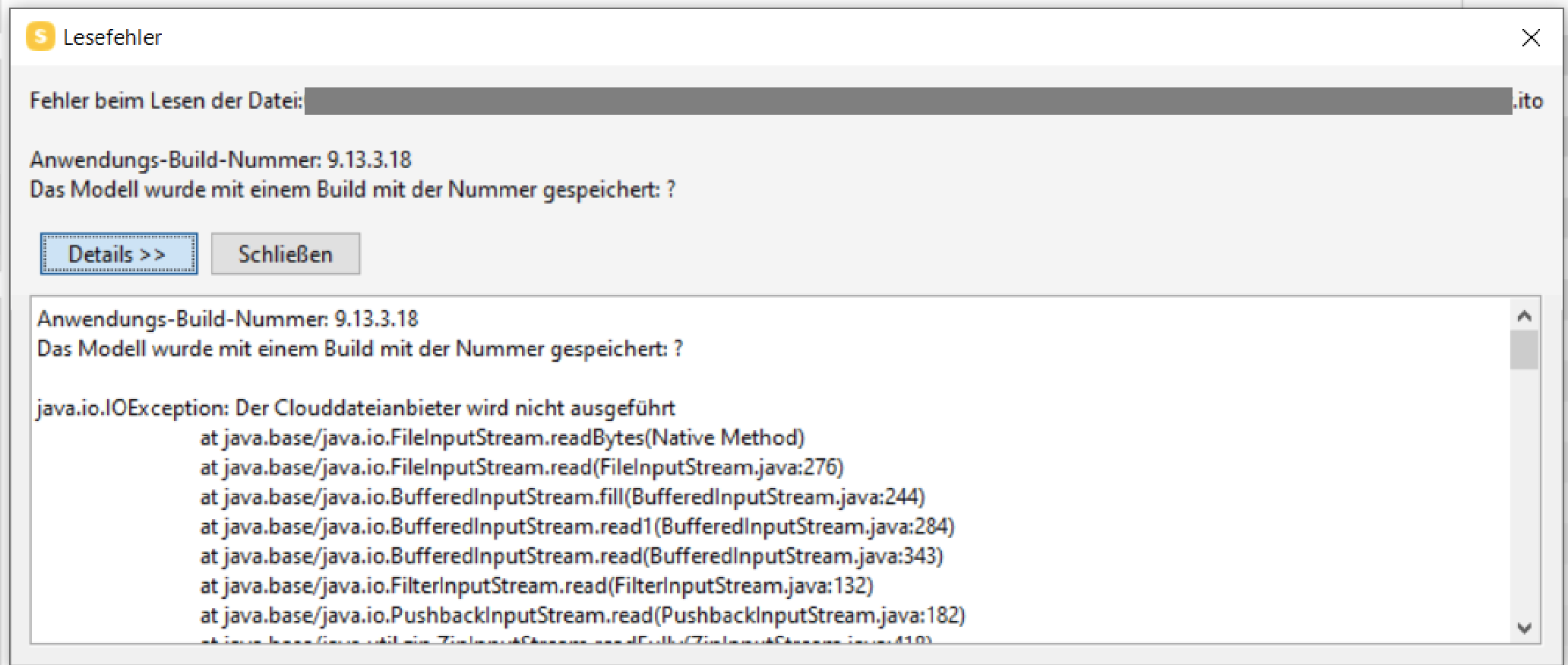
Actually if new files are getting deployed to the shared location and even sync settings for this location are set to “Keep always available” it seems like that this is causing issues as Solibri often throws the usual file reading error before all the ressources could be loaded.
Not sure why this is happening, but if it does it is pretty annyoing as then I have to either force close or dismiss tons of warnings to proceed.
And then there is the “hufterproof” point, which is something where a seperation of test, developement and productive environments for ressources gets more complicated as it should be causing the need for third party services to reduce time for administration.
So to sum it up, still have not found a best practice workflow which satisfies the needs and is easy at use at the same time but probably there are already better ways to achieve what’s needed but I just don’t know enough about deployment.
-
 J JSN referenced this topic on

Copyright © 2025 Solibri Inc. | Powered by NodeBB