
Model not showing through Model Tree, only through Classifications
-
Hi,
I have a problem with showing models through the model tree. Some models won’t show if I use the = or +.
If I classify the model, I can make it visible. So there are elements in the model and I can see them if I use = / + at the classifications.
Re-opening the project or Solibri makes no difference.I have had the problem several times now (not often, fortunately). Earlier in Solibri 9.10, now in 9.12 too.
The model I’m using right now and showing this problem, is made in Allplan en exported IFC 4x0. But I’ve had other models from Allplan or IFC 4x0, with no problems.Hope to hear if anyone else has this problem and knows why it’s happening!
-
Can you share a screenshot?
-
In the first screenshot, I select the modelcategorie ‘05 - Leistungsphase’ and then =. The first model shown in this modelcategory won’t show.
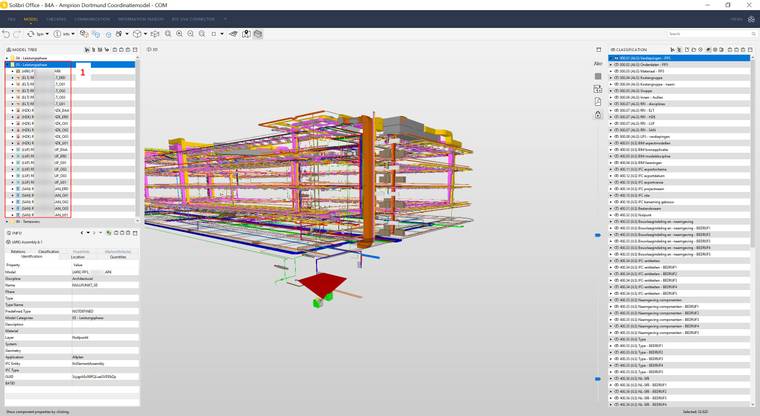
In the second screenshot, I add a random classification where the same model (the first in the modelcategory) is classificated and add it to the view.
In this way, I can see the model.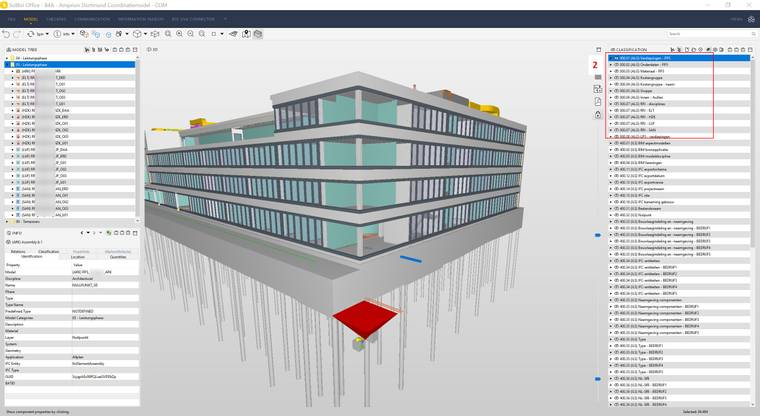
So summarizing: the model won’t show if I select it in the model tree. But it does show when I use a classification.
-
I am sorry… I have not experienced that before.
Does the model always show when you use “the big brown box” as we call it. (Show All)
Funny you have classifications in both Dutch and German…
-
Haha, it’s a German project but with our Dutch template.
The model does show when I use ‘show all’.
So there are ways to make it visibile. But in most of those cases, I see to much or to little, so I prefer showing the models through the model tree (modelcategories). -
@manongrobben Can you do the following:
- Start Solibri
- Open the model
- Select a couple of models in the model tree
- Press the = sign in the model tree
- zip the log folder in Solibri installation directory, e.g., “C:\Program Files\Solibri\SOLIBRI\9.12.0\log”
- Attach the log to your reply
-
@Pasi-Paasiala I attached the log folder.
@agroni unfortunately no. The model still won’t show If I use the model tree.
-
@manongrobben Unfortunately the log didn’t reveal anything. Would you be willing to share the file?
-
@manongrobben we have the same problem for a very small number of models. so it might be a solibri issue and not the IFC?
This IFC was made through HiCAD -
Just a guess… but maybe something to do with Assemblies? Solibri sometimes has difficulty showing models with lots of Assemblies…
-
@jeroenkoomen this was a model with 1 assembly. just a test model for one window

-
@manongrobben @Daan If you switch to Component Hierarchy in Model tree:

Do you see anything then?
If you do, and click on a component and see its Containment relation and that shows nothing, then the components are not contained in any storey.
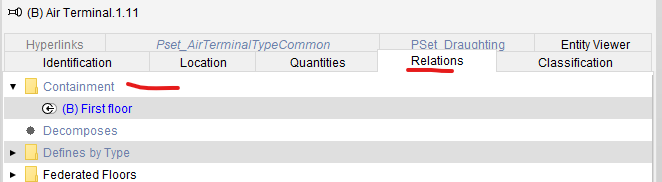
If that is the case, then most likely, the containment relation is not coming in IFC.
-
@Pasi-Paasiala The component hierarchy is not empty. And if I select a component, the containment relations does show the floor. So that’s not the problem, apparently. Not sure if I can share the file, cause it belongs to a client of ours.
@JeroenKoomen I do have a lot, and I mean a lot!, of assemblies in the IFC. But I had the problem with a smaller IFC too, with only a few assemblies. Everything in that model was in a assembly though. So maybe it has something to do with it.
-
@daan Would it be possible for you to share that simple model?


Copyright © 2025 Solibri Inc. | Powered by NodeBB