Skip to content
  • Categories
Collapse
Solibri Society Forum
  1. Home
  2. General Discussion
  3. Model not showing through Model Tree, only through Classifications

Model not showing through Model Tree, only through Classifications

Scheduled Pinned Locked Moved General Discussion
15 Posts 5 Posters 2.8k Views
  • Oldest to Newest
  • Newest to Oldest
  • Most Votes
Log in to reply
This topic has been deleted. Only users with topic management privileges can see it.
  • JeroenKoomenJ Offline
    JeroenKoomenJ Offline
    JeroenKoomen
    wrote on last edited by
    #2

    Can you share a screenshot?

    http://www.linkedin.com/in/koomenjeroen
    https://www.bimloket.nl/BIMbasisILS

    1 Reply Last reply
    0
    • M Offline
      M Offline
      manongrobben
      wrote on last edited by manongrobben
      #3

      In the first screenshot, I select the modelcategorie ‘05 - Leistungsphase’ and then =. The first model shown in this modelcategory won’t show.
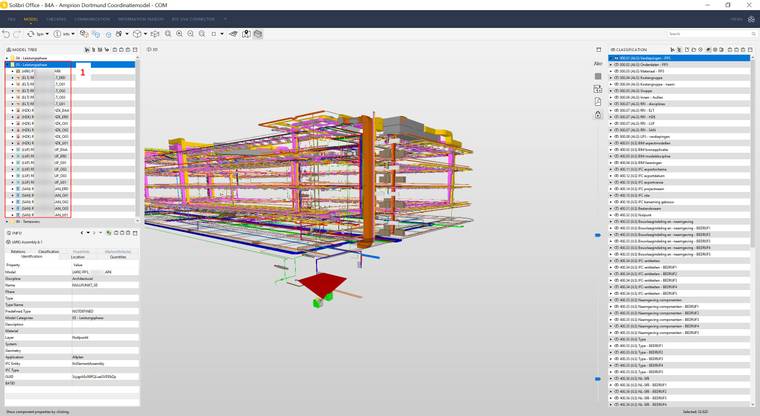
      Solibri society - 1.jpg

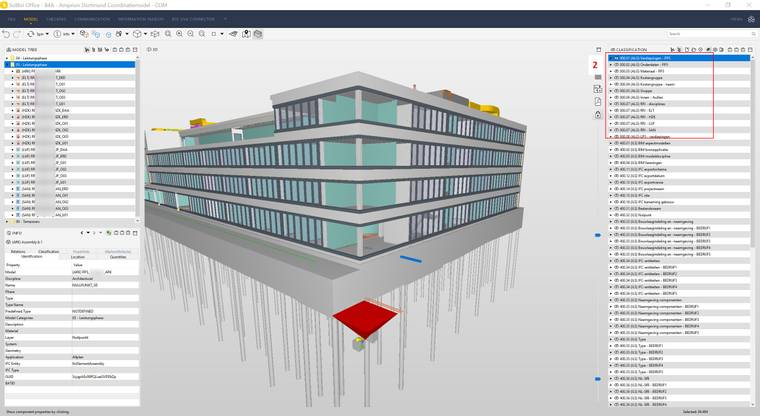
      In the second screenshot, I add a random classification where the same model (the first in the modelcategory) is classificated and add it to the view.
      In this way, I can see the model.
      Solibri society - 2.jpg

      So summarizing: the model won’t show if I select it in the model tree. But it does show when I use a classification.

      1 Reply Last reply
      0
      • JeroenKoomenJ Offline
        JeroenKoomenJ Offline
        JeroenKoomen
        wrote on last edited by
        #4

        I am sorry… I have not experienced that before.

        Does the model always show when you use “the big brown box” as we call it. (Show All)

        Funny you have classifications in both Dutch and German…

        http://www.linkedin.com/in/koomenjeroen
        https://www.bimloket.nl/BIMbasisILS

        1 Reply Last reply
        0
        • M Offline
          M Offline
          manongrobben
          wrote on last edited by
          #5

          Haha, it’s a German project but with our Dutch template.

          The model does show when I use ‘show all’.
          So there are ways to make it visibile. But in most of those cases, I see to much or to little, so I prefer showing the models through the model tree (modelcategories).

          D 1 Reply Last reply
          0
          • P Offline
            P Offline
            Pasi Paasiala Solibrians
            wrote on last edited by
            #6

            @manongrobben Can you do the following:

            1. Start Solibri
            2. Open the model
            3. Select a couple of models in the model tree
            4. Press the = sign in the model tree
            5. zip the log folder in Solibri installation directory, e.g., “C:\Program Files\Solibri\SOLIBRI\9.12.0\log”
            6. Attach the log to your reply
            1 Reply Last reply
            0
            • agroniA Offline
              agroniA Offline
              agroni
              wrote on last edited by
              #7

              … and if you open that IFC File in a separate Solibri instance, do you see the model without a problem?

              AllesWirdGut Architecture
              www.awg.at

              1 Reply Last reply
              0
              • M Offline
                M Offline
                manongrobben
                wrote on last edited by
                #8

                log.zip

                @Pasi-Paasiala I attached the log folder.

                @agroni unfortunately no. The model still won’t show If I use the model tree.

                1 Reply Last reply
                0
                • P Offline
                  P Offline
                  Pasi Paasiala Solibrians
                  wrote on last edited by
                  #9

                  @manongrobben Unfortunately the log didn’t reveal anything. Would you be willing to share the file?

                  1 Reply Last reply
                  0
                  • D Offline
                    D Offline
                    Daan
                    replied to manongrobben on last edited by
                    #10

                    @manongrobben we have the same problem for a very small number of models. so it might be a solibri issue and not the IFC?
                    This IFC was made through HiCAD

                    1 Reply Last reply
                    0
                    • JeroenKoomenJ Offline
                      JeroenKoomenJ Offline
                      JeroenKoomen
                      wrote on last edited by
                      #11

                      Just a guess… but maybe something to do with Assemblies? Solibri sometimes has difficulty showing models with lots of Assemblies…

                      http://www.linkedin.com/in/koomenjeroen
                      https://www.bimloket.nl/BIMbasisILS

                      D 1 Reply Last reply
                      0
                      • D Offline
                        D Offline
                        Daan
                        replied to JeroenKoomen on last edited by
                        #12

                        @jeroenkoomen this was a model with 1 assembly. just a test model for one window 🙂

                        P 1 Reply Last reply
                        0
                        • P Offline
                          P Offline
                          Pasi Paasiala Solibrians
                          wrote on last edited by
                          #13

                          @manongrobben @Daan If you switch to Component Hierarchy in Model tree:

                          50ffeb29-b396-4cba-a823-d3601d8c17ae-image.png

                          Do you see anything then?

                          If you do, and click on a component and see its Containment relation and that shows nothing, then the components are not contained in any storey.
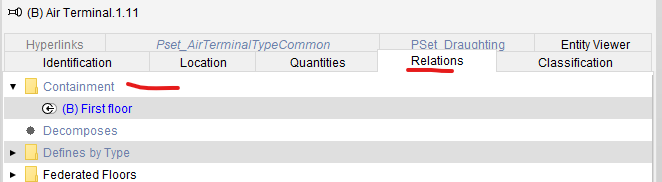
                          53c455e6-e5b0-4475-adea-82e81c57906e-image.png

                          If that is the case, then most likely, the containment relation is not coming in IFC.

                          1 Reply Last reply
                          0
                          • M Offline
                            M Offline
                            manongrobben
                            wrote on last edited by
                            #14

                            @Pasi-Paasiala The component hierarchy is not empty. And if I select a component, the containment relations does show the floor. So that’s not the problem, apparently. Not sure if I can share the file, cause it belongs to a client of ours.

                            @JeroenKoomen I do have a lot, and I mean a lot!, of assemblies in the IFC. But I had the problem with a smaller IFC too, with only a few assemblies. Everything in that model was in a assembly though. So maybe it has something to do with it.

                            1 Reply Last reply
                            0
                            • P Offline
                              P Offline
                              Pasi Paasiala Solibrians
                              replied to Daan on last edited by
                              #15

                              @daan Would it be possible for you to share that simple model?

                              1 Reply Last reply
                              0

                              Copyright © 2025 Solibri Inc. | Powered by NodeBB

                              • Login

                              • Don't have an account? Register

                              • Login or register to search.
                              • First post
                                Last post
                              0
                              • Categories
