
Model not showing through Model Tree, only through Classifications
-
@manongrobben Can you do the following:
- Start Solibri
- Open the model
- Select a couple of models in the model tree
- Press the = sign in the model tree
- zip the log folder in Solibri installation directory, e.g., “C:\Program Files\Solibri\SOLIBRI\9.12.0\log”
- Attach the log to your reply
-
@Pasi-Paasiala I attached the log folder.
@agroni unfortunately no. The model still won’t show If I use the model tree.
-
@manongrobben Unfortunately the log didn’t reveal anything. Would you be willing to share the file?
-
@manongrobben we have the same problem for a very small number of models. so it might be a solibri issue and not the IFC?
This IFC was made through HiCAD -
Just a guess… but maybe something to do with Assemblies? Solibri sometimes has difficulty showing models with lots of Assemblies…
-
@jeroenkoomen this was a model with 1 assembly. just a test model for one window

-
@manongrobben @Daan If you switch to Component Hierarchy in Model tree:

Do you see anything then?
If you do, and click on a component and see its Containment relation and that shows nothing, then the components are not contained in any storey.
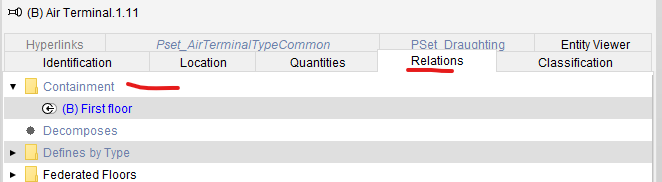
If that is the case, then most likely, the containment relation is not coming in IFC.
-
@Pasi-Paasiala The component hierarchy is not empty. And if I select a component, the containment relations does show the floor. So that’s not the problem, apparently. Not sure if I can share the file, cause it belongs to a client of ours.
@JeroenKoomen I do have a lot, and I mean a lot!, of assemblies in the IFC. But I had the problem with a smaller IFC too, with only a few assemblies. Everything in that model was in a assembly though. So maybe it has something to do with it.
-
@daan Would it be possible for you to share that simple model?


Copyright © 2025 Solibri Inc. | Powered by NodeBB