Skip to content
  • Categories
Collapse
Solibri Society Forum
  1. Home
  2. General Discussion
  3. ITOs and Autorun

ITOs and Autorun

Scheduled Pinned Locked Moved Solved General Discussion
18 Posts 5 Posters 3.2k Views
  • Oldest to Newest
  • Newest to Oldest
  • Most Votes
Log in to reply
This topic has been deleted. Only users with topic management privileges can see it.
  • MattiM Offline
    MattiM Offline
    Matti Solibrians
    replied to IFC GHOST on last edited by Matti
    #7

    @ifc-ghost

    Only 9.12.8 onwards.

    There are also some other autorun improvements:

    Fix BCF 2.1 autorun reporting

    • Example: <bcfreport file="C:\SolibriAutorun\reports\SolibriBuilding_BCFReport.bcf" version="2.1"/>

    Setting model categories

    <openmodel file="C:\Users\Public\Solibri\SOLIBRI\Samples\ifc\Solibri Building.ifc">
    <category>CAT_NAME1</category>
    <category>CAT_NAME2</category>
    </openmodel>
    

    updatemodel

    • Updates a specific IFC file included in the SMC model with a new IFC file.

    • Parameters:

      • file: Specify the file and the path to the file to be updated. The file must be included in the SMC model opened by the openmodel task.
    • Optional parameters:

      • with: Specify the path to the new version of the file.

      • autoupdate: When true, model is updated only when the IFC file is newer than the previously imported version. When false, the model is updated unconditionally.

    • Example: <updatemodel file="C:\Users\Public\Solibri\SOLIBRI\Samples\ifc\SMC Building.ifc" autoupdate="true"/>

    autoupdatemodels

    <autoupdatemodels/>

    • Updates all imported models that have a newer version on the disk.
    1 Reply Last reply
    1
    • I Offline
      I Offline
      IFC GHOST
      wrote on last edited by
      #8

      @Matti-Kannala
      This is just amazing, thank you for these improvements.

      1 Reply Last reply
      4
      • B Offline
        B Offline
        BIMGOAT
        wrote on last edited by
        #9

        Has anybody tried Excel Template Report, it’s not working for me. It crashes.

        MattiM 1 Reply Last reply
        0
        • MattiM Offline
          MattiM Offline
          Matti Solibrians
          replied to BIMGOAT on last edited by
          #10

          @bimgoat

          Could you check the log files. There is also separate autorun.log.

          Check the paths.

          You also try this one:

          <?xml version="1.0" encoding="ISO-8859-1"?>
          <batch name="Simple Batch" default="root">
          <!-- This is the starting task -->
          <target name="root">
          
          <openmodel file="C:\Users\Public\Solibri\SOLIBRI\Samples\ifc\Solibri Building.ifc" />
          
          <openito file="C:\Users\Public\Solibri\SOLIBRI\Information Takeoff\Spaces.ito" />
          <takeoff name="Spaces" />
          <itoreport name="Spaces" file="C:\Users\Public\Solibri\SOLIBRI\Samples\Spaces Simple.xlsx" />
          <itoreport name="Spaces" file="C:\Users\Public\Solibri\SOLIBRI\Samples\Spaces with Template.xlsx" reportTitle="Report" templatefile="C:\Users\Public\Solibri\SOLIBRI\Information Takeoff\Templates\Spaces.xlsx" />
          
          <exit />
          </target>
          </batch>
          
          B 1 Reply Last reply
          0
          • MattiM Offline
            MattiM Offline
            Matti Solibrians
            wrote on last edited by
            #11

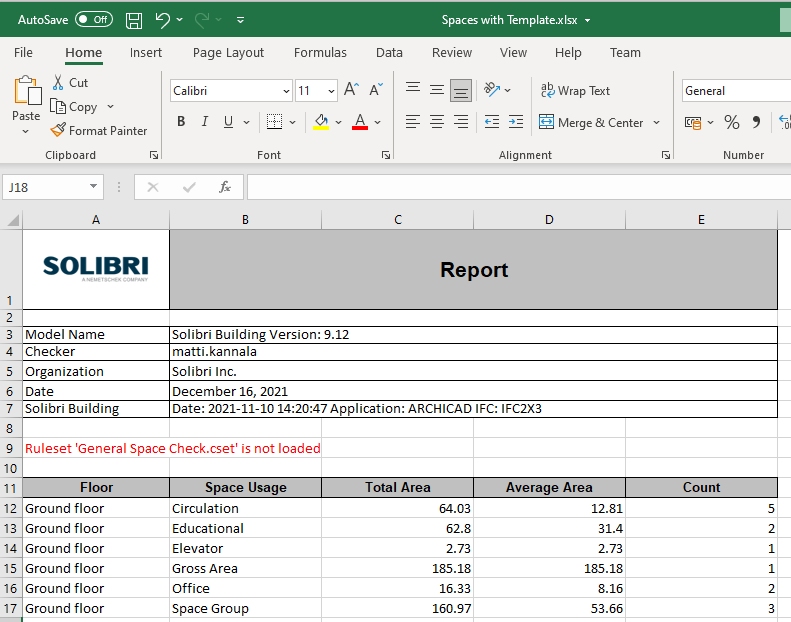
            As result of previous autorun you will get:
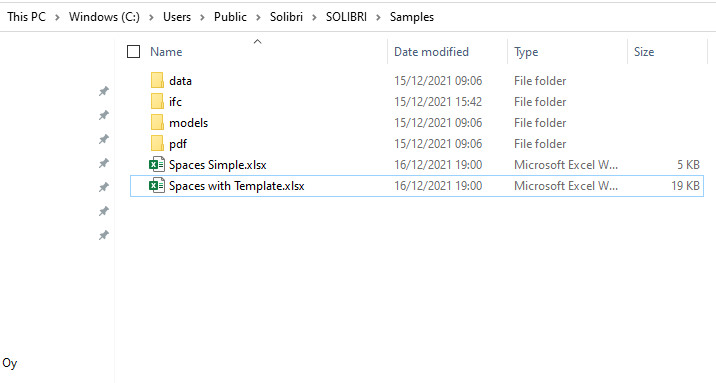
            0c6111c4-9040-42fa-a6de-eb5ed118b96b-image.png

            b3a7b34b-515d-4493-a361-0900f97bd11c-image.png

            1 Reply Last reply
            0
            • MattiM Offline
              MattiM Offline
              Matti Solibrians
              wrote on last edited by
              #12

              Solibri 9.12.8 Developer Platform documentation is published.
              It includes the new autorun features.
              https://solibri.github.io/Developer-Platform/

              1 Reply Last reply
              0
              • B Offline
                B Offline
                BIMGOAT
                wrote on last edited by BIMGOAT
                #13

                @matti-kannala

                I use a custom made template that works perfectly when using it in Solibri, to generate the report from template.

                I’ll try the example you’re suggesting but there’s an error at the moment when starting Solibri Office.

                This is from the autorun log file when it crashes on the last task that’s the ito template report.

                
                2021-12-16 17:00:40.800+0100 ERROR c.s.s.p.b.actions.BatchAction - Failed while running BatchRun
                java.lang.NullPointerException: Cannot invoke "com.solibri.resource.Resource.getString()" because the return value of "com.solibri.saf.core.resource.RecentResource.getResource()" is null
                	at com.solibri.saf.core.resource.RecentResource.c(Unknown Source)
                	at com.solibri.saf.core.resource.RecentResource.a(Unknown Source)
                	at com.solibri.saf.core.resource.RecentResource.addRecentResources(Unknown Source)
                	at com.solibri.saf.core.resource.RecentResource.addRecentResources(Unknown Source)
                	at com.solibri.saf.core.resource.RecentResource.addRecentResources(Unknown Source)
                	at com.solibri.saf.plugins.batchplugin.tasks.ReportItoTask.a(Unknown Source)
                	at com.solibri.saf.plugins.batchplugin.tasks.ReportItoTask.b(Unknown Source)
                	at com.solibri.saf.plugins.batchplugin.tasks.ReportItoTask.b(Unknown Source)
                	at com.solibri.saf.plugins.batchplugin.tasks.ReportItoTask.a(Unknown Source)
                	at com.solibri.saf.plugins.batchplugin.tasks.ReportItoTask.run(Unknown Source)
                	at com.solibri.saf.plugins.batchplugin.BatchTarget.run(Unknown Source)
                	at com.solibri.saf.plugins.batchplugin.BatchRun.runTarget(Unknown Source)
                	at com.solibri.saf.plugins.batchplugin.BatchRun.run(Unknown Source)
                	at com.solibri.saf.plugins.batchplugin.actions.BatchAction.runBatch(Unknown Source)
                	at com.solibri.modelchecker.core.ModelChecker.a(Unknown Source)
                	at java.base/java.lang.Thread.run(Thread.java:831)
                
                
                1 Reply Last reply
                0
                • B Offline
                  B Offline
                  BIMGOAT
                  wrote on last edited by
                  #14

                  Is it required to have an ITO in the SMC file with the exact same content as the report template?
                  When using the report template in Solibri this is not a requirement, put perhaps using Autorun it is required?

                  1 Reply Last reply
                  0
                  • B Offline
                    B Offline
                    BIM1337
                    replied to Matti on last edited by BIM1337
                    #15

                    @matti-kannala said in ITOs and Autorun:

                    @bimgoat

                    Could you check the log files. There is also separate autorun.log.

                    Check the paths.

                    You also try this one:

                    <?xml version="1.0" encoding="ISO-8859-1"?>
                    <batch name="Simple Batch" default="root">
                    <!-- This is the starting task -->
                    <target name="root">
                    
                    <openmodel file="C:\Users\Public\Solibri\SOLIBRI\Samples\ifc\Solibri Building.ifc" />
                    
                    <openito file="C:\Users\Public\Solibri\SOLIBRI\Information Takeoff\Spaces.ito" />
                    <takeoff name="Spaces" />
                    <itoreport name="Spaces" file="C:\Users\Public\Solibri\SOLIBRI\Samples\Spaces Simple.xlsx" />
                    <itoreport name="Spaces" file="C:\Users\Public\Solibri\SOLIBRI\Samples\Spaces with Template.xlsx" reportTitle="Report" templatefile="C:\Users\Public\Solibri\SOLIBRI\Information Takeoff\Templates\Spaces.xlsx" />
                    
                    <exit />
                    </target>
                    </batch>
                    

                    Same for me, the one you suggest to try works great.

                    Yet I get the same error when using a template that we use to extract model timestamps.

                    00203236-6b88-477e-98f6-f26a5db3a168-image.png

                    This is the content of the template, works when reporting ito in Solibri, with Autorun it crashes.

                    1 Reply Last reply
                    0
                    • B Offline
                      B Offline
                      BIM1337
                      wrote on last edited by
                      #16

                      It works for me now after adding this line:

                      <openito file="C:\Users\Public\Solibri\SOLIBRI\Information Takeoff\Modellist.ito" />
                      <takeoff name="Modellist" />
                      

                      No more crash!

                      MattiM 2 Replies Last reply
                      0
                      • MattiM Offline
                        MattiM Offline
                        Matti Solibrians
                        replied to BIM1337 on last edited by
                        #17

                        @bim1337

                        There is a problem with ITO template reports that happens with some .ito files.

                        There is a workaround for the problem:

                        1. Open the ITO
                        2. Report once with any template
                        3. Save ITO

                        This will be fixed to next release.

                        1 Reply Last reply
                        0
                        • MattiM Offline
                          MattiM Offline
                          Matti Solibrians
                          replied to BIM1337 on last edited by
                          #18

                          @bim1337

                          Solibri 9.12.8.33 (hotfix for 9.12.8.29) released yesterday.
                          It contains fix for Autorun ITO Template Report issue.

                          1 Reply Last reply
                          1
                          • MattiM Matti marked this topic as a question on
                          • MattiM Matti has marked this topic as solved on

                          Copyright © 2025 Solibri Inc. | Powered by NodeBB

                          • Login

                          • Don't have an account? Register

                          • Login or register to search.
                          • First post
                            Last post
                          0
                          • Categories