
Rule Report Order
-
Maybe this was already mentioned, but I could not find it…
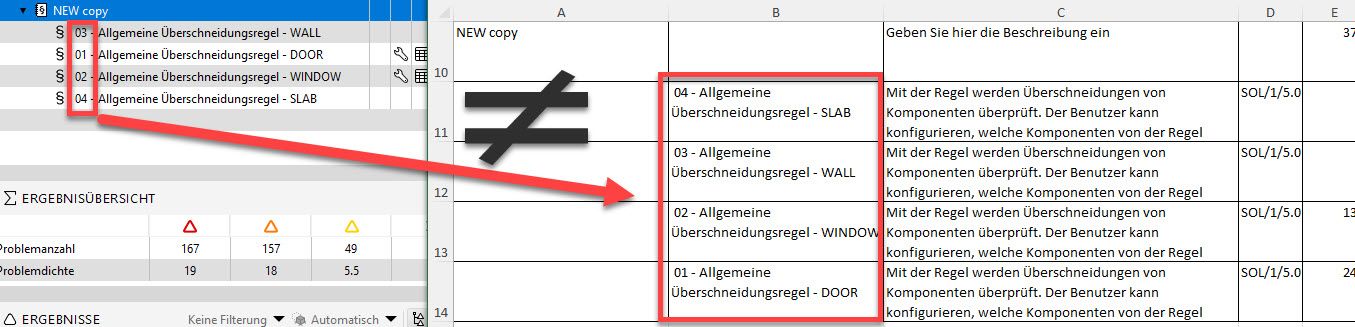
While I tried to export the reports from the rulesets, I have seen that the order of the rules do not match the rules in the report. Of course, we can reorder the report in Excel or connect the cells with the values, but that should not be necessary.
While testing this, I have noticed that the rule order/structure or rule name (alphabetical or numerical) do not influence the position in the report, but the report is based solely on the fact when this particular rule has been added to the ruleset.
this means that once the ruleset is completed or structured, you must reorder the ruleset in a new one, before saving it. Reordering the ruleset and coping it does not work

or am I missing something?
here is the problem:
-
@marchi said in Rule Report Order:
Maybe this was already mentioned, but I could not find it…
You will probably finde some more information about the “logic” of the sort order in those topics.
https://society.solibri.com/topic/1309/result-summary-excel-report-and-the-lost-gatekeeper-rules/2
https://society.solibri.com/topic/674/output-in-report-of-result-summary/9tl;dr: I guess there is none but try to select all of your rules when exporting.
-
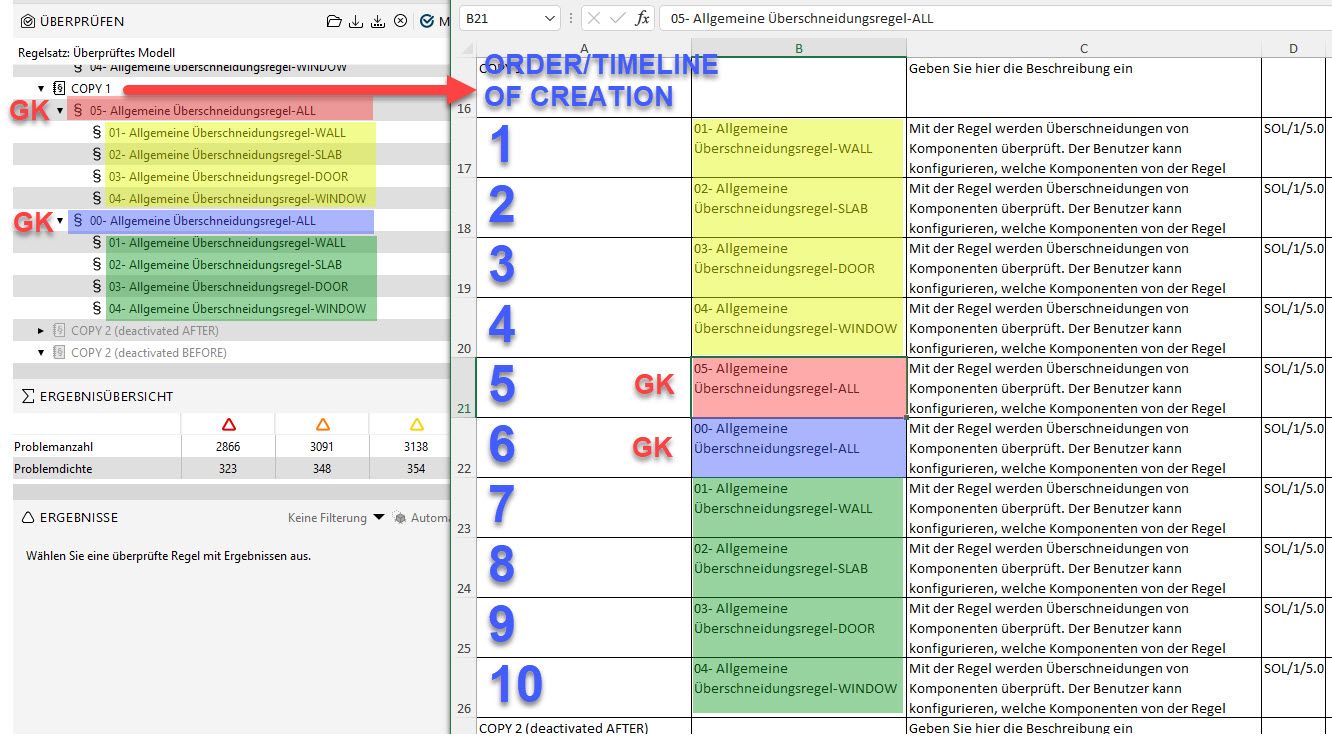
it is, as mentioned, affected by the Timestamp when this rule was added. I tried to run the test with an activated/deactivated gatekeeper, but the results are always the same.
If the Gatekeeper has been added after the creation of the other rules, it will appear later in the list.
The only way around would be to add another ruleset and copy the rules ONE by ONE! in the exact order as you would like them in your report.
-
That’s a good observation and visualisation you made there. I guess the key learnings for improvements are
- rule order should be reflected as visible in Solibri (not sorted by the creation date=
- deactivated rules should be able to be identiefied somehow - or there should be a setting to decide if they should be exported at all
- better identification of gatekeepers - this is something I do manually at the moment by giving a hint in the description - which kinda works, I think they should stay within the same hierachy level as the rules, also because I figured out that this way a stepped “folder” logic can be better read by machine and therefore processed better, but this however requires manual hints within the gatekeepers - this should at least be improved
-
 J JSN referenced this topic on
-
What’s the status here?
Just got confused again as the export sort order is simply neglecting everything else than the invisible creation date. This is rather painful to fix when harvesting the information at the moment … copy/paste is the only solution working so far, but not really an option in productive environments where deleting active rules with results is the last thing we want.
-
I don’t have any updates regarding a fix for version 9.x as it is still under investigation.
I ran a test using v10 alpha 2 as I suspected the issue could go away with the new .csetx file format, which is plain text.
Using the alpha of version 10, I opened a v9.12 .cset that had the sort order issue, and it still had the sorting issue in that session with that cset. However after I resaved the .cset as a csetx, and reopened that ruleset, the result summary exported the ordering correctly.
I see that you are part of the alpha testing of v10, so please give this a try and let me know what you find. I’ll update this thread if there is any updates in the meantime.
-
@john-lipp said in Rule Report Order:
Using the alpha of version 10, I opened a v9.12 .cset that had the sort order issue, and it still had the sorting issue in that session with that cset. However after I resaved the .cset as a csetx, and reopened that ruleset, the result summary exported the ordering correctly.
Thx for elaborating this - I will keep that in mind in the meantime!
-
hi,
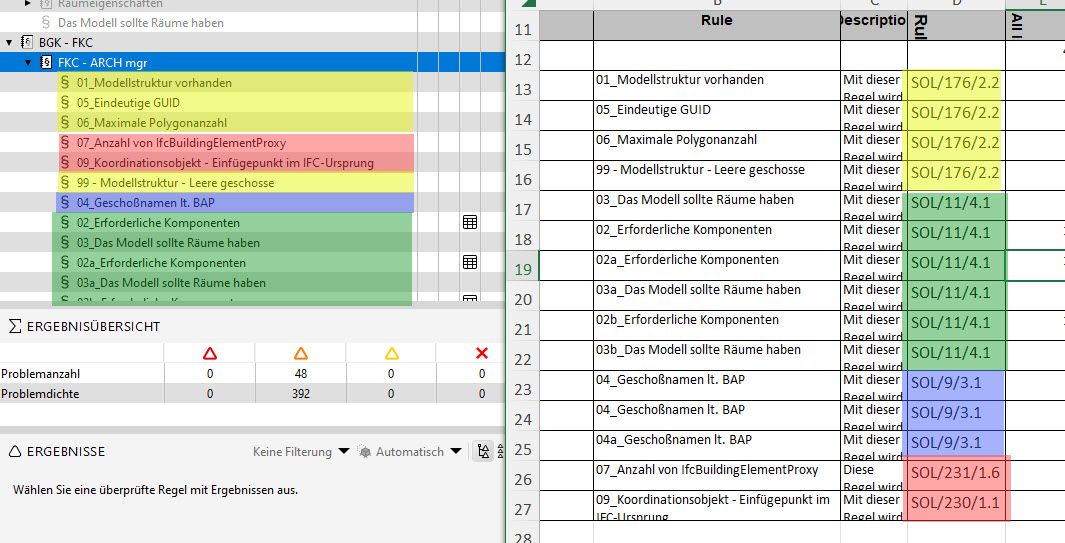
I haven´t had the chance to test the “*.csetx”, but this issue reoccured and here are some of further findings on this topic:- the primary property for sorting is the Rule Nr. and when it was created - in my file it was #176, #11, #9, #231, #230
- the secondary property is the creation within the range of Rule Nr. - this can be partially influenced/rearranged by dragging the rule outside the ruleset and then moving it again inside
here is a picture from the export, where the rules are arranged by rule nr and then chronological:
-
We’ve reported this as an issue. You’ll get updates when this is fixed.
-
 M Matti marked this topic as a question on
-
M Matti has marked this topic as solved on
-
This is fixed in Solibri 9.13.2.


Copyright © 2025 Solibri Inc. | Powered by NodeBB