
Sync problems to Bimsync - unknown symbol for Sync Status
-
Dear Solibrians,
When trying to syncronize validated issues to Bimsync, some issues – apparently the ones where I added new viewpoints – won’t syncronize and an atypical Sync Status symbol appears.
Does anyone know what that means? What might have been the problem?
Thank you.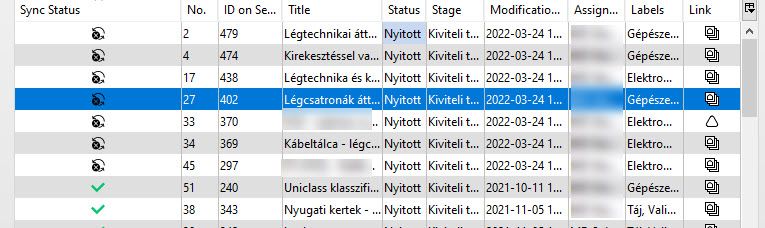
-
@avarkeszi have a look at the following topic:
-
Thank you @Ricardo for the link. However, I’m afraid, that topic refers to a different problem. I simply added new viewpoints to the issues in question, and didn’t even try to update the components, or update any older viewpoints. It is part of our workflow to add new viewpoints to existing issues, and usually we are having no such sync problems with them. That’s why I wonder now what this black symbol for the Sync Status means.
-
Hi @avarkeszi, please send this query along with your workflow video and the model to [email protected], for further investigation.
BR,
Anil -
Did you only add a new vieuwpoint?
BIM collab don’t take it very good wel you only add only een new vieuwpoiunt at a exsiting issue.This you can solve by put a text by the new vieuwpoint.
I hope this solve your problem
-
Hello @Harmen-Jorritsma, thank you for the comment. The communication platfrom is Bimsync in this case. With Bimcollab it works (if one gives a comment to the viewpoont, as you described). We’ve contacted Solibri support, hope to hear from them soon.



Copyright © 2025 Solibri Inc. | Powered by NodeBB