Skip to content
  • Categories
Collapse
Solibri Society Forum
  1. Home
  2. General Discussion
  3. Sync problems to Bimsync - unknown symbol for Sync Status

Sync problems to Bimsync - unknown symbol for Sync Status

Scheduled Pinned Locked Moved General Discussion
6 Posts 4 Posters 1.1k Views
  • Oldest to Newest
  • Newest to Oldest
  • Most Votes
Log in to reply
This topic has been deleted. Only users with topic management privileges can see it.
  • A Offline
    A Offline
    avarkeszi
    wrote on last edited by avarkeszi
    #1

    Dear Solibrians,

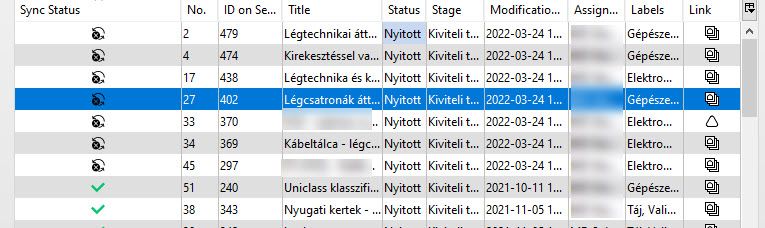
    When trying to syncronize validated issues to Bimsync, some issues – apparently the ones where I added new viewpoints – won’t syncronize and an atypical Sync Status symbol appears.
    Does anyone know what that means? What might have been the problem?
    Thank you.
    jfp_sync_para_societyre.jpg

    RicardoR 1 Reply Last reply
    1
    • RicardoR Offline
      RicardoR Offline
      Ricardo
      replied to avarkeszi on last edited by
      #2

      @avarkeszi have a look at the following topic:

      https://society.solibri.com/topic/1644/can-t-add-components-to-issue-after-it-has-synchronized-build-9-12-7-24/7

      1 Reply Last reply
      0
      • A Offline
        A Offline
        avarkeszi
        wrote on last edited by
        #3

        Thank you @Ricardo for the link. However, I’m afraid, that topic refers to a different problem. I simply added new viewpoints to the issues in question, and didn’t even try to update the components, or update any older viewpoints. It is part of our workflow to add new viewpoints to existing issues, and usually we are having no such sync problems with them. That’s why I wonder now what this black symbol for the Sync Status means.

        1 Reply Last reply
        0
        • AnilA Offline
          AnilA Offline
          Anil Solibrians
          wrote on last edited by
          #4

          Hi @avarkeszi, please send this query along with your workflow video and the model to [email protected], for further investigation.

          BR,
          Anil

          1 Reply Last reply
          0
          • Harmen JorritsmaH Offline
            Harmen JorritsmaH Offline
            Harmen Jorritsma
            wrote on last edited by
            #5

            Did you only add a new vieuwpoint?
            BIM collab don’t take it very good wel you only add only een new vieuwpoiunt at a exsiting issue.

            This you can solve by put a text by the new vieuwpoint.

            I hope this solve your problem

            Met vriendelijke groet,
            Harmen Jorritsma

            BIM regisseur Van Wijnen Amsterdam
            Diemerhof 32 | 1112 XN Diemen | KvK 32129744

            020 -36 44 000 | 06-83 15 66 88 | LinkedIn | www.vanwijnen.nl
            Volg ons op Facebook en Twitter

            A 1 Reply Last reply
            0
            • A Offline
              A Offline
              avarkeszi
              replied to Harmen Jorritsma on last edited by avarkeszi
              #6

              Hello @Harmen-Jorritsma, thank you for the comment. The communication platfrom is Bimsync in this case. With Bimcollab it works (if one gives a comment to the viewpoont, as you described). We’ve contacted Solibri support, hope to hear from them soon.


              1 Reply Last reply
              0

              Copyright © 2025 Solibri Inc. | Powered by NodeBB

              • Login

              • Don't have an account? Register

              • Login or register to search.
              • First post
                Last post
              0
              • Categories
