
Solibri Shutting Down with no reason
-
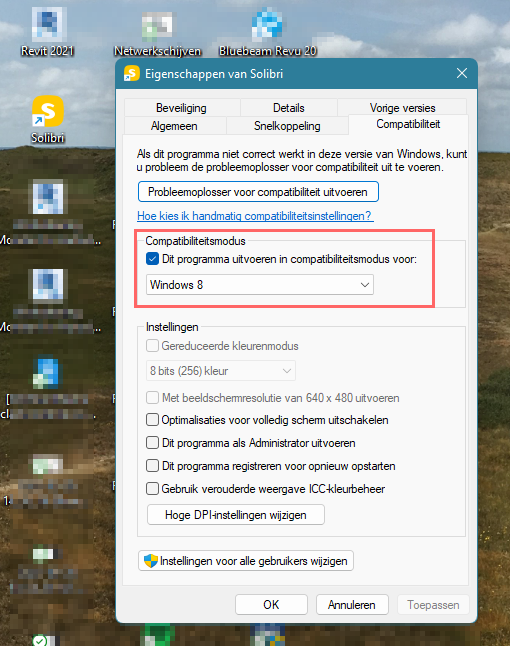
I have seen other posts, where is stated that Solibri does not support Windows 11. This can cause problems like Solibri crashing. We had that too with multiple people here. What you can do is try to run Solibri in compability mode for windows 8.
Why it takes so long to optimize Solibri for Windows 11 though, I don’t know…
I hope the tip above works for you. -
If the Solibri crashes totally and sudden it could be issue with 3D graphics.
Sometimes it a hs_err_*.log file is written. If you find this kind of file at the solibri installation folder please send it to support.Could you report in this topic which Graphics cards you are using with Solibri.
The card info can be seen in Solibri FIle->Help 3D InformationWhat could help:
- Update graphics card driver
- Change graphics used with Solibri in case your your laptop has two cards. This can be done usually in NVidia or AMD settings.
- Try 3d sectioning heavily and see if this is causing the crash.
-
@Matti-Kannala
Crashes occuring more frequently than usual in the last days on various machines. Just now again during some rule testing, nothing special actually.
Sometimes it a hs_err_*.log file is written. If you find this kind of file at the solibri installation folder please send it to support.
Can’t locate that one but the ordinary log ends with the following lines, not sure if this is related and helps to track down the issue.
2022-09-22 13:29:02.704+0200 [Checking] INFO c.s.s.p.c.actions.CheckDesignAction - Checking started 2022-09-22 13:29:03.188+0200 [ForkJoinPool-25-worker-3] ERROR com.solibri.sae.greenox.Constraint - com.solibri.constraints.construction.ConstructionTypesFromAgreedListConstraint can't find resource string for key: par.DEFAULT_VALUE 2022-09-22 13:29:03.188+0200 [ForkJoinPool-25-worker-3] ERROR com.solibri.sae.greenox.Constraint - com.solibri.constraints.construction.ConstructionTypesFromAgreedListConstraint can't find resource string for key: par.DEFAULT_VALUE 2022-09-22 13:29:03.274+0200 [ForkJoinPool-25-worker-3] ERROR com.solibri.sae.greenox.Constraint - com.solibri.constraints.construction.ConstructionTypesFromAgreedListConstraint can't find resource string for key: par.DEFAULT_VALUE 2022-09-22 13:29:03.274+0200 [ForkJoinPool-25-worker-3] ERROR com.solibri.sae.greenox.Constraint - com.solibri.constraints.construction.ConstructionTypesFromAgreedListConstraint can't find resource string for key: par.DEFAULT_VALUE 2022-09-22 13:29:03.849+0200 [ForkJoinPool-25-worker-4] ERROR com.solibri.sae.greenox.Constraint - com.solibri.constraints.construction.ConstructionTypesFromAgreedListConstraint can't find resource string for key: par.DEFAULT_VALUE 2022-09-22 13:29:03.849+0200 [ForkJoinPool-25-worker-4] ERROR com.solibri.sae.greenox.Constraint - com.solibri.constraints.construction.ConstructionTypesFromAgreedListConstraint can't find resource string for key: par.DEFAULT_VALUE 2022-09-22 13:29:03.937+0200 [ForkJoinPool-25-worker-4] ERROR com.solibri.sae.greenox.Constraint - com.solibri.constraints.construction.ConstructionTypesFromAgreedListConstraint can't find resource string for key: par.DEFAULT_VALUE 2022-09-22 13:29:03.937+0200 [ForkJoinPool-25-worker-4] ERROR com.solibri.sae.greenox.Constraint - com.solibri.constraints.construction.ConstructionTypesFromAgreedListConstraint can't find resource string for key: par.DEFAULT_VALUE 2022-09-22 13:29:07.635+0200 [ForkJoinPool-25-worker-5] ERROR com.solibri.sae.greenox.Constraint - com.solibri.constraints.construction.ConstructionTypesFromAgreedListConstraint can't find resource string for key: par.DEFAULT_VALUE 2022-09-22 13:29:07.635+0200 [ForkJoinPool-25-worker-5] ERROR com.solibri.sae.greenox.Constraint - com.solibri.constraints.construction.ConstructionTypesFromAgreedListConstraint can't find resource string for key: par.DEFAULT_VALUE 2022-09-22 13:29:07.753+0200 [ForkJoinPool-25-worker-5] ERROR com.solibri.sae.greenox.Constraint - com.solibri.constraints.construction.ConstructionTypesFromAgreedListConstraint can't find resource string for key: par.DEFAULT_VALUE 2022-09-22 13:29:07.753+0200 [ForkJoinPool-25-worker-5] ERROR com.solibri.sae.greenox.Constraint - com.solibri.constraints.construction.ConstructionTypesFromAgreedListConstraint can't find resource string for key: par.DEFAULT_VALUE 2022-09-22 13:29:10.282+0200 [ForkJoinPool-25-worker-4] ERROR com.solibri.sae.greenox.Constraint - com.solibri.constraints.construction.ModelComparisonRule can't find resource string for key: rpReport.DEFAULT_VALUE 2022-09-22 13:29:10.282+0200 [ForkJoinPool-25-worker-4] ERROR com.solibri.sae.greenox.Constraint - com.solibri.constraints.construction.ModelComparisonRule can't find resource string for key: rpReport.DEFAULT_VALUE -
-
@Matti-Kannala
I have something to add to that. I have noticed that in windows 11 this setting is not always enough to let the computer use it’s dedicated GPU…
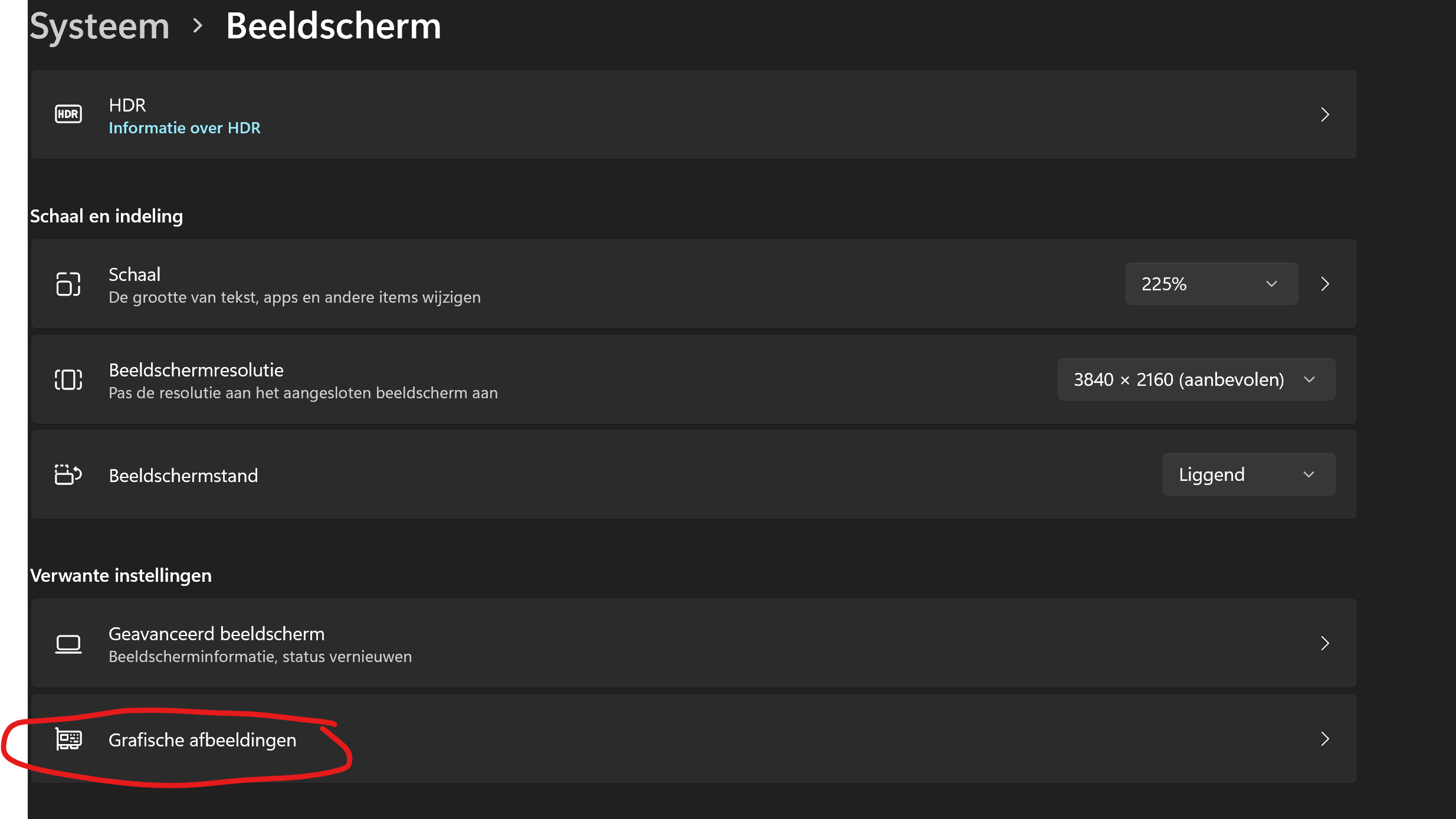
There is a second place in Windows where I also needed to change the settings for some of our laptops. It’s under; settings -> System -> monitor -> graphics.For your programs that need to use the dedicated GPU, set the settings to ‘high performance’.
A tip to check which GPU is used by a program: CTRL + SHIFT + ESC --> In the processes tab you will see GPU 0 and GPU 1 next to the processes. In the performance tab you can see which number is your dedicated or integrated GPU.
If I could only go back to W10

-
Another thing to check are your windows error logs.
Over here we noticed our new security client (antivirus, firewall etc.) SentinelOne was a cause of some of the random crashes. After whitelisting the Solibri application, it’s application folders and Solibri’s connections (https://help.solibri.com/hc/en-us/articles/1500005246021-Firewall-Settings) the random errors reduced a lot. -
I forgot about that one, but it was mentioned in january of this year that they don’t officially support Windows 11:
https://society.solibri.com/topic/1710/windows-11-and-solibri/6?_=1667998461934
I haven’t heard a lot about supporting it since then.




 Core
Core i7-11850H @ 2.50GHz 2.50 GHz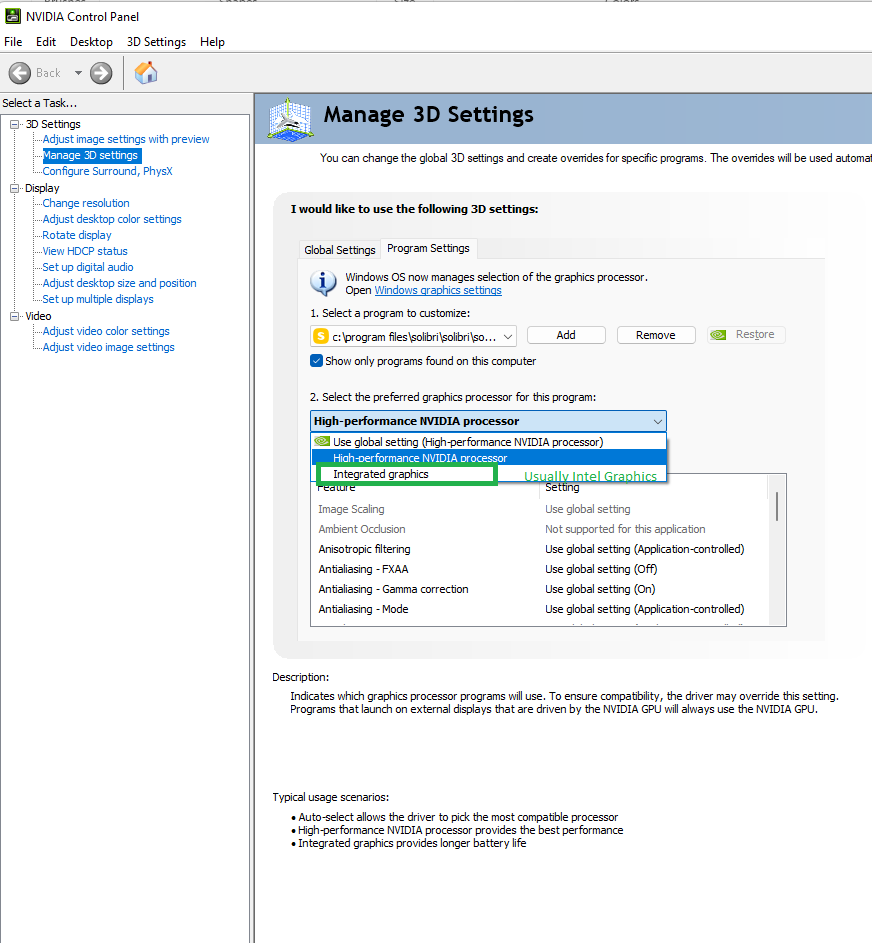

Copyright © 2025 Solibri Inc. | Powered by NodeBB