Skip to content
  • Categories
Collapse
Solibri Society Forum
  1. Home
  2. General Discussion
  3. Special symbols in classification does not show up

Special symbols in classification does not show up

Scheduled Pinned Locked Moved Solved General Discussion
12 Posts 4 Posters 2.4k Views
  • Oldest to Newest
  • Newest to Oldest
  • Most Votes
Log in to reply
This topic has been deleted. Only users with topic management privileges can see it.
  • bariscanpolatB Offline
    bariscanpolatB Offline
    bariscanpolat
    wrote on last edited by
    #2

    Hi,
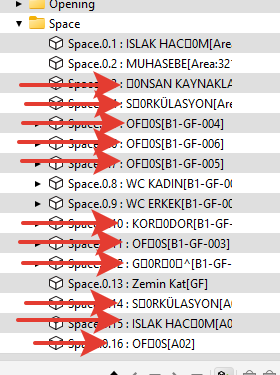
    With the update, special characters are not shown right, not only classification:
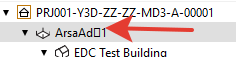
    4f55f89b-872e-49f6-a886-ddbcff2340a1-image.png
    4cf06445-8ad7-4c33-a537-c6d8c729d01e-image.png

    And you are right, it was ok before.

    1 Reply Last reply
    1
    • T Offline
      T Offline
      twosk
      wrote on last edited by twosk
      #3

      @bariscanpolat
      Perhaps its connected to regional settings? Or is it ok in you computer?

      M 1 Reply Last reply
      0
      • bariscanpolatB Offline
        bariscanpolatB Offline
        bariscanpolat
        wrote on last edited by
        #4

        I don’t know if it is about regional settings, because before the update it was ok

        MattiM 1 Reply Last reply
        0
        • MattiM Offline
          MattiM Offline
          Matti Solibrians
          replied to bariscanpolat on last edited by
          #5

          @twosk @bariscanpolat

          Could you confirm which version of Solibri you are using and are they correct in some older Solibri version?

          MattiM 1 Reply Last reply
          0
          • MattiM Offline
            MattiM Offline
            Matti Solibrians
            replied to Matti on last edited by Matti
            #6

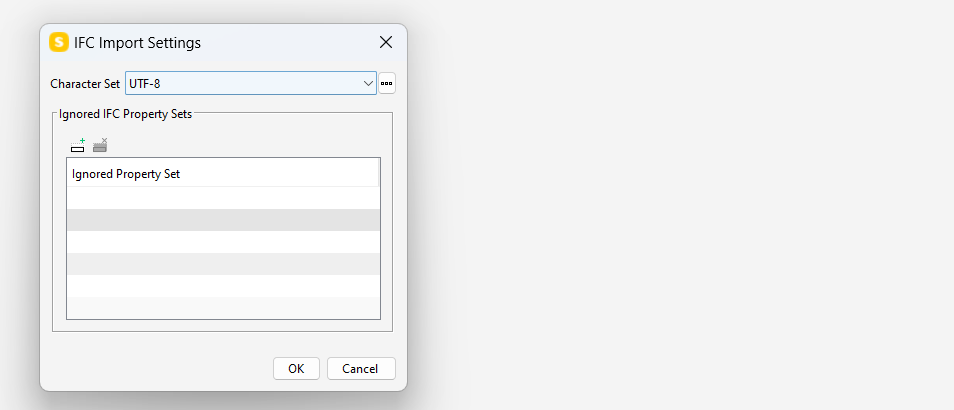
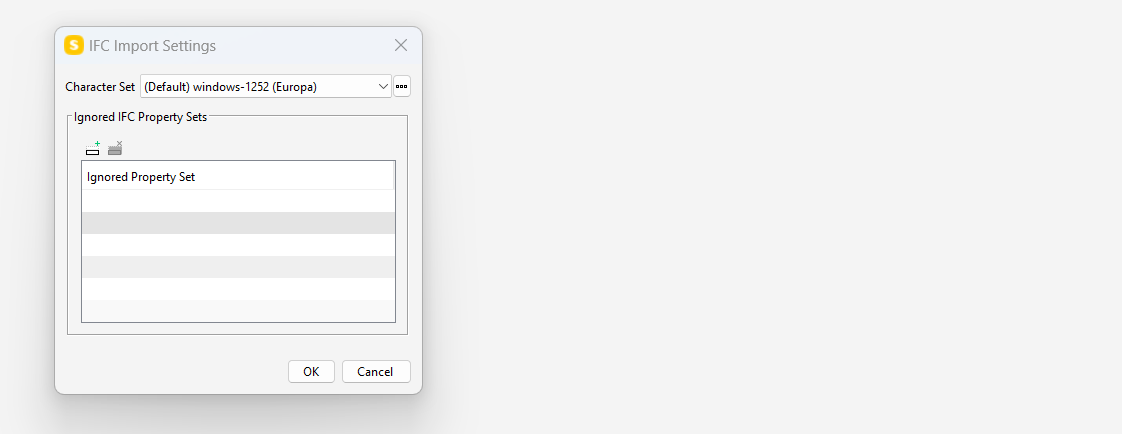
            Also you can try these settings

            3295414c-149b-4476-a546-29e09d971b3c-image.png

            or

            ecf56ae5-650f-4126-83ca-bb338dd141b7-image.png

            M 1 Reply Last reply
            0
            • M Offline
              M Offline
              manuel.furia Solibrians
              replied to twosk on last edited by manuel.furia
              #7

              @twosk

              It is most likely connected to regional settings. Before 9.13.4, Solibri used the System default encoding for reading strings in ifc files. This was now changed to UTF-8 by default, which can be changed from the Solibri settings (but the system settings are ignored).

              You can try this:
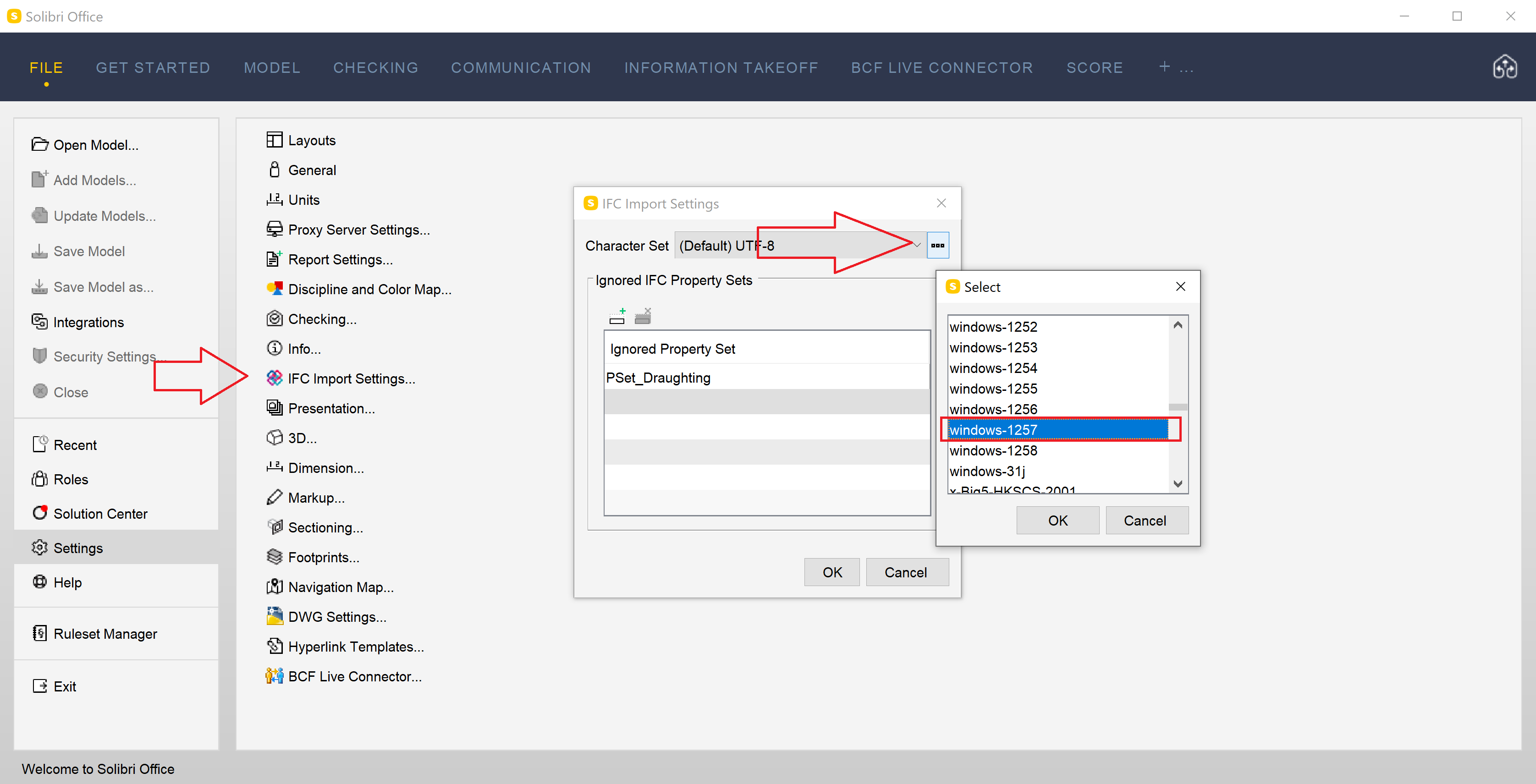
              61e4e034-91a3-4afc-a87a-bbfccb12a9fa-image.png

              You should probably try Windows-1257 (Baltic).

              T 1 Reply Last reply
              0
              • M Offline
                M Offline
                manuel.furia Solibrians
                replied to Matti on last edited by
                #8

                @Matti-Kannala Windows-1252 is not going to work, since it does not have the U with the bar on top. Windows-1257 may be the right encoding.

                1 Reply Last reply
                0
                • bariscanpolatB Offline
                  bariscanpolatB Offline
                  bariscanpolat
                  wrote on last edited by
                  #9

                  @Matti-Kannala thank you, I changed the settings to UTF-8 and it worked for me

                  1 Reply Last reply
                  0
                  • T Offline
                    T Offline
                    twosk
                    replied to manuel.furia on last edited by
                    #10

                    @manuel-furia
                    it does not work with the newest version.
                    With an older version it works if I reupdate the file.
                    It works with the newest version and UTF-8 settings.
                    Thank you for your suggestion.

                    1 Reply Last reply
                    0
                    • M Offline
                      M Offline
                      manuel.furia Solibrians
                      wrote on last edited by
                      #11

                      So, I’m guessing the strings in the file are encoded with UTF-8, but the IFC Import Setting uses the system’s encoding by default, not UTF-8 as I was expecting.
                      Since UTF-8 strings are much more common than other encodings, I will create a ticket to always default to UTF-8 instead of System’s default settings.

                      1 Reply Last reply
                      0
                      • JSNJ JSN referenced this topic on
                      • MattiM Offline
                        MattiM Offline
                        Matti Solibrians
                        wrote on last edited by
                        #12

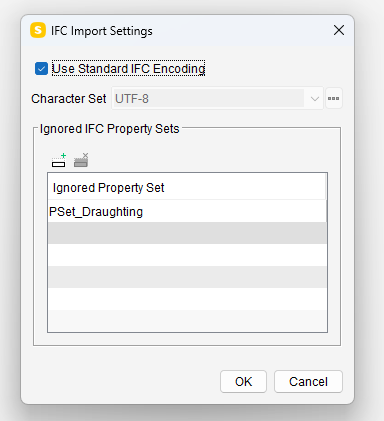
                        Solibri 9.13.5 has been released!

                        IFC import handles now special characters correctly.
                        UTF-8 is now the default encoding for IFC.

                        https://society.solibri.com/topic/2524/solibri-9-13-5-has-been-released
                        84ee22a2-d4f1-43cb-ba90-f5db24eec946-image.png

                        1 Reply Last reply
                        1
                        • MattiM Matti marked this topic as a question on
                        • MattiM Matti has marked this topic as solved on
                        • MattiM Matti unlocked this topic on
                        • MattiM Matti locked this topic on
                        • MattiM Matti unlocked this topic on

                        Copyright © 2025 Solibri Inc. | Powered by NodeBB

                        • Login

                        • Don't have an account? Register

                        • Login or register to search.
                        • First post
                          Last post
                        0
                        • Categories