
Issues duplicated with BCF Live and BIMcollab
-
Hi,
I experienced the exactly same problem…
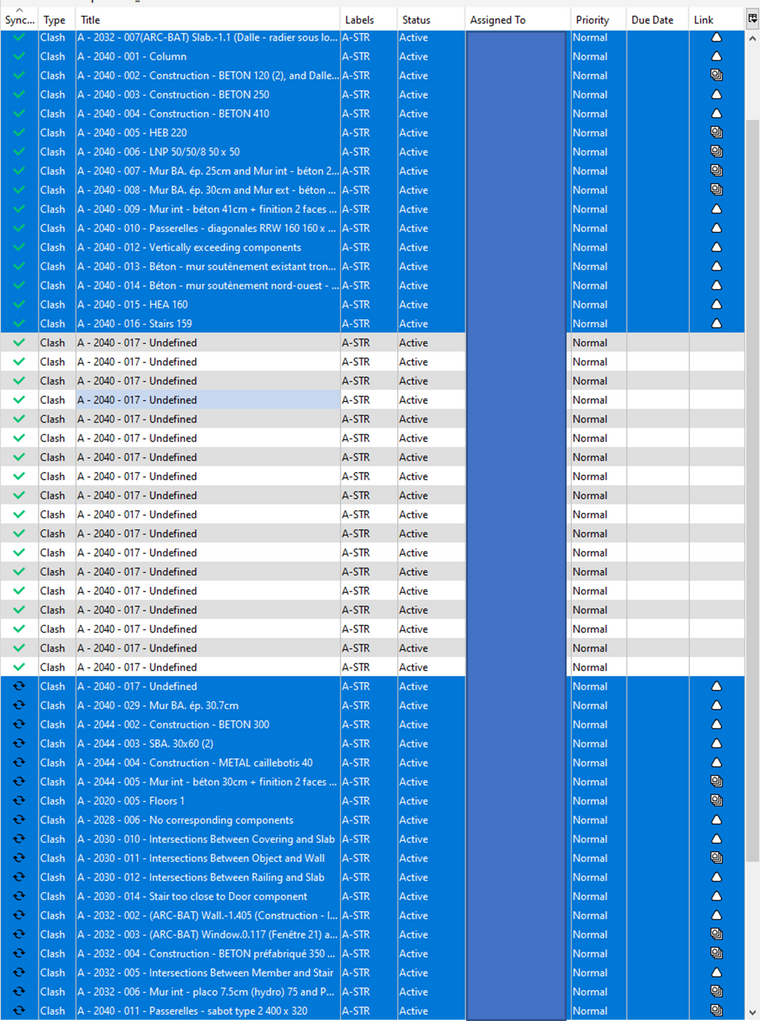
I selected all the issues I imported in the BCFlive conector. The first part of the issues synced well until it arrives on the issues named " A-2040-017" that begans to duplicate (as you can see on the image below)… And on BIMcollb platform alle the duplications haven’t any images.MY SOLUTION : After around 50times duplications I decided to turn off the connexion with server. I deleted the initial “A-2040-017” issue that hasn’t been synced (as you can see on the image below) and then I re-turned on the connexion to the server. It automatically restarts to synchronise the second part of the issues (that haven’t been synced the first time because of the duplication of the one issue).
Maxime
-
Hi @tonigyllenberg and @david-polanski, any news regarding these problems? As I understand from the post by @degraan Solibri is aware of the problem, but we haven heard anything from you guys so far.
Meanwhile the problem is getting bigger and bigger, our projects filling with hunderds and sometimes thousands of useless copies of issues, and more and more colleagues are dealing with these problems.
Have you identified the cause of all off this, is there a solution and if so will this be available soon? We need to know whether or not we have to roll back to a previous version of Solibri.
Can you please give us an update on the situation? Thanks in advance.
-
Hi everyone,
Our team is currently working on fixes for these issues and we are aiming to publish those fixes within the next week or so. We are aware of the problems this is causing, and we are working to resolve this as fast as we can.
There are also some fixes required from Bimcollab’s side which will be handled as part of the fix.Once it is sorted, we will post an update.
We appreciate the patience and apologize for the inconvenience. -
Hello,
We have found one reason why this happens. If a model has very long BATIDs, a viewpoint does not get created in BIMcollab and that causes the duplication. We have identified a fix in Solibri side and hope to get that to the next version. Here’s an example of a long BATID. Also BIMcollab is aware of this particular problem. I’m not promising a fix on their behalf

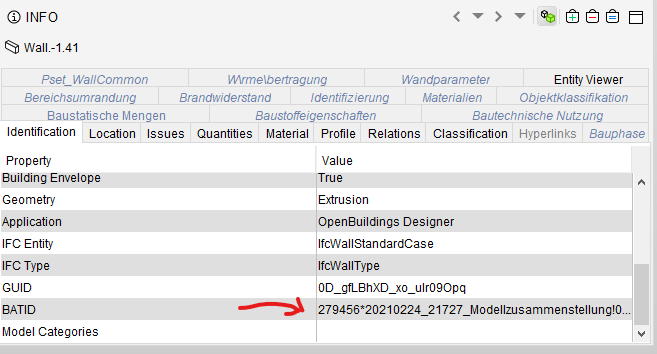
The thing is that this model has come from an exotic tool called “OpenBuildings Designer 10.07.00.105” and I suspect that this may not be the only reason for the duplication. If anyone is willing to share a file that doesn’t have long BATIDs and still produces the problem, please let us know.
-
@pasi-paasiala We have files that come from Revit so they don’t have a long BATID +/- 8 characters. Can you send me your emailadress so we can send you a file?
-
Thanks @YasmineD. I sent an upload link to you in private chat. Hope you got it.
-
Hi, I have a new issue, that might be related to the ongoing problem.
Today when I synchronized new issues with BIMCollab, a few of the issues images did not turn up. And when I synchronized from BIMCollab the Resolve issues (5 issuesin BIMCollab), the box in Solibri says that it found 5 issues, but I can not find them in the presentation folder.
This is something that has worked without problems before. -
HI @Trina @Dennis @NickKoster @Maxime-Sabbagh
it is a very interesting find from @Pasi-PaasialaBut can you also confirm that you also have these strange BATIDs in your project? What BIM Tools are you using for the components?
I am currently starting a big project with multiple BIM tools and what to be one step ahead with this case. To be honest I have never seen such BATIDs in Solibri working with Archicad, Revit, Zoom, Tekla…
-
The long BATIDs are only one situation that causes problems. There are a couple of others that we have been able to duplicate with the help of the file @YasmineD provided. We’re in close contact with @Paul-Deckers from KUBUS to find out the problems.
-
@sebastian-nybäck This might be the same problem, but hard to say 100%.
-
What can help to get de image back in BIM Collab:
Workaround.
Synchronize issues from bim collab to solibri for the latest stand.
Make from the presentation a bcf report, and import those in BIM Collab online.(import bcf)
The issues will be overwrite on BIMcollab, but the this time the issues are visable.The issues on BIM collab have now image again and can be comunicated to others.
-
Hi @agroni, I also don’t see any strange BATIDs in my smc files, they all consist of 8 numbers
-
Hi everyone,
I have noticed a worrisome increase in issues that get synchronized to BIMCollab without the viewpoint image in our company. The issues that are without viewpoint images, are both existing issues with new comments and also new issues. Does anyone know what causes the problem, and/or a workaround that saves all the comments in an issue (we have had issues where bcf report 2.1 does not include everything). And is it possible to say when this issue is expected to be fixed?
-Sebastian
-
Hello all!
Regarding these issues, a fix is now available for testing with our 9.12.6 beta version. Please test and let us know how the solution works

Not yet a beta tester? See these instructions on how to join.
Kind regards,
Toni in behalf of the Solibri team






Copyright © 2025 Solibri Inc. | Powered by NodeBB