
ITOs and Autorun
-
Could you check the log files. There is also separate autorun.log.
Check the paths.
You also try this one:
<?xml version="1.0" encoding="ISO-8859-1"?> <batch name="Simple Batch" default="root"> <!-- This is the starting task --> <target name="root"> <openmodel file="C:\Users\Public\Solibri\SOLIBRI\Samples\ifc\Solibri Building.ifc" /> <openito file="C:\Users\Public\Solibri\SOLIBRI\Information Takeoff\Spaces.ito" /> <takeoff name="Spaces" /> <itoreport name="Spaces" file="C:\Users\Public\Solibri\SOLIBRI\Samples\Spaces Simple.xlsx" /> <itoreport name="Spaces" file="C:\Users\Public\Solibri\SOLIBRI\Samples\Spaces with Template.xlsx" reportTitle="Report" templatefile="C:\Users\Public\Solibri\SOLIBRI\Information Takeoff\Templates\Spaces.xlsx" /> <exit /> </target> </batch> -
As result of previous autorun you will get:
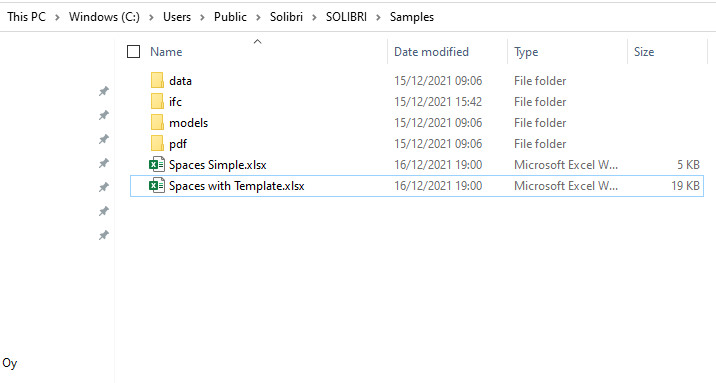
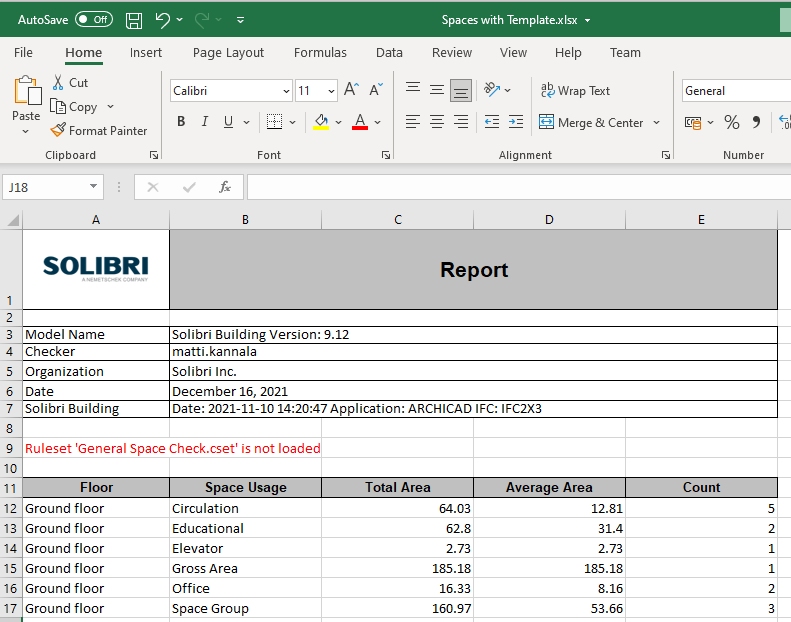
-
Solibri 9.12.8 Developer Platform documentation is published.
It includes the new autorun features.
https://solibri.github.io/Developer-Platform/ -
@matti-kannala
I use a custom made template that works perfectly when using it in Solibri, to generate the report from template.
I’ll try the example you’re suggesting but there’s an error at the moment when starting Solibri Office.
This is from the autorun log file when it crashes on the last task that’s the ito template report.
2021-12-16 17:00:40.800+0100 ERROR c.s.s.p.b.actions.BatchAction - Failed while running BatchRun java.lang.NullPointerException: Cannot invoke "com.solibri.resource.Resource.getString()" because the return value of "com.solibri.saf.core.resource.RecentResource.getResource()" is null at com.solibri.saf.core.resource.RecentResource.c(Unknown Source) at com.solibri.saf.core.resource.RecentResource.a(Unknown Source) at com.solibri.saf.core.resource.RecentResource.addRecentResources(Unknown Source) at com.solibri.saf.core.resource.RecentResource.addRecentResources(Unknown Source) at com.solibri.saf.core.resource.RecentResource.addRecentResources(Unknown Source) at com.solibri.saf.plugins.batchplugin.tasks.ReportItoTask.a(Unknown Source) at com.solibri.saf.plugins.batchplugin.tasks.ReportItoTask.b(Unknown Source) at com.solibri.saf.plugins.batchplugin.tasks.ReportItoTask.b(Unknown Source) at com.solibri.saf.plugins.batchplugin.tasks.ReportItoTask.a(Unknown Source) at com.solibri.saf.plugins.batchplugin.tasks.ReportItoTask.run(Unknown Source) at com.solibri.saf.plugins.batchplugin.BatchTarget.run(Unknown Source) at com.solibri.saf.plugins.batchplugin.BatchRun.runTarget(Unknown Source) at com.solibri.saf.plugins.batchplugin.BatchRun.run(Unknown Source) at com.solibri.saf.plugins.batchplugin.actions.BatchAction.runBatch(Unknown Source) at com.solibri.modelchecker.core.ModelChecker.a(Unknown Source) at java.base/java.lang.Thread.run(Thread.java:831) -
@matti-kannala said in ITOs and Autorun:
Could you check the log files. There is also separate autorun.log.
Check the paths.
You also try this one:
<?xml version="1.0" encoding="ISO-8859-1"?>
<batch name="Simple Batch" default="root">
<!-- This is the starting task -->
<target name="root">

<openmodel file="C:\Users\Public\Solibri\SOLIBRI\Samples\ifc\Solibri Building.ifc" />

<openito file="C:\Users\Public\Solibri\SOLIBRI\Information Takeoff\Spaces.ito" />
<takeoff name="Spaces" />
<itoreport name="Spaces" file="C:\Users\Public\Solibri\SOLIBRI\Samples\Spaces Simple.xlsx" />
<itoreport name="Spaces" file="C:\Users\Public\Solibri\SOLIBRI\Samples\Spaces with Template.xlsx" reportTitle="Report" templatefile="C:\Users\Public\Solibri\SOLIBRI\Information Takeoff\Templates\Spaces.xlsx" />

<exit />
</target>
</batch>
Same for me, the one you suggest to try works great.
Yet I get the same error when using a template that we use to extract model timestamps.

This is the content of the template, works when reporting ito in Solibri, with Autorun it crashes.
-
 M Matti marked this topic as a question on
-
M Matti has marked this topic as solved on
Copyright © 2025 Solibri Inc. | Powered by NodeBB