Skip to content
  • Categories
Collapse
Solibri Society Forum
  1. Home
  2. General Discussion
  3. BCF Live Connector not connecting

BCF Live Connector not connecting

Scheduled Pinned Locked Moved General Discussion
13 Posts 6 Posters 2.6k Views
  • Oldest to Newest
  • Newest to Oldest
  • Most Votes
Log in to reply
This topic has been deleted. Only users with topic management privileges can see it.
  • B Offline
    B Offline
    build effects
    wrote on last edited by
    #4

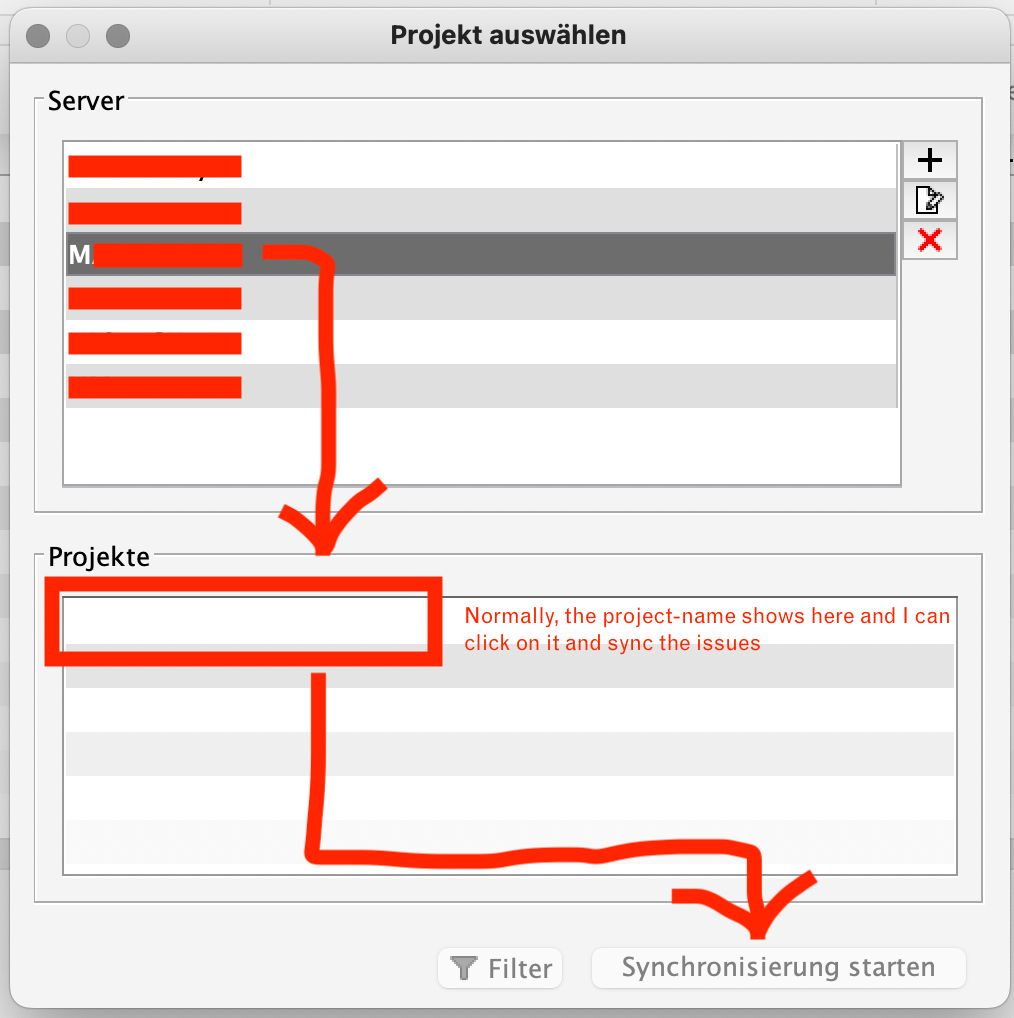
    Bildschirmfoto 2023-02-17 um 15.40.39.png

    Harmen JorritsmaH 1 Reply Last reply
    0
    • Harmen JorritsmaH Offline
      Harmen JorritsmaH Offline
      Harmen Jorritsma
      replied to build effects on last edited by
      #5

      @build-effects

      Oke, sorry i can’t help u.
      This is strange.

      Maybe a fress instal of Solibri helps?

      Met vriendelijke groet,
      Harmen Jorritsma

      BIM regisseur Van Wijnen Amsterdam
      Diemerhof 32 | 1112 XN Diemen | KvK 32129744

      020 -36 44 000 | 06-83 15 66 88 | LinkedIn | www.vanwijnen.nl
      Volg ons op Facebook en Twitter

      RicardoR 1 Reply Last reply
      0
      • RicardoR Offline
        RicardoR Offline
        Ricardo
        replied to Harmen Jorritsma on last edited by
        #6

        I contacted BIMcollab because we have the same problem. Their response was this;

        This problem occurs with Solibri version 9.12.
        Please update to Solibri version 9.13 to resolve the problem.

        We just created an article to inform users via our helpcenter and we will keep this updated in case we have new information.
        https://helpcenter.bimcollab.com/portal/en/kb/articles/projects-not-available-in-solibri-bcf-live-connector-9-12
        Projects not available in Solibri BCF live connector (9.12)

        The solution looks simple, but it’s not. We can’t use 9.13 because it freezes a lot with bigger models.

        So I feel quite ‘stuck’ at the moment…

        1 Reply Last reply
        1
        • P Offline
          P Offline
          Pasi Paasiala Solibrians
          wrote on last edited by
          #7

          @Ricardo How does 9.13 freeze. Could you share a model or create a video to show what happens?

          1 Reply Last reply
          0
          • hkringsKUBUSH Offline
            hkringsKUBUSH Offline
            hkringsKUBUS
            wrote on last edited by
            #8

            @Pasi-Paasiala could it be that the fix for the Dalux authentication problem (https://society.solibri.com/topic/2204/sync-status-bimcollab/12) is related to the project selection problem?
            I noticed this fix was done around the time that the problems with BIMcollab started.

            P 1 Reply Last reply
            0
            • JeroenKoomenJ Offline
              JeroenKoomenJ Offline
              JeroenKoomen
              wrote on last edited by
              #9

              @Pasi We have this also. Happens to me a lot when dragging section planes.

              My colleagues say that this helps… https://society.solibri.com/topic/2179/my-3d-view-freeze?_=1676885107123

              http://www.linkedin.com/in/koomenjeroen
              https://www.bimloket.nl/BIMbasisILS

              1 Reply Last reply
              0
              • P Offline
                P Offline
                Pasi Paasiala Solibrians
                replied to hkringsKUBUS on last edited by
                #10

                @hkringsKUBUS The project selection problem is fixed already in 9.13 and the fix to Dalux authentication is fixed in the next release, so they’re different fixes.

                1 Reply Last reply
                0
                • P Offline
                  P Offline
                  Pasi Paasiala Solibrians
                  wrote on last edited by
                  #11

                  @hkringsKUBUS This could be worked around on Bimcollab side also by adding the foundation API versions endpoint. The content of the endpoint should be the same as the one with BCF-API versions endpoint.
                  For example, the BCF-API end point for us is: https://solibri.bimcollab.com/bcf/versions
                  And the corresponding Foundation API end point would be: https://solibri.bimcollab.com/foundation/versions

                  hkringsKUBUSH 1 Reply Last reply
                  0
                  • hkringsKUBUSH Offline
                    hkringsKUBUSH Offline
                    hkringsKUBUS
                    replied to Pasi Paasiala on last edited by
                    #12

                    @Pasi-Paasiala said in BCF Live Connector not connecting:

                    This could be worked around on Bimcollab side also by adding the foundation API versions endpoint. The content of the endpoint should be the same as the one with BCF-API versions endpoint.
                    For example, the BCF-API end point for us is: https://solibri.bimcollab.com/bcf/versions
                    And the corresponding Foundation API end point would be: https://solibri.bimcollab.com/foundation/versions

                    Thank you Pasi, I’ve forwarded this to the BIMcollab developers.

                    1 Reply Last reply
                    0
                    • P Offline
                      P Offline
                      Pasi Paasiala Solibrians
                      wrote on last edited by
                      #13

                      @build-effects @JeroenKoomen @Harmen-Jorritsma @Ricardo @hkringsKUBUS

                      It seems that this is now working. Apparently Bimcollab is throwing and exception that version 9.12 can handle. Yesterday it threw an exception that 9.12 cannot handle, but 9.13 can.

                      1 Reply Last reply
                      1

                      Copyright © 2025 Solibri Inc. | Powered by NodeBB

                      • Login

                      • Don't have an account? Register

                      • Login or register to search.
                      • First post
                        Last post
                      0
                      • Categories