Skip to content
  • Categories
Collapse
Solibri Society Forum
  1. Home
  2. Comments & Feedback
  3. Tech Talks
  4. Unable to configure BCF connector

Unable to configure BCF connector

Scheduled Pinned Locked Moved Tech Talks
7 Posts 5 Posters 1.3k Views
  • Oldest to Newest
  • Newest to Oldest
  • Most Votes
Log in to reply
This topic has been deleted. Only users with topic management privileges can see it.
  • EgilsBE Offline
    EgilsBE Offline
    EgilsB
    wrote on last edited by
    #1

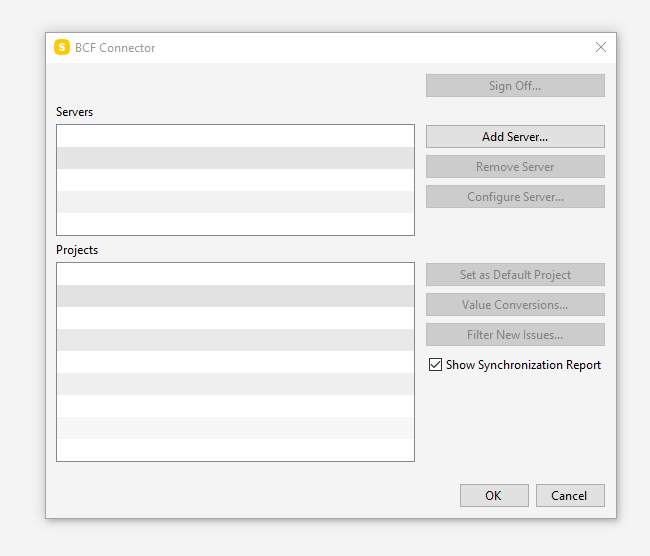
    Colleague of mine has encountered greyed out buttons in BCF Connector configuration under options stopping them from configuring connection to BCF Issue manager.

    His peers with same hardware, OS and Solibri build don’t have this issue.

    Screenshot to be attached when received.

    W10 17134.1246
    Solibri 9.10.5.18

    EgilsBE 1 Reply Last reply
    1
    • EgilsBE Offline
      EgilsBE Offline
      EgilsB
      replied to EgilsB on last edited by
      #2

      image.png
      Add Server… has no response

      1 Reply Last reply
      0
      • L Offline
        L Offline
        lasse.lindqvist
        wrote on last edited by
        #3

        Hi. In order for us to solve this issue, we would need the application logs. Those can be sent to [email protected] and are usually found from C:\Program Files\Solibri\SOLIBRI\log

        EgilsBE 1 Reply Last reply
        0
        • EgilsBE Offline
          EgilsBE Offline
          EgilsB
          replied to lasse.lindqvist on last edited by
          #4

          @lasse-lindqvist, many thanks, logs will come through soon.

          1 Reply Last reply
          0
          • BramB Offline
            BramB Offline
            Bram
            wrote on last edited by
            #5

            One customer have the same issue - I can replicate if choosing Anywhere and go into settings, nothing happens when clicking “Add Server…”, back in Office it works fine.

            Case sent to Support

            MattiM 1 Reply Last reply
            0
            • MattiM Offline
              MattiM Offline
              Matti Solibrians
              replied to Bram on last edited by
              #6

              Adding a server needs network connection to Solibri servers to retrieve the list of the BCF Servers.
              It is possible that this is a networking problem. Lets see the logs.

              1 Reply Last reply
              0
              • R Offline
                R Offline
                rahul.sule
                wrote on last edited by rahul.sule
                #7

                We looked into the logs from another instance but similar case and found that:

                • Anywhere starts in case of SSC connection errors
                • BCF Server cannot be retrieved from SSC in case of such a connection error
                • The connection error is HTTP 401 Unauthorized

                It would be good to:

                • Test signing in to solution.solibri.com, to make sure there are no issues with the credentials

                If that is successful, then:

                • Try removing the “.solibri” folder (located at C:\Users<user name>) and sign in again

                Please try these out and let us know how it goes.

                1 Reply Last reply
                0

                Copyright © 2025 Solibri Inc. | Powered by NodeBB

                • Login

                • Don't have an account? Register

                • Login or register to search.
                • First post
                  Last post
                0
                • Categories