Skip to content
  • Categories
Collapse
Solibri Society Forum
  1. Home
  2. General Discussion
  3. Import Excel Worksheet - Rule#203

Import Excel Worksheet - Rule#203

Scheduled Pinned Locked Moved Solved General Discussion
importexcelworksheetrule203
18 Posts 7 Posters 3.9k Views
  • Oldest to Newest
  • Newest to Oldest
  • Most Votes
Log in to reply
This topic has been deleted. Only users with topic management privileges can see it.
  • paola bronzoP Offline
    paola bronzoP Offline
    paola bronzo
    replied to JSN on last edited by
    #4

    @jsn said in Import Excel Worksheet - Rule#203:

    I have not really used it, but I think you would have to specify the Operator and the Numeric Value too then.
    EDIT: You are right - this is either not user friendly enough, or just not working as it should.
    Why is there not a good documentation of such things?

    Yes, I should have specify the Operator and the Numeric value…but how?
    What is the correct writing to put in excel so that it is automatically read by the rule?
    You are right, we would need some more documentation.

    1 Reply Last reply
    0
    • paola bronzoP Offline
      paola bronzoP Offline
      paola bronzo
      replied to JSN on last edited by
      #5

      @jsn said in Import Excel Worksheet - Rule#203:

      Turns out we are not alone.
      https://society.solibri.com/topic/978/rule-203-numeric-value-without-unit?_=1610019703710
      So yeah, the question left is now what hast to be inserted for “Unit” when you want to leave it out - because otherwise it works. If the specification is correct then updating is possible as well.

      @Solibrians will you give us a hint?

      Thanks @JSN !!! this is interesting!

      1 Reply Last reply
      0
      • paola bronzoP Offline
        paola bronzoP Offline
        paola bronzo
        wrote on last edited by
        #6

        @JSN I did some tests with an excel worksheet formatted as shown below … but I can’t get the desired result.
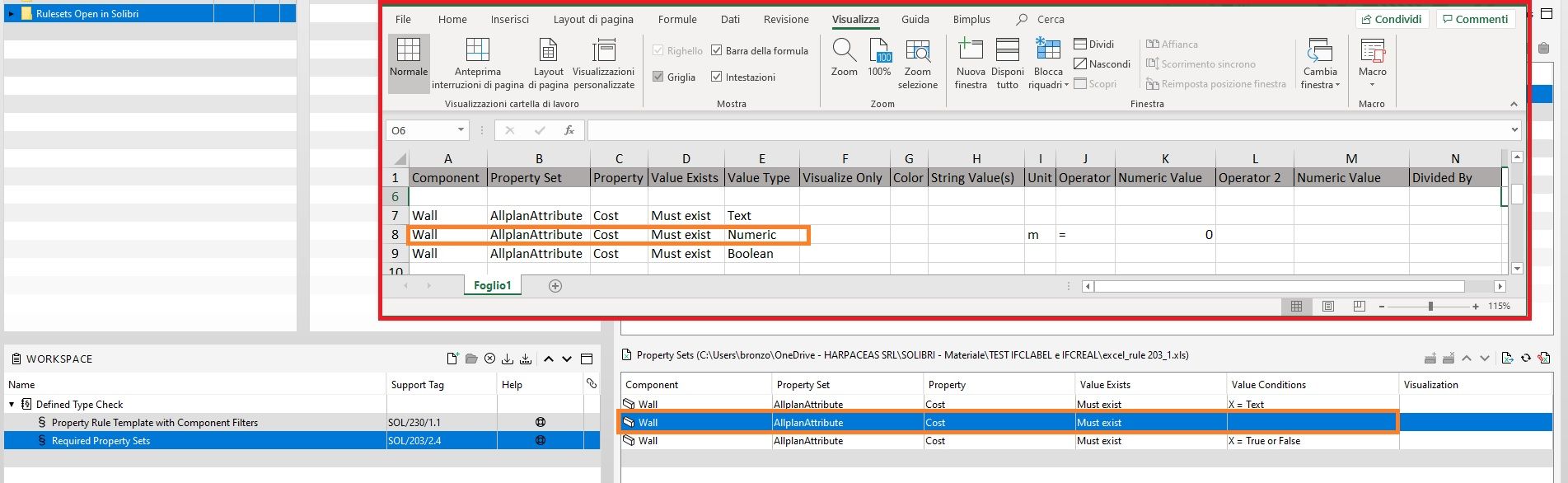
        Import excel Rule203_1.jpg
        @Solibrians is there a guide on how to write the excel file so that all the possible values are read by the rule?

        JSNJ chrisC 2 Replies Last reply
        0
        • L Offline
          L Offline
          lasse.lindqvist
          wrote on last edited by
          #7

          Hi. Can you try using Area/Length/Volume/Date as the unit?

          JSNJ 1 Reply Last reply
          0
          • paola bronzoP Offline
            paola bronzoP Offline
            paola bronzo
            wrote on last edited by
            #8

            @lasse-lindqvist yes, I tried to do it but nothing changes … also the “update imported data” still does not work …

            1 Reply Last reply
            0
            • JSNJ Offline
              JSNJ Offline
              JSN
              replied to paola bronzo on last edited by JSN
              #9

              @paola-bronzo said in Import Excel Worksheet - Rule#203:

              @Solibrians is there a guide on how to write the excel file so that all the possible values are read by the rule?

              @lasse-lindqvist Yes, that would be great.

              yes, I tried to do it but nothing changes … also the “update imported data” still does not work …

              @paola-bronzo
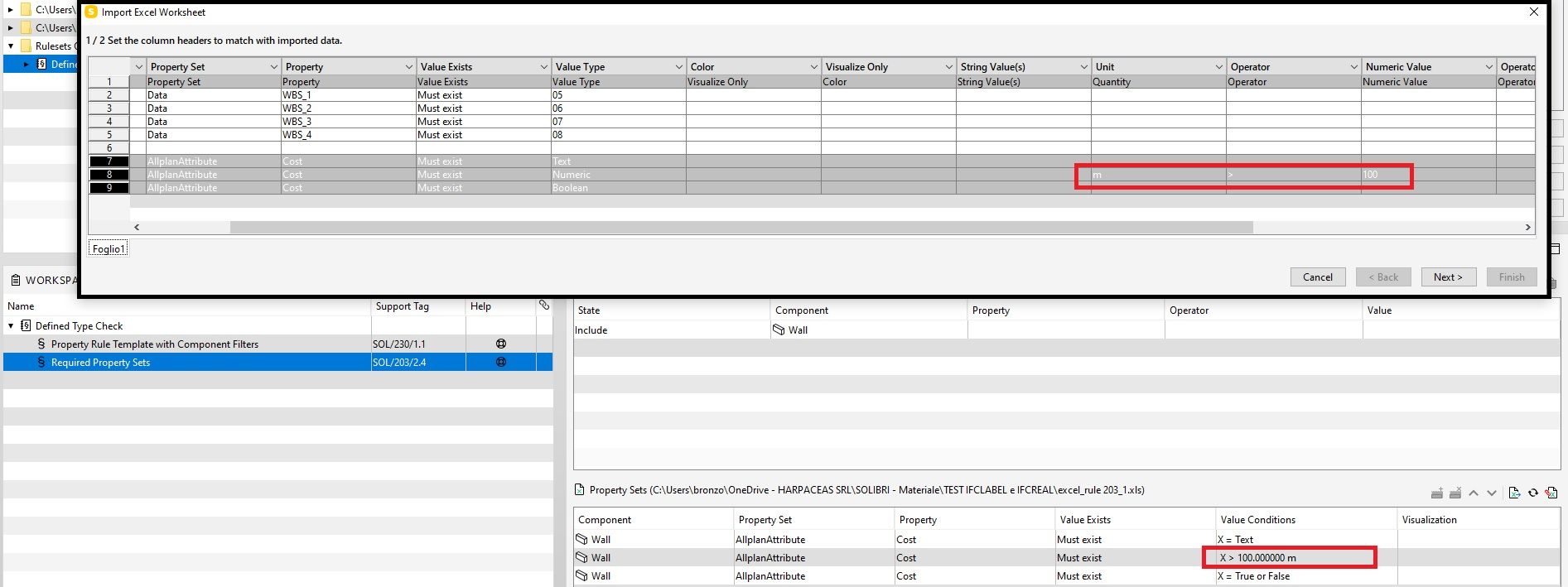
              Did you make sure the headers are all matching - at least when using units like m or m2, the full line should load correctly and then you are able to update …


              a33a1149-dcac-43d7-a907-2b934151ce98-image.png

              ff37a5c8-e83e-4043-841c-cffbb1a0370e-image.png

              paola bronzoP 1 Reply Last reply
              0
              • JSNJ Offline
                JSNJ Offline
                JSN
                replied to lasse.lindqvist on last edited by
                #10

                @lasse-lindqvist

                With Units it’s working as shown above, but what is the secret symbol for no unit now?
                Afaik it’s not “”, " ", “*”, “-”, “_”, …

                JSNJ 1 Reply Last reply
                0
                • paola bronzoP Offline
                  paola bronzoP Offline
                  paola bronzo
                  replied to JSN on last edited by
                  #11

                  @jsn Thanks ;)! Now It works!
                  Import excel Rule203_2.jpg

                  JSNJ 1 Reply Last reply
                  1
                  • JSNJ Offline
                    JSNJ Offline
                    JSN
                    replied to paola bronzo on last edited by JSN
                    #12

                    @paola-bronzo

                    Ok, let’s see if we also find out more about the lost symbol for no units.

                    In the meantime, a note about consistency and UX, as your table brought light into another very confusing thing.

                    @Solibrians Why is the import drop down menu header called “Unit” whilst in the UX dialog it’s clearly labeled with “Quantity”? This is confusing. Probably just a legacy thing, but still.

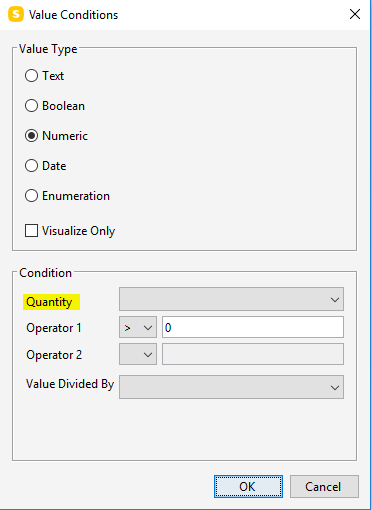
                    b50012a8-ceb8-4884-b4e1-f4da973d5405-image.png

                    475c12c6-bba7-4179-b119-03e6ea9a107e-image.png

                    1 Reply Last reply
                    1
                    • JSNJ Offline
                      JSNJ Offline
                      JSN
                      replied to JSN on last edited by
                      #13

                      @lasse-lindqvist
                      With Units it’s working as shown above, but what is the secret symbol for no unit now?
                      Afaik it’s not “”, " ", “*”, “-”, “_”, …

                      Would be great to learn more about it as it still is a bit of a mystery and I have not yet found it out on my own …

                      1 Reply Last reply
                      0
                      • tonigyllenbergT Offline
                        tonigyllenbergT Offline
                        tonigyllenberg Solibrians
                        wrote on last edited by
                        #14

                        Hello!

                        This has been fixed in Solibri 9.12.7. Please try out the new version and let us know how it feels!

                        Kind regards,
                        Toni on behalf of the Solibri team

                        1 Reply Last reply
                        1
                        • chrisC Offline
                          chrisC Offline
                          chris
                          replied to paola bronzo on last edited by
                          #15

                          @Solibrians Is there a guide how to write the excel file?

                          MattiM john.lippJ 2 Replies Last reply
                          0
                          • MattiM Offline
                            MattiM Offline
                            Matti Solibrians
                            replied to chris on last edited by
                            #16

                            @chris

                            No guide. Try to use this as an example:

                            C:\Users\Public\Solibri\SOLIBRI\Samples\data\Required Property Sets.xlsx
                            
                            1 Reply Last reply
                            1
                            • john.lippJ Offline
                              john.lippJ Offline
                              john.lipp
                              replied to chris on last edited by
                              #17

                              @chris

                              Here is a XLSX that has a picklist/cheatsheet that you can use to copy/paste cells from to your required property sets sheet along with providing hints:
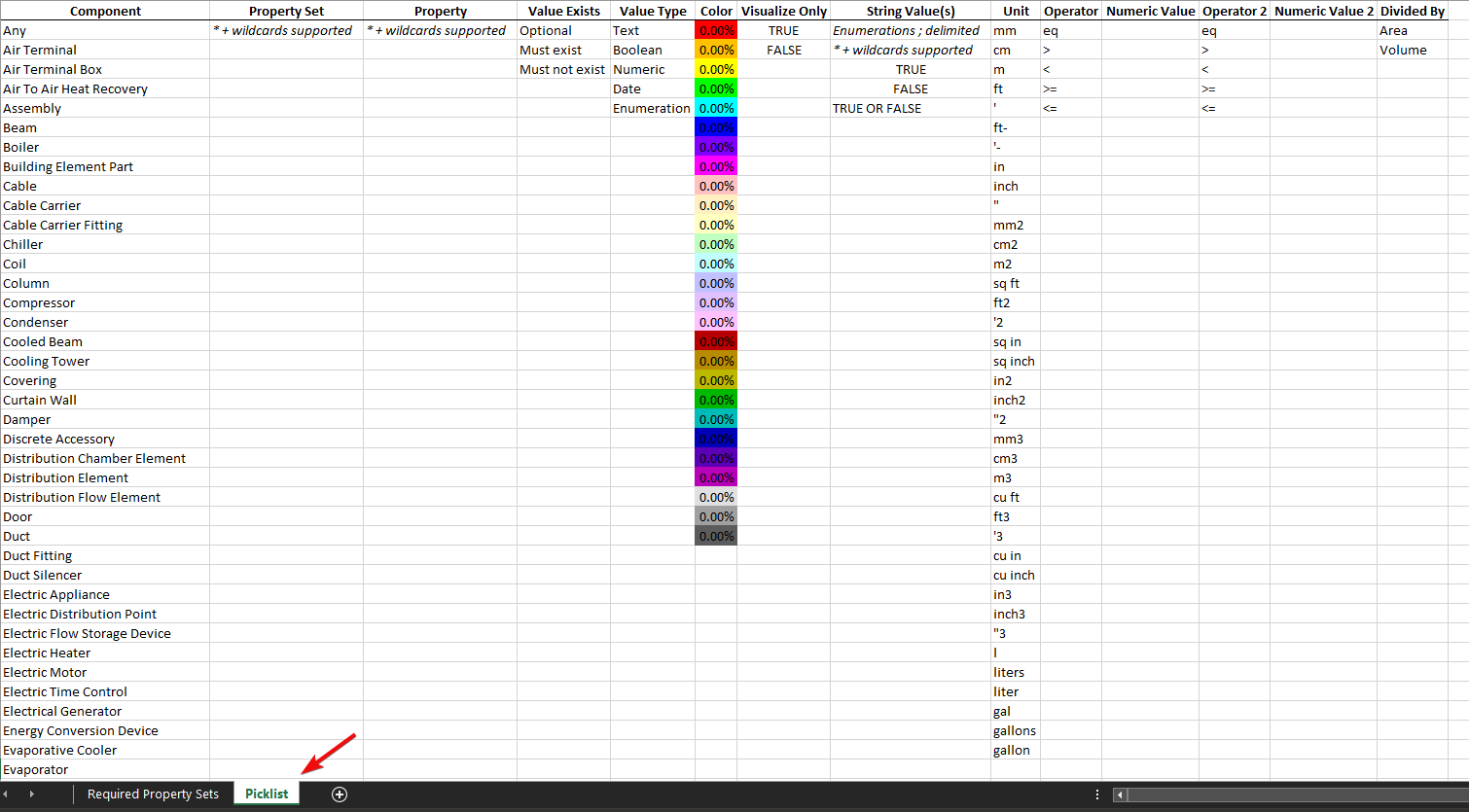
                              96d7e103-1a68-49b4-8afc-599fdee95cdd-image.png

                              Required_Property_Sets_Picklist.xlsx

                              Some things things to note:

                              • You can use asterisks and question mark wild card characters in your pset, property, and property values.
                              • There are many ways to specify units (even gallons for volumes), and it should convert to your File > Settings > Units that you have set.
                              • To set the True, False, True or False value for a boolean property, it goes in the “String Value” column
                              • You can use any color you want (the picklist has some standard ones), and the percent is how transparent. NOTE: XLS will limit the colors so its better to use XLSX. NOTE: You see the colors in the Rule Tools.
                              • Use a semicolon to separate an enumeration.
                              • For the equal numerical operator, use ‘eq’. You can NOT use equals sign (=), though you can use >= and <=

                              Example : 5a8aaddc-d923-4a8f-a13d-b54bec3bc27e-image.png

                              331b8888-fba8-47c3-8222-c82c06bf5347-image.png

                              chrisC 1 Reply Last reply
                              3
                              • chrisC Offline
                                chrisC Offline
                                chris
                                replied to john.lipp on last edited by
                                #18

                                @john-lipp Thank you very much 😊

                                1 Reply Last reply
                                0
                                • john.lippJ john.lipp referenced this topic on
                                Copyright © 2025 Solibri Inc. | Powered by NodeBB

                                • Login

                                • Don't have an account? Register

                                • Login or register to search.
                                • First post
                                  Last post
                                0
                                • Categories


