Skip to content
  • Categories
Collapse
Solibri Society Forum
  1. Home
  2. General Discussion
  3. Import Excel Worksheet - Rule#203

Import Excel Worksheet - Rule#203

Scheduled Pinned Locked Moved Solved General Discussion
importexcelworksheetrule203
18 Posts 7 Posters 3.9k Views
  • Oldest to Newest
  • Newest to Oldest
  • Most Votes
Log in to reply
This topic has been deleted. Only users with topic management privileges can see it.
  • JSNJ Offline
    JSNJ Offline
    JSN
    replied to paola bronzo on last edited by JSN
    #9

    @paola-bronzo said in Import Excel Worksheet - Rule#203:

    @Solibrians is there a guide on how to write the excel file so that all the possible values are read by the rule?

    @lasse-lindqvist Yes, that would be great.

    yes, I tried to do it but nothing changes … also the “update imported data” still does not work …

    @paola-bronzo
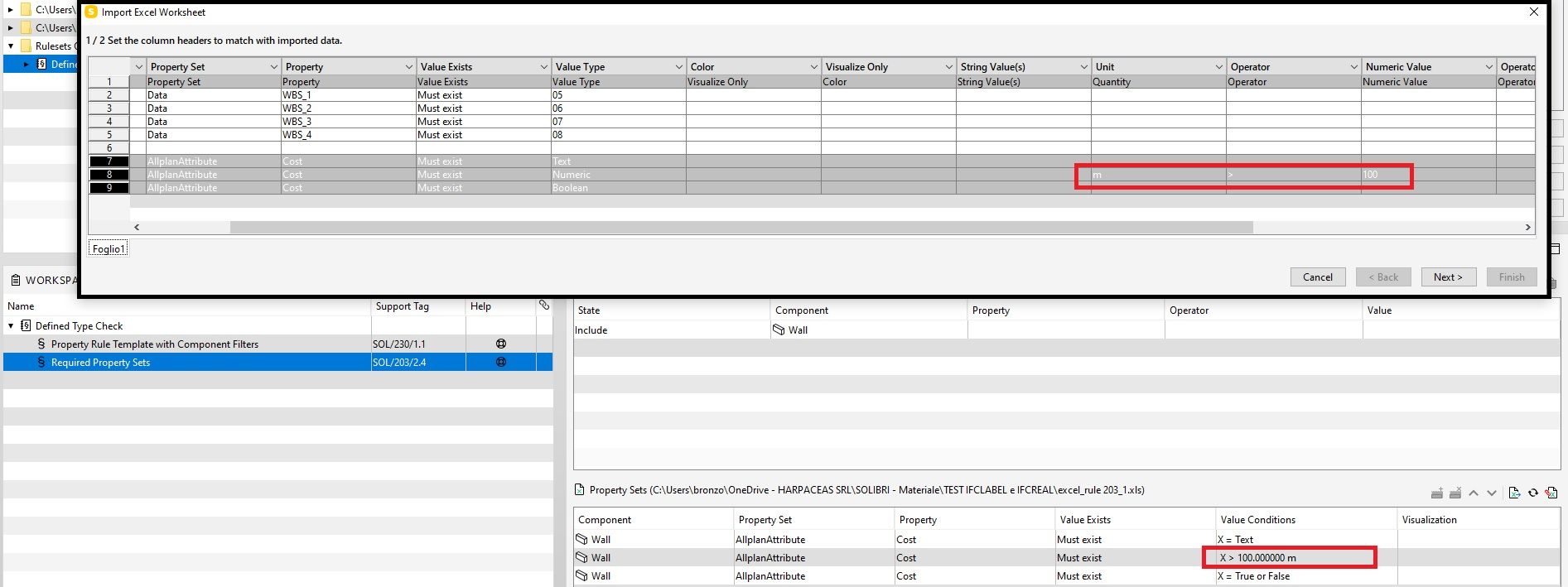
    Did you make sure the headers are all matching - at least when using units like m or m2, the full line should load correctly and then you are able to update …


    a33a1149-dcac-43d7-a907-2b934151ce98-image.png

    ff37a5c8-e83e-4043-841c-cffbb1a0370e-image.png

    paola bronzoP 1 Reply Last reply
    0
    • JSNJ Offline
      JSNJ Offline
      JSN
      replied to lasse.lindqvist on last edited by
      #10

      @lasse-lindqvist

      With Units it’s working as shown above, but what is the secret symbol for no unit now?
      Afaik it’s not “”, " ", “*”, “-”, “_”, …

      JSNJ 1 Reply Last reply
      0
      • paola bronzoP Offline
        paola bronzoP Offline
        paola bronzo
        replied to JSN on last edited by
        #11

        @jsn Thanks ;)! Now It works!
        Import excel Rule203_2.jpg

        JSNJ 1 Reply Last reply
        1
        • JSNJ Offline
          JSNJ Offline
          JSN
          replied to paola bronzo on last edited by JSN
          #12

          @paola-bronzo

          Ok, let’s see if we also find out more about the lost symbol for no units.

          In the meantime, a note about consistency and UX, as your table brought light into another very confusing thing.

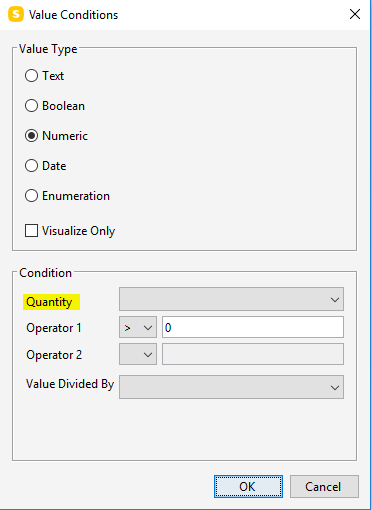
          @Solibrians Why is the import drop down menu header called “Unit” whilst in the UX dialog it’s clearly labeled with “Quantity”? This is confusing. Probably just a legacy thing, but still.

          b50012a8-ceb8-4884-b4e1-f4da973d5405-image.png

          475c12c6-bba7-4179-b119-03e6ea9a107e-image.png

          1 Reply Last reply
          1
          • JSNJ Offline
            JSNJ Offline
            JSN
            replied to JSN on last edited by
            #13

            @lasse-lindqvist
            With Units it’s working as shown above, but what is the secret symbol for no unit now?
            Afaik it’s not “”, " ", “*”, “-”, “_”, …

            Would be great to learn more about it as it still is a bit of a mystery and I have not yet found it out on my own …

            1 Reply Last reply
            0
            • tonigyllenbergT Offline
              tonigyllenbergT Offline
              tonigyllenberg Solibrians
              wrote on last edited by
              #14

              Hello!

              This has been fixed in Solibri 9.12.7. Please try out the new version and let us know how it feels!

              Kind regards,
              Toni on behalf of the Solibri team

              1 Reply Last reply
              1
              • chrisC Offline
                chrisC Offline
                chris
                replied to paola bronzo on last edited by
                #15

                @Solibrians Is there a guide how to write the excel file?

                MattiM john.lippJ 2 Replies Last reply
                0
                • MattiM Offline
                  MattiM Offline
                  Matti Solibrians
                  replied to chris on last edited by
                  #16

                  @chris

                  No guide. Try to use this as an example:

                  C:\Users\Public\Solibri\SOLIBRI\Samples\data\Required Property Sets.xlsx
                  
                  1 Reply Last reply
                  1
                  • john.lippJ Offline
                    john.lippJ Offline
                    john.lipp
                    replied to chris on last edited by
                    #17

                    @chris

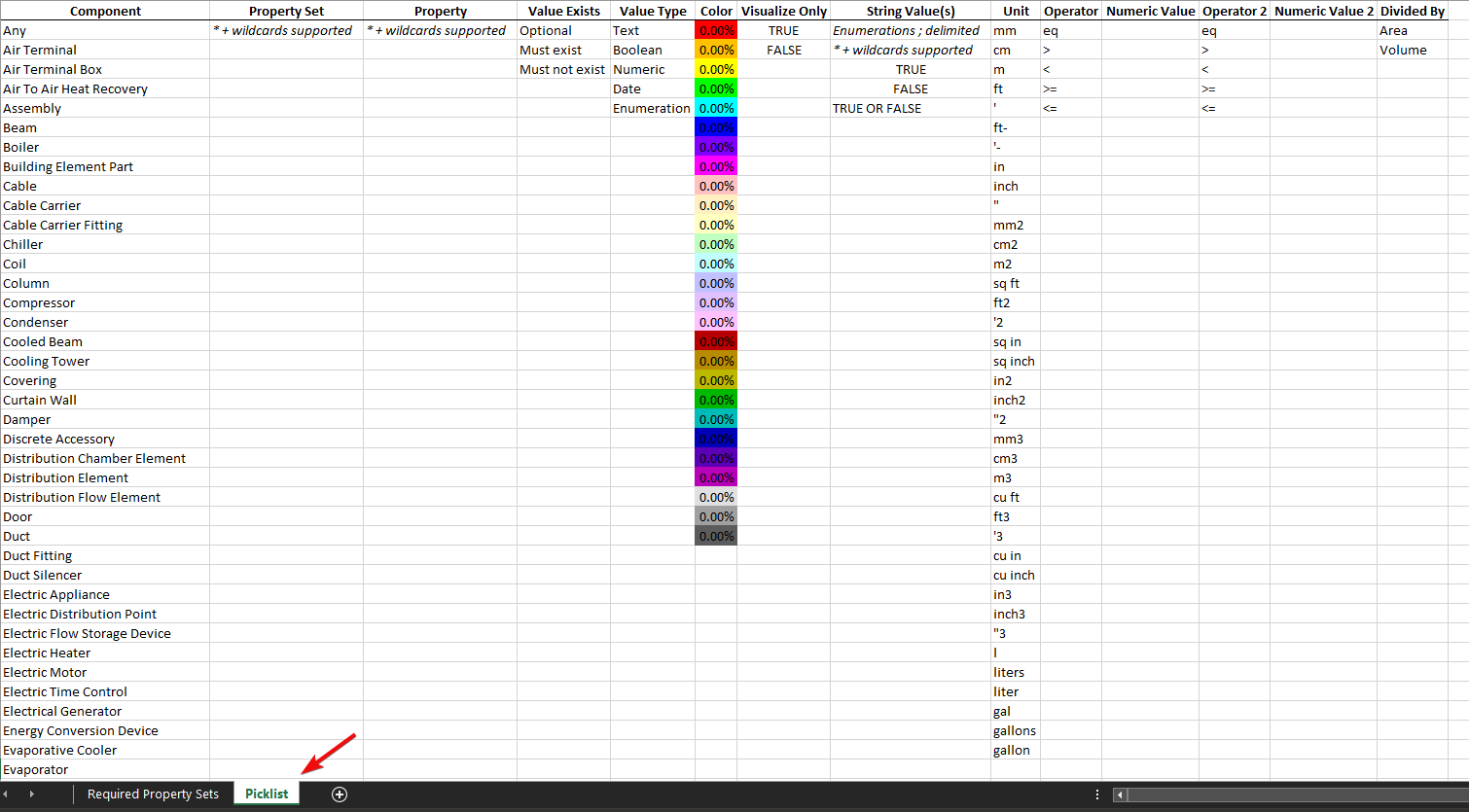
                    Here is a XLSX that has a picklist/cheatsheet that you can use to copy/paste cells from to your required property sets sheet along with providing hints:
                    96d7e103-1a68-49b4-8afc-599fdee95cdd-image.png

                    Required_Property_Sets_Picklist.xlsx

                    Some things things to note:

                    • You can use asterisks and question mark wild card characters in your pset, property, and property values.
                    • There are many ways to specify units (even gallons for volumes), and it should convert to your File > Settings > Units that you have set.
                    • To set the True, False, True or False value for a boolean property, it goes in the “String Value” column
                    • You can use any color you want (the picklist has some standard ones), and the percent is how transparent. NOTE: XLS will limit the colors so its better to use XLSX. NOTE: You see the colors in the Rule Tools.
                    • Use a semicolon to separate an enumeration.
                    • For the equal numerical operator, use ‘eq’. You can NOT use equals sign (=), though you can use >= and <=

                    Example : 5a8aaddc-d923-4a8f-a13d-b54bec3bc27e-image.png

                    331b8888-fba8-47c3-8222-c82c06bf5347-image.png

                    chrisC 1 Reply Last reply
                    3
                    • chrisC Offline
                      chrisC Offline
                      chris
                      replied to john.lipp on last edited by
                      #18

                      @john-lipp Thank you very much 😊

                      1 Reply Last reply
                      0
                      • john.lippJ john.lipp referenced this topic on

                      Copyright © 2025 Solibri Inc. | Powered by NodeBB

                      • Login

                      • Don't have an account? Register

                      • Login or register to search.
                      • First post
                        Last post
                      0
                      • Categories