Skip to content
  • Categories
Collapse
Solibri Society Forum
  1. Home
  2. General Discussion
  3. Functions in ITO reports

Functions in ITO reports

Scheduled Pinned Locked Moved General Discussion
16 Posts 7 Posters 3.6k Views
  • Oldest to Newest
  • Newest to Oldest
  • Most Votes
Log in to reply
This topic has been deleted. Only users with topic management privileges can see it.
  • B Offline
    B Offline
    Bram 0
    wrote on last edited by
    #1

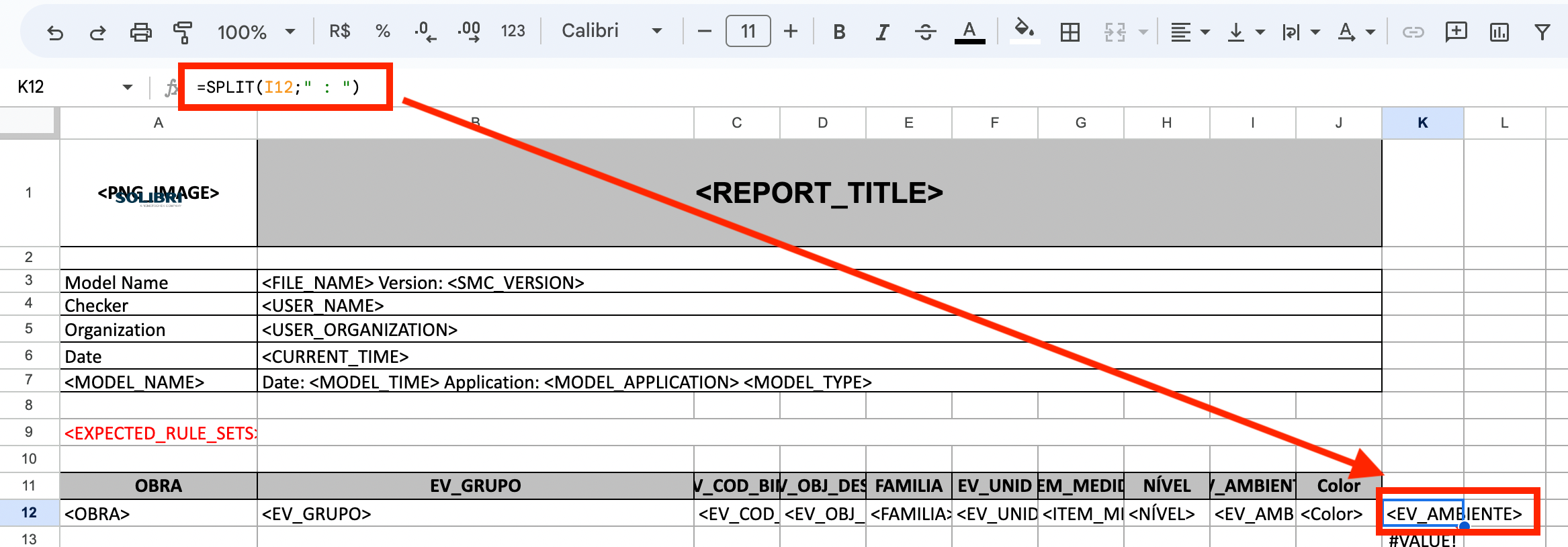
    Hello, I hope you are well, I have been looking for information about which Excel functions are supported by the Solibri ITO report templates. Since I would like to add the SPLIT function in the template, but the function does not recognize me, where could I find more information about it, or if it is possible a database of functions in Solibri? Since my objective would be to separate the automatic ID that Solibri places on the Spaces (See screenshot).
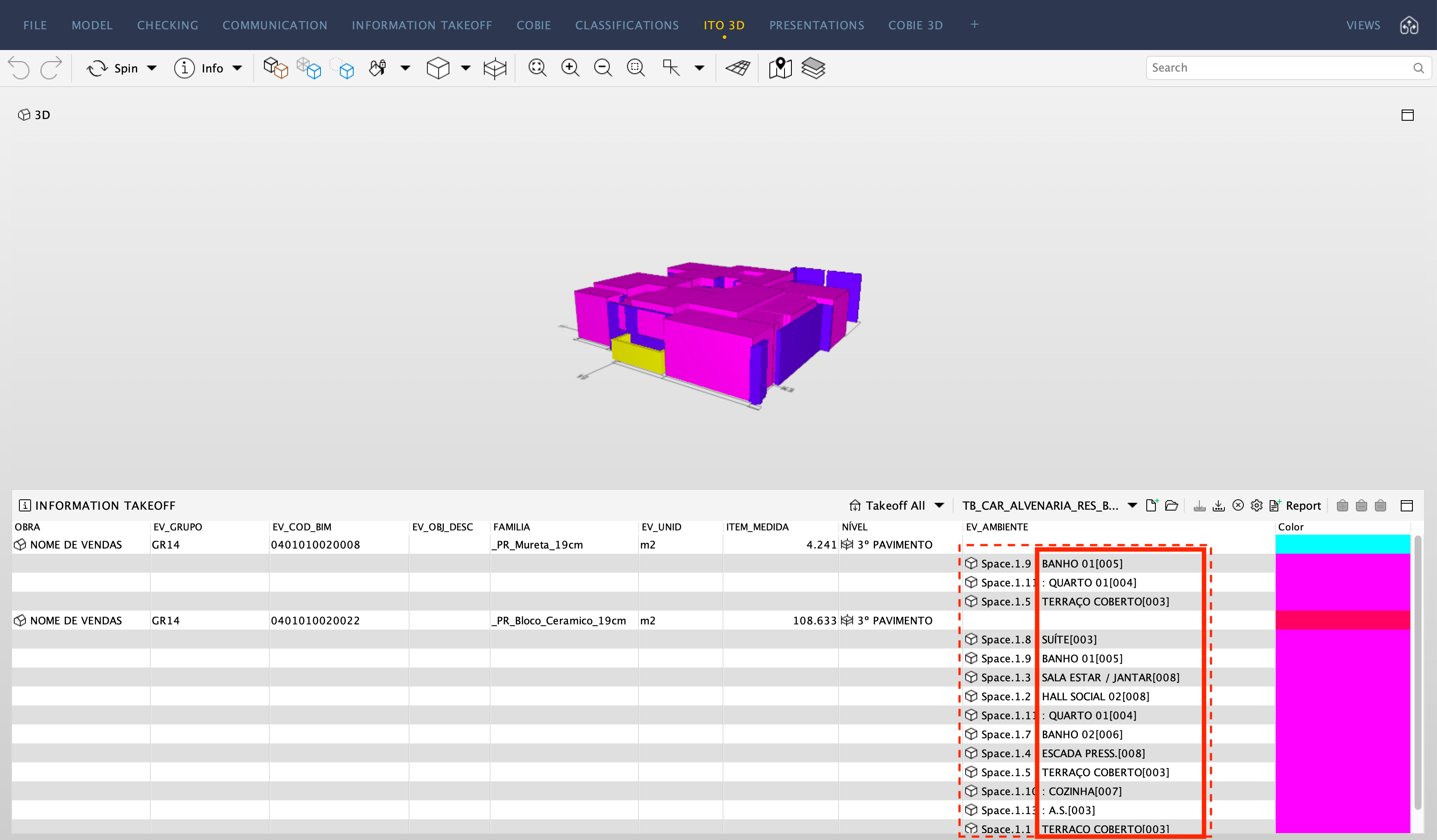
    Captura de Pantalla 2023-06-27 a la(s) 13.26.53.png

    Captura de Pantalla 2023-06-27 a la(s) 13.29.51.png

    1 Reply Last reply
    0
    • JSNJ Offline
      JSNJ Offline
      JSN
      wrote on last edited by
      #2

      Afaik expression are not really working well with the templates, but in the meatime or as a workaround you could e.g. use a Javascript column in the ITO to perform the split or make use of macros within excel.

      1 Reply Last reply
      0
      • B Offline
        B Offline
        Bram 0
        wrote on last edited by
        #3

        Hello @JSN , thanks for the answer, the truth about programming for now I only know a little about Excel and XML, nothing about Java or other languages, so in the short term it would not be applicable, at least in my case.

        On the other hand there is also no information on the web specifically for Java on Solibri, at least not free, that I have found. If you know if there is information to be able to learn to program specifically for the Solibri extension, I would be grateful. Greetings.

        JSNJ 1 Reply Last reply
        0
        • JSNJ Offline
          JSNJ Offline
          JSN
          replied to Bram 0 on last edited by JSN
          #4

          @Bram-0 said in Functions in ITO reports:

          On the other hand there is also no information on the web specifically for Java on Solibri, at least not free, that I have found. If you know if there is information to be able to learn to program specifically for the Solibri extension, I would be grateful. Greetings.

          You are right the getting started guides could be better, but there are some ressources which can be found here. Anyhow in this specific case I was not refering to the Java API but I menat the JavaScript support for the ITOs which has quite a good quickstart tutorial - check if you have access.

          https://society.solibri.com/topic/620/javascript-api-documentation-solibri-version-9-10-8

          I only know a little about Excel and XML, nothing about Java or other languages, so in the short term it would not be applicable, at least in my case.

          I gues you could also try to use Power Query with the template as a crutch for now to at least automate the splitting.

          B E 2 Replies Last reply
          0
          • bariscanpolatB Offline
            bariscanpolatB Offline
            bariscanpolat
            wrote on last edited by
            #5

            Hi @JSN

            The link generates the following error:
            “Access Denied
            You seem to have stumbled upon a page that you do not have access to.”

            JSNJ 1 Reply Last reply
            0
            • JSNJ Offline
              JSNJ Offline
              JSN
              replied to bariscanpolat on last edited by
              #6

              @bariscanpolat

              @Solibrians need to give you access privileges

              B W 2 Replies Last reply
              0
              • B Offline
                B Offline
                Bram 0
                replied to JSN on last edited by
                #7

                @JSN I would also like to be able to access the link

                1 Reply Last reply
                0
                • B Offline
                  B Offline
                  Bram 0
                  replied to JSN on last edited by
                  #8

                  @JSN said in Functions in ITO reports:

                  I gues you could also try to use Power Query with the template as a crutch for now to at least automate the splitting.

                  The problem is that the office works with google sheets, and in this case the Querry function is used. What I would like is to do it from the same file or template

                  1 Reply Last reply
                  0
                  • W Offline
                    W Offline
                    Wing Mang
                    replied to JSN on last edited by
                    #9

                    @JSN

                    I’d also like to get access to the link too.

                    It’s something new to me.

                    1 Reply Last reply
                    0
                    • MattiM Offline
                      MattiM Offline
                      Matti Solibrians
                      wrote on last edited by
                      #10

                      @Bram-0

                      The split can be done in the Excel template of Solibri ITO.
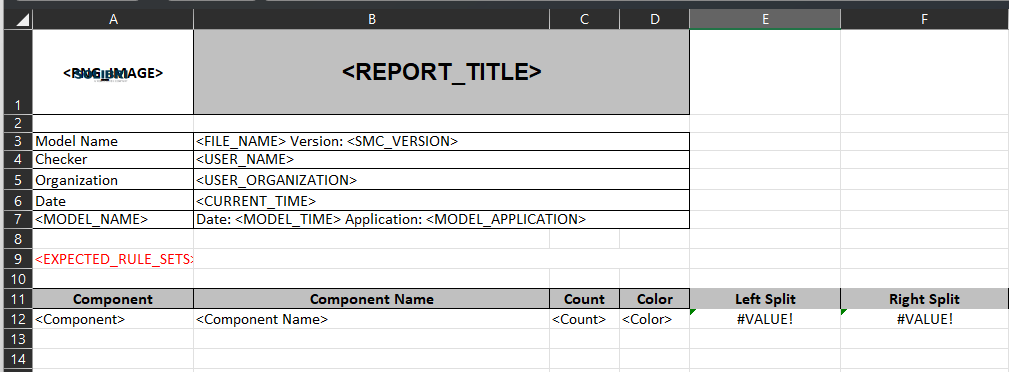
                      Use following functions in additional columns

                      =LEFT(B12;FIND(" : ";B12))
                      =RIGHT(B12; LEN(B12) - FIND(" : ";B12) - 2)
                      

                      image.png

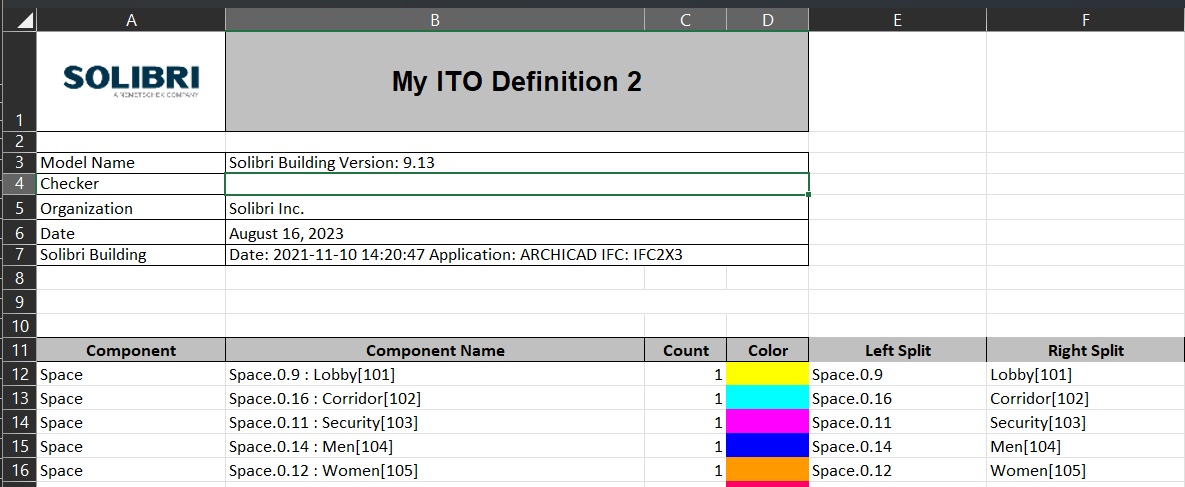
                      and the result:

                      624a6c16-87ce-4d13-a008-70df863dcda0-image.png

                      JSNJ 1 Reply Last reply
                      0
                      • B Offline
                        B Offline
                        Bram 0
                        wrote on last edited by
                        #11

                        Hello @Matti-Kannala , very grateful for your answer, I see that it helps me so that everything comes out from the template, but the only details are that if there are blank cells, the value “#VALUE!” remains, on the other hand, it does not recognize the “IFERROR” formula. since all the boxes remain in value “=0”. I’m going to try the “IF” formula to see if I get something. Greetings

                        Captura de Pantalla 2023-08-16 a la(s) 10.12.59.png

                        1 Reply Last reply
                        0
                        • JSNJ Offline
                          JSNJ Offline
                          JSN
                          replied to Matti on last edited by
                          #12

                          @Matti-Kannala

                          We had issues in the past that some formulas or formatings of the report templates are not properly supported. So in some cases there is just nothing happening on a report export. It’s not doing anything until you delete such columns. No errors, no hints, no logs (?), just nothing.

                          B 1 Reply Last reply
                          0
                          • B Offline
                            B Offline
                            Bram 0
                            replied to JSN on last edited by
                            #13

                            @JSN Sometimes that happens to me when I save in google sheets, I don’t know why, but when I export it from Numbers (mac) it accepts the template and exports from Solibri without problems…

                            JSNJ 1 Reply Last reply
                            0
                            • JSNJ Offline
                              JSNJ Offline
                              JSN
                              replied to Bram 0 on last edited by
                              #14

                              @Bram-0

                              Just using excel and sometimes it feels like a bit hit and miss if it’s working or not. Regarding IFERROR() on the other hand I am pretty sure it works so maybe check your formula again.

                              1 Reply Last reply
                              0
                              • E Offline
                                E Offline
                                EloyRD
                                replied to JSN on last edited by
                                #15

                                @JSN said in Functions in ITO reports:

                                You are right the getting started guides could be better, but there are some ressources which can be found here. Anyhow in this specific case I was not refering to the Java API but I menat the JavaScript support for the ITOs which has quite a good quickstart tutorial - check if you have access.

                                https://society.solibri.com/topic/620/javascript-api-documentation-solibri-version-9-10-8

                                @Solibrians Could you point me towards the current tutorial? Sorry for commenting on a quite old post.

                                tonigyllenbergT 1 Reply Last reply
                                0
                                • tonigyllenbergT Offline
                                  tonigyllenbergT Offline
                                  tonigyllenberg Solibrians
                                  replied to EloyRD on last edited by
                                  #16

                                  @Solibrians Could you point me towards the current tutorial? Sorry for commenting on a quite old post.

                                  Hello!

                                  For JavaScript API the latest documentation is here:

                                  https://society.solibri.com/topic/3368/solibri-api-solibri-javascript-api

                                  Kind regards,

                                  Toni

                                  1 Reply Last reply
                                  1

                                  Copyright © 2025 Solibri Inc. | Powered by NodeBB

                                  • Login

                                  • Don't have an account? Register

                                  • Login or register to search.
                                  • First post
                                    Last post
                                  0
                                  • Categories