Skip to content
  • Categories
Collapse
Solibri Society Forum
  1. Home
  2. General Discussion
  3. Functions in ITO reports

Functions in ITO reports

Scheduled Pinned Locked Moved General Discussion
16 Posts 7 Posters 3.6k Views
  • Oldest to Newest
  • Newest to Oldest
  • Most Votes
Log in to reply
This topic has been deleted. Only users with topic management privileges can see it.
  • B Offline
    B Offline
    Bram 0
    replied to JSN on last edited by
    #7

    @JSN I would also like to be able to access the link

    1 Reply Last reply
    0
    • B Offline
      B Offline
      Bram 0
      replied to JSN on last edited by
      #8

      @JSN said in Functions in ITO reports:

      I gues you could also try to use Power Query with the template as a crutch for now to at least automate the splitting.

      The problem is that the office works with google sheets, and in this case the Querry function is used. What I would like is to do it from the same file or template

      1 Reply Last reply
      0
      • W Offline
        W Offline
        Wing Mang
        replied to JSN on last edited by
        #9

        @JSN

        I’d also like to get access to the link too.

        It’s something new to me.

        1 Reply Last reply
        0
        • MattiM Offline
          MattiM Offline
          Matti Solibrians
          wrote on last edited by
          #10

          @Bram-0

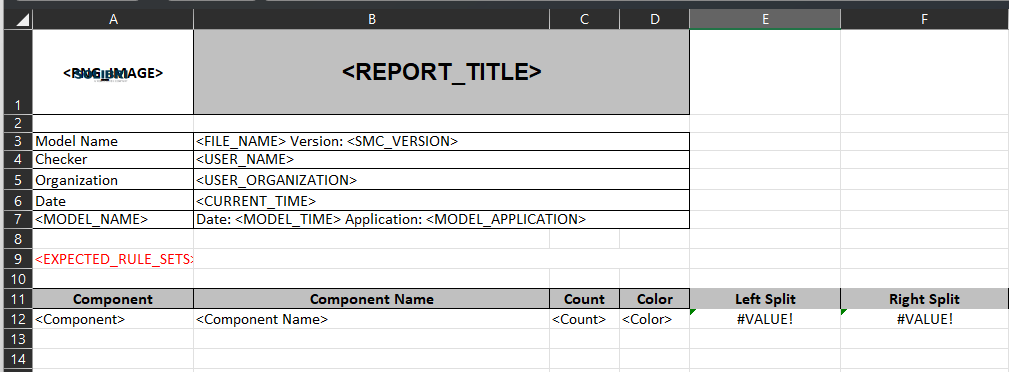
          The split can be done in the Excel template of Solibri ITO.
          Use following functions in additional columns

          =LEFT(B12;FIND(" : ";B12))
          =RIGHT(B12; LEN(B12) - FIND(" : ";B12) - 2)
          

          image.png

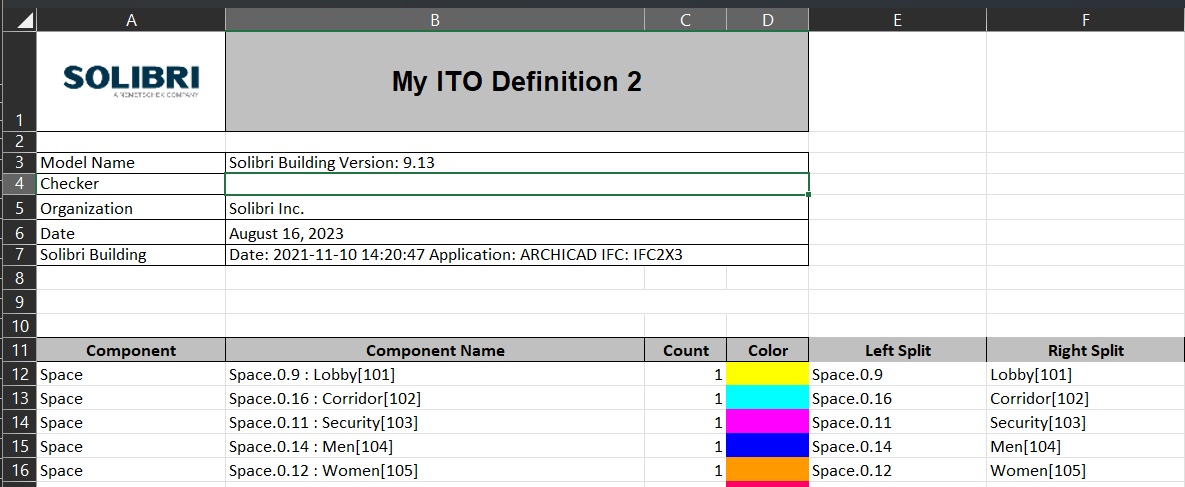
          and the result:

          624a6c16-87ce-4d13-a008-70df863dcda0-image.png

          JSNJ 1 Reply Last reply
          0
          • B Offline
            B Offline
            Bram 0
            wrote on last edited by
            #11

            Hello @Matti-Kannala , very grateful for your answer, I see that it helps me so that everything comes out from the template, but the only details are that if there are blank cells, the value “#VALUE!” remains, on the other hand, it does not recognize the “IFERROR” formula. since all the boxes remain in value “=0”. I’m going to try the “IF” formula to see if I get something. Greetings

            Captura de Pantalla 2023-08-16 a la(s) 10.12.59.png

            1 Reply Last reply
            0
            • JSNJ Offline
              JSNJ Offline
              JSN
              replied to Matti on last edited by
              #12

              @Matti-Kannala

              We had issues in the past that some formulas or formatings of the report templates are not properly supported. So in some cases there is just nothing happening on a report export. It’s not doing anything until you delete such columns. No errors, no hints, no logs (?), just nothing.

              B 1 Reply Last reply
              0
              • B Offline
                B Offline
                Bram 0
                replied to JSN on last edited by
                #13

                @JSN Sometimes that happens to me when I save in google sheets, I don’t know why, but when I export it from Numbers (mac) it accepts the template and exports from Solibri without problems…

                JSNJ 1 Reply Last reply
                0
                • JSNJ Offline
                  JSNJ Offline
                  JSN
                  replied to Bram 0 on last edited by
                  #14

                  @Bram-0

                  Just using excel and sometimes it feels like a bit hit and miss if it’s working or not. Regarding IFERROR() on the other hand I am pretty sure it works so maybe check your formula again.

                  1 Reply Last reply
                  0
                  • E Offline
                    E Offline
                    EloyRD
                    replied to JSN on last edited by
                    #15

                    @JSN said in Functions in ITO reports:

                    You are right the getting started guides could be better, but there are some ressources which can be found here. Anyhow in this specific case I was not refering to the Java API but I menat the JavaScript support for the ITOs which has quite a good quickstart tutorial - check if you have access.

                    https://society.solibri.com/topic/620/javascript-api-documentation-solibri-version-9-10-8

                    @Solibrians Could you point me towards the current tutorial? Sorry for commenting on a quite old post.

                    tonigyllenbergT 1 Reply Last reply
                    0
                    • tonigyllenbergT Offline
                      tonigyllenbergT Offline
                      tonigyllenberg Solibrians
                      replied to EloyRD on last edited by
                      #16

                      @Solibrians Could you point me towards the current tutorial? Sorry for commenting on a quite old post.

                      Hello!

                      For JavaScript API the latest documentation is here:

                      https://society.solibri.com/topic/3368/solibri-api-solibri-javascript-api

                      Kind regards,

                      Toni

                      1 Reply Last reply
                      1

                      Copyright © 2025 Solibri Inc. | Powered by NodeBB

                      • Login

                      • Don't have an account? Register

                      • Login or register to search.
                      • First post
                        Last post
                      0
                      • Categories